These instructions apply to the Volkswagen Golf Mk7 (5G) 2012-2020.
For other models, please choose your vehicle here.
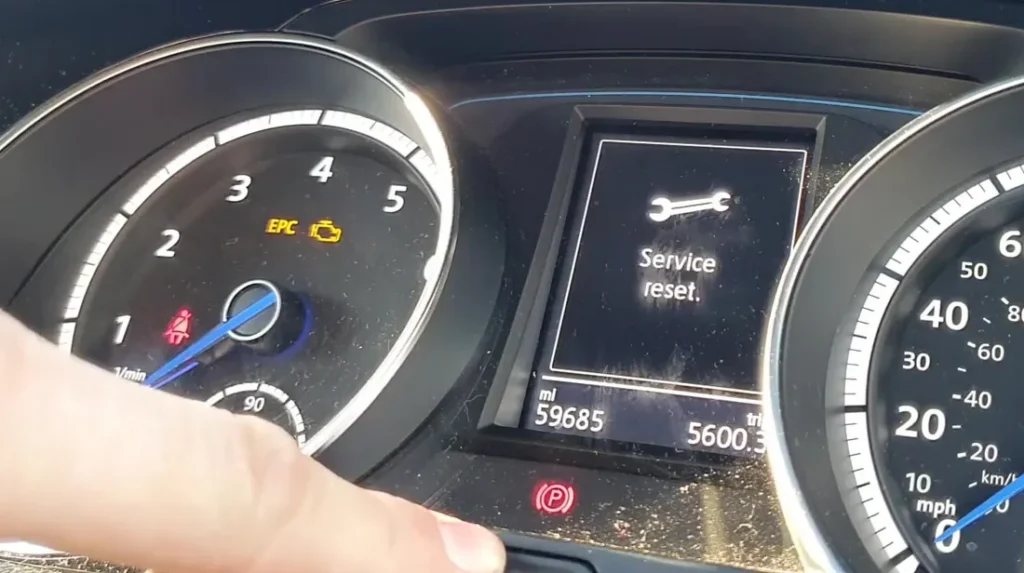
The Volkswagen Golf Mk7 (5G/BE/BA/BV/BQ, 2012–2020) tracks two separate service items: Oil Service (the wrench symbol with “INSP” or a dripping-oil icon) and Inspection Service (the spanner/check icon). They reset independently — clearing the oil reminder does not clear the inspection reminder, and vice versa. How you reset them depends on the instrument cluster fitted to your car: the standard analogue cluster (Trendline/S trims, base SE) uses the trip-reset button next to the speedometer, while the digital cockpit / Active Info Display (Highline, R-Line, GTI Performance and most post-2017 cars) drives the reset from the steering-wheel buttons via an on-screen menu.
Which Service Regime Is Your Car On?
Mk7 Golfs ship from the factory on one of two service regimes:
- Fixed (Time and Distance): oil change every 15,000 km / 9,300 miles or every 12 months, whichever comes first.
- LongLife / Variable (Service Interval Display): the car decides when oil is due based on driving conditions — up to a maximum of 30,000 km / 18,600 miles or 24 months. Most UK and EU Golfs left the factory on LongLife.
Is this the same as the oil service reset?
Yes. On the Golf the dashboard “Service” reminder covers the scheduled service (oil-change) interval, so this reset is what owners also search for as the oil service reset.
The reset procedure is identical on both regimes. The regime just affects when the reminder appears, not how you clear it. If you’ve switched from LongLife to Fixed for severe-service / short-trip driving (a common change for taxi-spec Golfs and short-commute owners), use a VCDS-compatible scan tool to change channel 2 in the instrument cluster, then perform the reset below.
Before You Begin
- Park on a level surface with the engine off.
- Finish the actual oil and filter change before resetting. The service interval display assumes the service work has been completed.
- Identify your cluster type. If the centre of the cluster is a small monochrome / colour LCD between two physical dials, you have the analogue cluster — use Method 1 below. If the entire cluster is a single configurable TFT display (no physical needles), you have the digital cockpit — use Method 2.
- For the analogue-cluster reset you need to press the cluster’s trip-reset button (small black button below the right-hand dial, sometimes labelled with “0.0” or a checkered-flag icon). For the digital cockpit you’ll use the steering-wheel buttons (the View toggle and the OK rocker on the right-hand multifunction pad).
What You’ll Need
None for the reset itself. Optional: a VCDS or compatible VAG diagnostic interface (Ross-Tech VCDS, OBDeleven, Carista) if you want to switch the service regime between Fixed and LongLife, or if the manual reset is refused (rare — typically only after a cluster replacement).
Method 1 — Analogue Instrument Cluster (Trendline, S, Base SE)
Oil Service Reset
- Make sure the ignition is OFF. If you’ve just driven the car, switch off and let the cluster go dark.
- Press and hold the trip-reset button on the cluster (the small button below the right-hand dial).
- While still holding the button, turn the ignition ON (key position 2, or one press of START/STOP without the brake pedal pressed).
- The cluster display shows “Reset oil change service?” (or your local-language equivalent).
- Release the trip-reset button. The reset mode is now armed.
- Press the trip-reset button briefly (a short tap).
- The display confirms the service interval has been reset to 100%.
- Switch the ignition off to exit.
Inspection Service Reset
Same procedure as the oil reset, but the prompt reads “Reset inspection service?”. The reset only opens this prompt if an inspection is actually due — if the cluster shows the oil-service prompt instead, the inspection isn’t yet due and there’s nothing to reset.
Method 2 — Digital Cockpit / Active Info Display (Highline, R-Line, GTI Performance, GTD)
Oil Service Reset
- Turn the ignition ON with the engine off. The digital cluster wakes up to the configurable view.
- Using the View / left-hand rocker on the steering wheel (button 1 — the one with the four-square icon or “View” label), scroll through the top-level menus until “Driving data” is highlighted.
- Now use the right-hand rocker (button 2) to scroll through the Driving-data sub-list.
- Highlight “RANGE” (yes, the range / remaining-fuel screen — this is intentional; VW hides the reset behind a long-press on this view).
- Press the OK button briefly, then release.
- Now press and hold the OK button for 10 seconds. Don’t release early — the service menu only appears at the 10-second mark.
- The hidden service-reset menu appears. Use the rocker to select “Reset oil change service”.
- Press OK to confirm. The cluster reports the interval has been reset.
- Switch the ignition off to exit.
Inspection Service Reset
Same path as above, but at step 7 select “Reset inspection” instead of “Reset oil change service”. The two items are independent — reset only the one that matches the work you actually completed.
Verify the Reset Worked
Switch the ignition off, wait at least 30 seconds, then cycle back on. The wrench / spanner symbol should be gone. On the analogue cluster, the service-interval display (accessible by short-pressing the trip-reset button to cycle through the trip computer) should show a fresh interval — typically “15,000 km” or “30,000 km” depending on regime. On the digital cockpit, the Service screen under Driving data shows the new “miles to next service” and “days to next service” values reset to full.
If Something Goes Wrong
- The “Reset oil change service?” prompt never appears on the analogue cluster. The most common cause is releasing the button too soon. Hold the trip-reset button down before turning the ignition on and keep it held until the cluster has fully woken up — only then does the prompt appear. Try again from a fully-off state.
- On the digital cockpit, OK long-press doesn’t reveal the service menu. You’re probably not on the RANGE screen — the long-press only works from RANGE (or, on some 2020 models, from the Service Information screen). Cycle through the Driving-data submenu carefully and look specifically for the range / remaining-fuel readout.
- Reset works but the wrench symbol comes back after a few miles. Two common causes: the 12V battery is marginal (load-test it; a tired battery causes cluster EEPROM writes to fail intermittently), or you reset the wrong item (you cleared “Inspection” when the car was actually asking for “Oil change”). Cycle through both reset prompts to clear the right one.
- The cluster shows “Service now” with no countdown. The service is overdue — the car will let you reset it the same way; the prompt simply skips the countdown phase.
- I can’t switch from LongLife to Fixed via the cluster. Correct — that change requires a diagnostic tool (VCDS, OBDeleven, Carista). The cluster menu only resets the counter; it does not change the service regime. Adapt channel 2 in module 17 (instruments) for the regime switch.
- I have a 2020 Golf Mk7 and the digital cockpit menu paths look different. The Mk7 facelift (2017+) introduced two digital-cockpit revisions. The procedure here covers both, but the labelling differs: on the later version, “Service Information” replaces the RANGE-screen long-press. Look in Driving data → Service Information and use the long-OK from there.
Frequently Asked Questions
What is the wrench / spanner symbol on my Golf Mk7?
VW uses two related icons on the Mk7. The dripping-oil wrench (often with “INSP” text) indicates the oil-change service is due. The plain spanner indicates the broader inspection service is due (typically brake check, filter inspections, brake-fluid timer). Each tracks separately. If both come up at once, you’ll need to reset both items — they don’t clear together.
What’s the difference between Fixed and LongLife service on a Mk7 Golf?
LongLife uses a flexible algorithm that watches driving conditions (engine load, oil temperature, journey length, fuel consumption) and stretches the oil interval up to a 30,000 km / 24-month maximum. Fixed locks the interval at 15,000 km / 12 months regardless. Most UK-spec Mk7s leave the factory on LongLife; some fleet and taxi-spec cars are pre-set to Fixed. The two regimes also use different VW oil specs — VW 504.00 / 507.00 for LongLife, and VW 502.00 / 505.00 (petrol) or 505.01 (diesel) acceptable on Fixed.
Will the reset clear engine fault codes?
No. The service-interval reset only zeros the maintenance counter. Engine fault codes are stored in the engine ECU and need a scan tool. For DTC interpretation see autodtcs.com.
Does this work on a Golf Mk7 GTI / R / GTD?
Yes. Performance trims (GTI, R, GTD) ship with the digital cockpit by default, so use Method 2. The reset menu paths are identical to other Mk7 variants. The only difference: GTI Performance Pack cars have a shorter brake-fluid interval that may trigger the inspection reminder earlier — reset it the same way.
Is the Mk7 procedure the same as the Mk7.5 (facelift)?
The mechanics are identical. The 2017 Mk7.5 facelift introduced a revised digital cockpit and slightly different on-screen labels, but the long-OK pattern (Method 2 above) is preserved. On the Mk7.5 with Discover Pro / MIB3, you can also reach the same menu via the central infotainment screen: Vehicle → Vehicle Settings → Service.
What about the Golf Mk6 (2009–2013) and Mk8 (2020–)?
The Mk6 uses a similar trip-button method but no digital-cockpit option (so only Method 1 applies). The Mk8 (post-2020) uses the all-touch infotainment and a different menu structure under Settings → Vehicle → Service. We’ll publish dedicated Mk6 and Mk8 guides separately.
For other VW Group cars sharing the MQB platform and the same reset logic, see our upcoming Audi A3 8V, SEAT Leon Mk3, and Skoda Octavia Mk3 guides.
Independent guide — not affiliated with Volkswagen. Always follow your official service manual and safety precautions. Read our full disclaimer.