These instructions apply to the Mazda CX-5 Mk1 (KE) 2012-2017.
For other models, please choose your vehicle here.
The Mazda CX-5 Mk1 (KE, 2012–2017) — Mazda’s first full SKYACTIV-platform SUV, sold in 2.0 and 2.5 SKYACTIV-G petrol and 2.2 SKYACTIV-D diesel forms, built in Hofu (Japan) and Ulyanovsk (Russia) for European markets — uses the same MZD Connect-based reset path as the Mazda 3 BM, with two methods depending on whether your CX-5 has the central 7-inch MZD Connect touchscreen. There’s no diagnostic tool needed, and on touchscreen trims the CX-5 actually tracks three separate service items independently — each resets on its own.
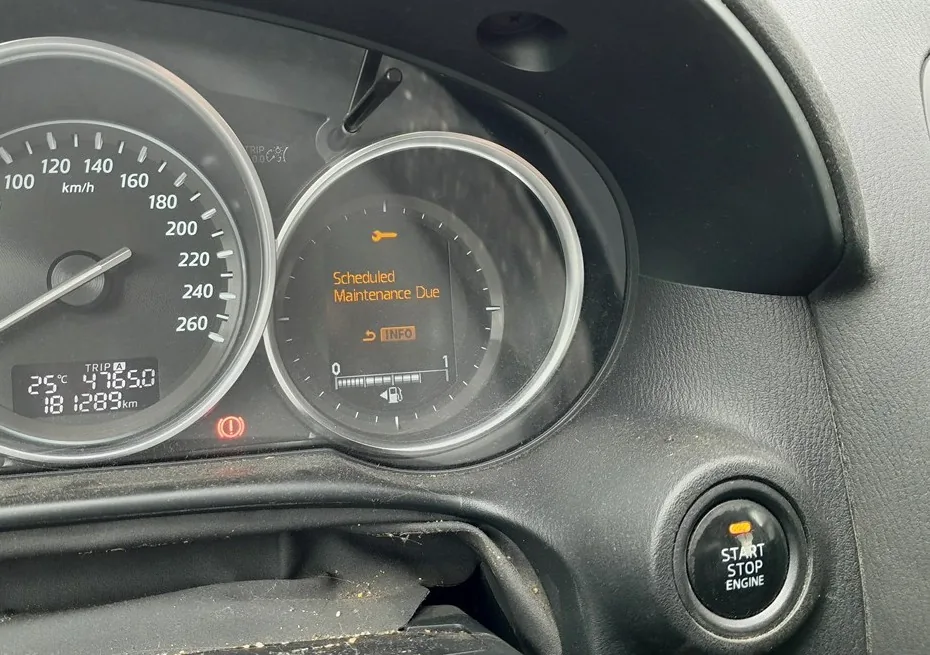
When to Reset the Service Indicator
- After completing an oil and filter change.
- After a scheduled inspection service.
- After a tyre rotation (touchscreen trims only — CX-5 KE tracks tyre rotation as a separate counter).
- If the spanner / wrench symbol with “Service Required” appears on the cluster at startup.
⚠️ The KE CX-5 tracks three separate service items on touchscreen trims: Oil change, Scheduled inspection, and Tyre rotation. Each resets independently — clearing one doesn’t clear the others. Reset only the items where work has actually been done.
First, a Few Checks
- Park on a level surface with the engine off.
- Complete the actual service work before the reset.
- Identify your trim: look at the centre console between the front seats. If there’s a rotary commander knob and a 7-inch screen at the top of the centre stack running MZD Connect, use Method 2. If there’s no rotary commander and the centre-stack screen is smaller or absent, use Method 1.
- Locate the trip-recorder button on the cluster — small button on the lower-left of the speedometer face. Used in Method 1.
Kit and Supplies
None for the reset itself. For the oil change: fresh Mazda-spec oil — 0W-20 ACEA C5 / Mazda Genuine 0W-20 SKYACTIV for the 2.0 / 2.5 SKYACTIV-G petrol engines, 0W-30 ACEA C3 / DPF-compatible for the 2.2 SKYACTIV-D diesel; a new spin-on filter (different parts for SKYACTIV-G PE/PY and SKYACTIV-D SH); a 14 mm sump-plug socket (petrol) or 17 mm (diesel); torque about 30 Nm.
Method 1 — Vehicles Without Touchscreen (Basic SE Trim)
- Turn the ignition OFF.
- Press and hold the trip-recorder button on the cluster.
- While still holding the button, turn the ignition ON (key position II, engine off).
- Keep holding the trip-recorder button.
- Wait until the LED next to the spanner symbol on the cluster starts flashing.
- Release the button. The reset is complete.
- Switch the ignition off.
Method 2 — Vehicles With MZD Connect Touchscreen (Most KE Trims)
The MZD Connect system tracks three service items independently. Reset only the one(s) you’ve completed.
Oil Service Reset
- Turn the ignition ON.
- On the MZD Connect screen, navigate to “Applications” using the rotary commander or by tapping (touchscreen works when stationary).
- Select “MAINTENANCE”.
- Select “Oil change”.
- Select “RESET”.
- Confirm. The oil-service counter resets.
Inspection Service Reset
- Turn the ignition ON.
- On MZD Connect, go to Applications → MAINTENANCE → Scheduled.
- Select “RESET”.
- Confirm.
Tyre Rotation Reset
- Turn the ignition ON.
- Go to Applications → MAINTENANCE → Tyre Rotation.
- Select “RESET”.
- Confirm.
Verify the Reset Worked
Switch the ignition off, wait 30 seconds, then cycle back on. The spanner symbol that was appearing at startup should be gone. On touchscreen trims, re-open the MAINTENANCE app — the item(s) you just reset should now show a fresh full interval. Typical KE CX-5 intervals: 12,500 miles / 20,000 km or 12 months for SKYACTIV-G petrol; 12,500 miles / 20,000 km or 24 months for SKYACTIV-D diesel.
Common Snags
- (Method 1) The LED next to the spanner doesn’t flash. Cluster wasn’t ready when you released. The procedure requires the button to be held continuously through the ignition transition. Start fully off, press and hold the button, then turn the key — not the other way around.
- (Method 2) MZD Connect doesn’t have a MAINTENANCE app. The MAINTENANCE app is part of the MZD Connect Tools section, rolled out across the KE range in mid-2014. Very early 2013–2014 CX-5s may have an older firmware that hides this app. A Mazda dealer can update MZD Connect via their workshop tool — the latest firmware adds the MAINTENANCE app along with several other improvements. After the update, the reset path becomes available.
- I reset the oil service but the spanner symbol stays on. Most likely: the inspection service is also due (KE tracks them separately). Open MZD Connect → MAINTENANCE → Scheduled — if the percentage is at 0%, reset that too.
- Touchscreen doesn’t respond while driving. Mazda locks parts of MZD Connect when the car is moving. The MAINTENANCE app should remain accessible at any speed, but if you can’t reach certain options, stop the car (park or neutral with parking brake) and try again.
- Reset works but the spanner comes back after a few miles. 12V battery condition. The KE cluster, particularly on SKYACTIV-G petrol variants with the 14:1 compression ratio (high cold-crank current), is sensitive to voltage drop. Load-test the battery; replace if older than 5 years.
- I drive a CX-5 KE with the AWD system — same procedure? Yes. The AWD selector adds menu entries elsewhere in MZD Connect but doesn’t change the maintenance-reset path.
- 2015 facelift — anything different? The 2015 facelift refreshed the front-end styling and added some interior trim revisions but kept the MZD Connect firmware structure unchanged. Procedure unchanged.
Frequently Asked Questions
What does the spanner symbol on the Mazda CX-5 mean?
On the KE CX-5 the spanner / wrench icon is the Mazda maintenance reminder — it indicates one or more of the three tracked items (oil, scheduled inspection, tyre rotation) is due. The cluster doesn’t tell you which one without opening the MAINTENANCE app on touchscreen trims. The icon does not indicate an engine fault — engine faults trigger the orange check-engine light (an engine-outline icon, different shape).
How often does the CX-5 KE service indicator come up?
Mazda’s official European-market schedule for the KE CX-5:
- 2.0 SKYACTIV-G petrol (PE): 12,500 miles (20,000 km) or 12 months.
- 2.5 SKYACTIV-G petrol (PY): 12,500 miles (20,000 km) or 12 months.
- 2.2 SKYACTIV-D diesel (SH): 12,500 miles (20,000 km) or 24 months.
The CX-5 KE doesn’t have a condition-based interval — it’s fixed mileage/time. Severe-service driving requires halving the interval manually.
Does the reset clear engine fault codes?
No. The reset zeros the service-distance counter only. Engine fault codes are stored in the engine ECU and need a scan tool. For DTC interpretation see autodtcs.com.
What about the CX-5 Mk2 (KF, 2017+)?
The second-generation CX-5 (KF) uses an updated MZD Connect with the same Applications → MAINTENANCE structure. The procedure described above works on both KE and KF — the menu wording is identical. We’ll publish a dedicated KF guide for any KF-specific variations.
Is the procedure the same as the Mazda 3 BM?
Yes. The Mazda 3 BM/BN (2013–2018) uses the same MZD Connect system and the same reset paths. Same logic across the SKYACTIV-platform Mazda lineup of the era — Mazda 3, CX-3, CX-5 all use this structure.
Will the touchscreen Method 2 work without touching the screen?
Yes. The rotary commander knob between the front seats can drive every menu option without ever touching the screen. Rotate to scroll, press to select. Mazda explicitly designed MZD Connect to be operable without touch input while driving — touch only works when stationary on most trims.
I drive the CX-5 with i-stop start/stop — same procedure?
Yes. The i-stop system is a separate engine-management feature and doesn’t affect the cluster maintenance reset. The reset works the same way.
For DTC code interpretation on Mazda vehicles see autodtcs.com.
Independent guide — not affiliated with Mazda. Always follow your official service manual and safety precautions. Read our full disclaimer.