These instructions apply to the Nissan X-Trail Mk4 (T33) 2022-Present.
For other models, please choose your vehicle here.
If the big touchscreen in your Nissan X-Trail (T33, 2022–present) has frozen, gone black, or stopped answering taps — or wireless CarPlay / Android Auto has locked up — you can force the NissanConnect unit to restart yourself in about a minute. The X-Trail drives normally while the screen is stuck; the fault is in the infotainment module only.
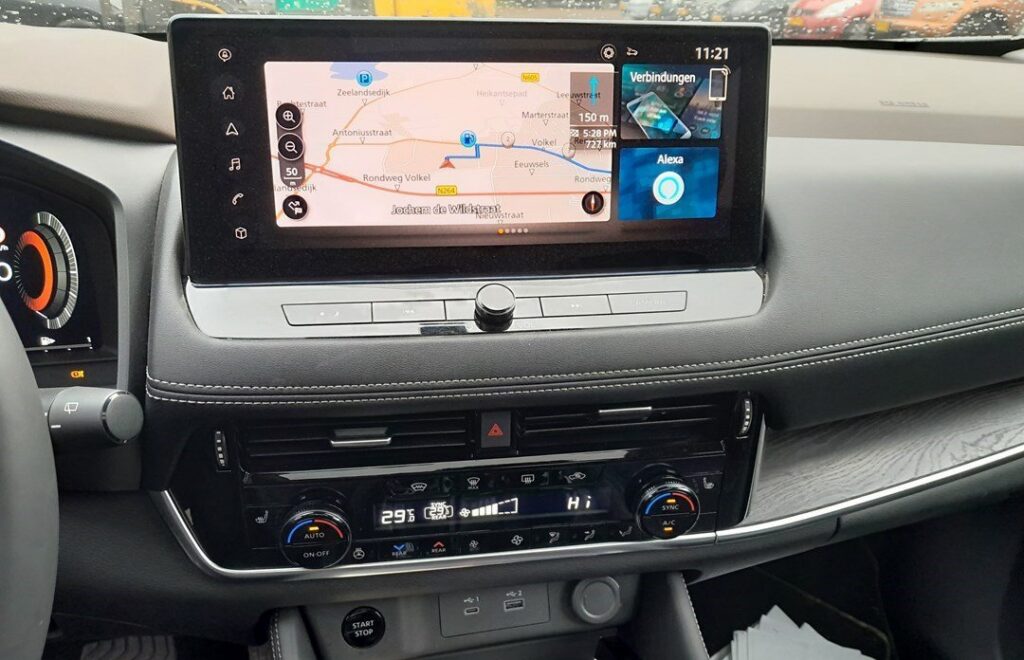
The system in this X-Trail
The fourth-generation T33 (including the e-POWER hybrid) uses a large 12.3-inch NissanConnect touchscreen with wireless Apple CarPlay and wired Android Auto, plus support for over-the-air software updates. Because CarPlay runs wirelessly here, a freeze is often the projection layer hanging rather than NissanConnect itself — the same reboot clears both.
The reboot control is the Power/Volume knob below the screen: press to mute, turn for volume, hold to force a restart.
Soft reset (reboot the screen)
Park the X-Trail and keep the ignition on so the unit stays powered.
- Find the Power/Volume knob on the centre console.
- Press and hold it in — a steady press, not a tap.
- Keep holding for about 10 seconds until the screen blacks out and the Nissan logo returns.
- Release the knob and let the system reload.
- Allow up to a minute before touch, audio and phone projection respond again.
Safe — it loses no data
The power-knob reboot does not erase presets, paired phones, saved destinations or your wireless CarPlay setup. It simply reloads the software. Repeat whenever needed.
If it stays frozen
- Hold longer. If 10 seconds did nothing, retry and hold the knob for 15–20 seconds.
- Reset the phone connection. If the freeze started with wireless CarPlay or wired Android Auto, forget/unplug the phone, reboot, then re-pair or reconnect using the data USB port. Toggling the phone’s Bluetooth and Wi-Fi off and on helps.
- Cycle the ignition fully. Switch off, open the driver’s door, lock the car and leave it a few minutes so the module powers down; then unlock and restart.
- Install the latest software. Open Settings → System → Software Update — the T33 receives over-the-air updates that patch flicker, lag and freeze bugs.
Factory reset (erases data)
Only needed when selling the car or chasing a glitch the reboot will not clear. Go to Settings → System → Factory Reset and confirm. This wipes paired phones, call history, presets, saved destinations and personalisation back to factory defaults — and you may need to re-activate any NissanConnect Services subscription afterwards. Not the fix for a routine freeze.
Frequently Asked Questions
Does the T33 X-Trail have a reset button?
No dedicated button — hold the Power/Volume knob in for about 10 seconds until the Nissan logo reappears.
Wireless CarPlay froze the 12.3-inch screen — how do I clear it?
Reboot with the power knob. If it keeps happening, forget the phone in the connections list, reboot, then re-pair, and make sure the car’s software is up to date via Software Update.
Will rebooting delete my pairings or CarPlay setup?
No. Only the Factory Reset clears them. The power-knob restart keeps every pairing and setting.
Is the e-POWER hybrid X-Trail any different to reset?
No — the e-POWER and mild-hybrid T33 share the same 12.3-inch NissanConnect and reset identically with the power knob.
Is it safe to drive with the screen frozen?
Yes. NissanConnect is independent of the engine and brakes — you only lose media, phone and navigation. Reboot when safely parked.
If a warning light or fault message stays on the dash after the reboot, the car may have stored a diagnostic trouble code — you can look it up on autodtcs.com.
Independent guide — not affiliated with Nissan. Always follow your official service manual and safety precautions. Read our full disclaimer.