These instructions apply to the Vauxhall Corsa Mk6 (F/P2JO) 2019-Present.
For other models, please choose your vehicle here.
The Vauxhall Corsa (Mk6/F, 2019–Present) sits on the Stellantis CMP platform and runs the PSA-derived NAC head unit — badged Multimedia Radio, Multimedia Navi or Multimedia Navi Pro, the same family as the Peugeot 208 and Citroën C3. When the touchscreen freezes, ignores taps or loops on the boot logo, you can force a clean reboot from the driver’s seat.
Before you start
- The Mk6 uses the Stellantis NAC system, not GM IntelliLink — so the fix is a long press on the power/volume control, not the Home + Fast-Forward combination used on the older Astra J and Corsa E.
- The control you need is the rotary power/volume knob, or the capacitive power touch-key / phone key on the slimmer fascia.
Soft reset (the normal fix)
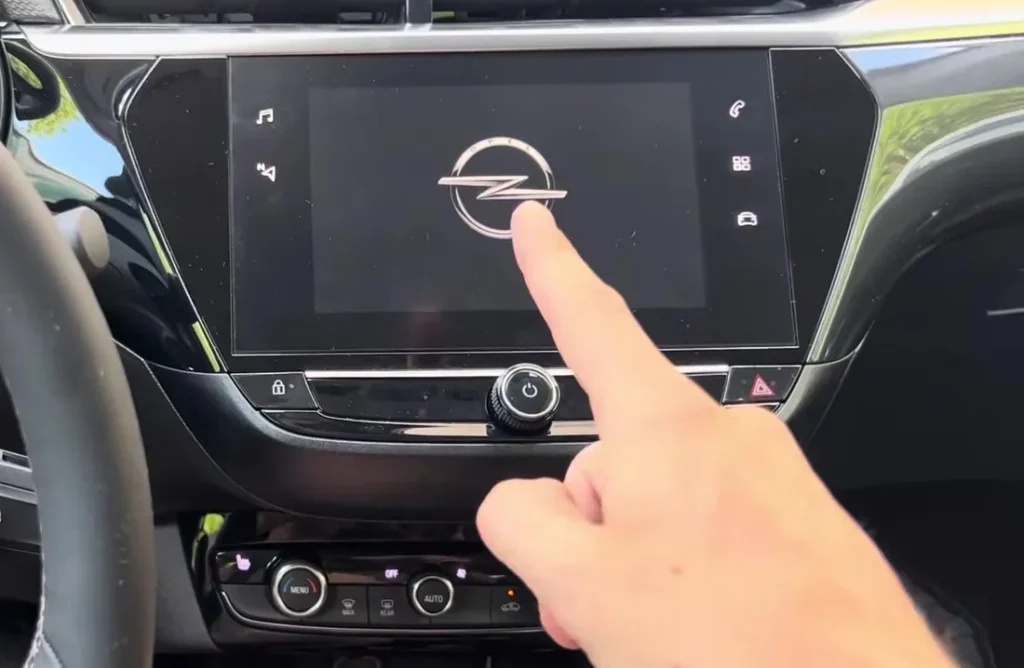
- Leave the ignition on — press the Start button once without your foot on the brake so the dash powers up but the engine stays off.
- Press and hold the power/volume knob (or the power touch-key) on the infotainment unit.
- Keep holding for 10 to 20 seconds. Do not let go early; the NAC unit only triggers its reboot near the end of that window.
- The screen goes black and the Vauxhall griffin logo reappears as the system restarts.
- Release and wait up to a minute for the home screen to load fully before touching anything.
If your trim has the phone/piano-key style buttons rather than a knob, holding the phone key for around 8–10 seconds triggers the same reboot. A soft reset erases nothing — presets, paired phones and navigation favourites all survive.
If it stays frozen
- Switch the ignition fully off, open and close the driver’s door, lock the car, walk away for a few minutes, then return — this lets the unit power down on its own timer.
- Repeat the power-knob hold a second time; one attempt occasionally aborts if the system was mid-task when it locked up.
- Try a full sleep cycle: leave the car locked for 20–30 minutes so the network nodes drop offline, then restart.
- As a last resort, pull the radio/infotainment fuse for 30 seconds, or disconnect the 12V battery negative terminal for ten minutes. On the Corsa F the fuse sits in the dashboard fuse box. This forces a hard power-down but also resets the clock.
Factory reset (erases data)
If the system keeps freezing after a software update or stays glitchy, a factory data reset restores it to as-delivered. With the ignition on, open the main menu, go to Settings → System and select Factory data reset (sometimes shown as Restore factory settings). Confirm when prompted. This wipes all presets, paired devices, saved destinations and personalised preferences, so only use it when a simple reboot will not stick.
Frequently Asked Questions
Why doesn’t the Home + Fast-Forward reset work on my Corsa F?
Because that combination is the GM IntelliLink method used on the older Corsa E and Astra J. The Mk6 Corsa uses the Stellantis NAC system, which reboots only on a long press of the power/volume control or the phone key.
Will resetting delete my paired phone or navigation favourites?
No. A soft reboot keeps everything. Only the Factory data reset in Settings → System erases paired phones, presets and saved destinations.
My screen is black but I can still hear the radio — is that the same thing?
Often yes — a frozen display with working audio usually clears with the power-knob reboot. If the reboot does not restore the picture and the sound stays fine, the LCD or its backlight may have a hardware fault rather than a software lock.
How often should a Corsa F need an infotainment reset?
Occasionally after a glitch is normal. If it freezes weekly, have the dealer check for a NAC software update via the Vauxhall service network, as several update revisions addressed early Mk6 freezing.
For trouble codes that point to electrical or comms faults behind a persistently dead screen, look the code up on autodtcs.com.
Independent guide — not affiliated with Vauxhall. Always follow your official service manual and safety precautions. Read our full disclaimer.