These instructions apply to the Alfa Romeo 159 Mk1 (939) 2005-2012.
For other models, please choose your vehicle here.
If the remote on your Alfa Romeo 159 (2005–2012) only locks the car when you’re almost touching the door, flashes weakly, or has stopped responding altogether, the coin cell inside the fob is the usual culprit. The 159 — whether saloon or Sportwagon, and the closely related Brera and Spider — used a three-button flip (switchblade) remote with a fold-out SIP22 blade and a distinctive red-brown battery carrier that levers out of the black housing. It’s one of the easier Alfa keys to service once you know the trick, and no reprogramming is needed afterwards. Here is how to spot a dying cell, the exact battery to buy, and the step-by-step swap.
How to Tell the Fob Battery Is Dying
- Shrinking range. You find yourself standing right beside the 159 — or holding the fob against the door handle — to make it lock or unlock. A collapsing range is almost always the first sign.
- The remote’s LED dims or stops. The little indicator on the fob normally blinks on each press. When it barely lights, or doesn’t light at all, the cell voltage has dropped.
- Hit-and-miss buttons. The car answers one press in three, and it’s worse on a cold morning — low temperature saps an already-tired lithium cell.
A CR2032 in a 159 remote typically lasts three to four years. If yours is around that age and behaving as above, fit a fresh cell before you start suspecting the receiver, aerial or immobiliser.
The Battery You Need
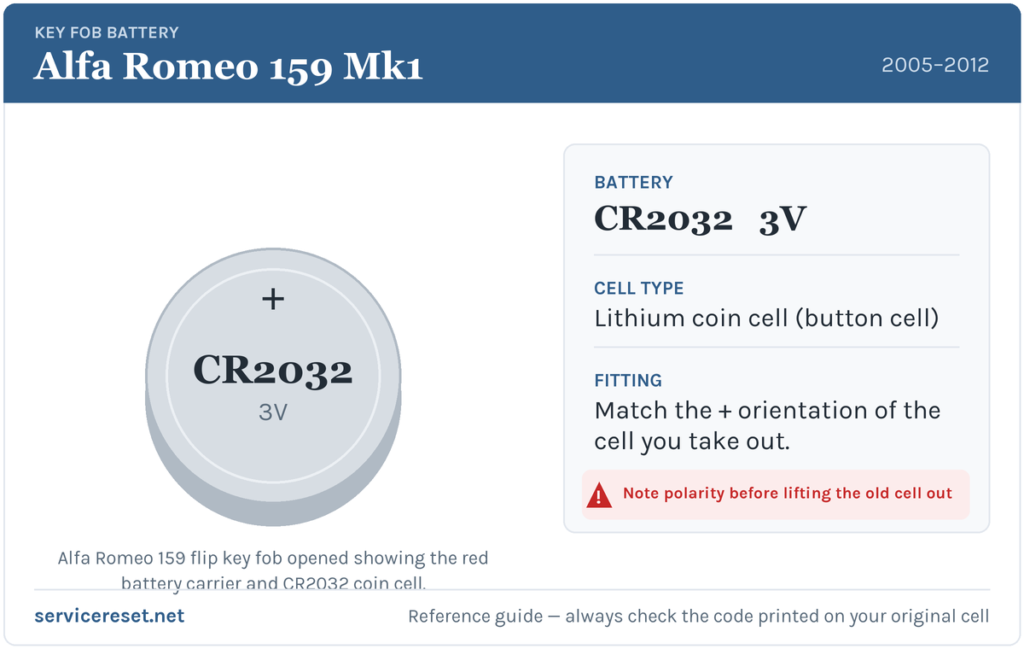
The 159 flip remote takes a single CR2032 — a 3-volt lithium coin cell about 20 mm across, the most common fob battery made and stocked by any supermarket, hardware shop or newsagent. Buy a good branded cell; budget batteries sag under the brief high current the transmitter draws and can give poor range even when they’re fresh out of the packet. If you want to be certain before you shop, pop the fob open first and read the code printed on the old cell — it should say CR2032.
Replacing the Cell — Step by Step
- Release the emergency blade. Press one of the two small metal catches on the fob and let the fold-out key blade spring or pull out. You’ll use it as a lever in a moment.
- Lever out the battery carrier. The 159 hides its cell in a red-brown plastic tray that clips into the black body. Slip the tip of the metal blade (or a small flat-blade screwdriver) into the seam and gently prise the coloured carrier out of the housing. It comes away as one piece — you don’t need to split the whole case.
- Note the orientation, then slide the old cell out. Look at which face is up before you disturb it. On the 159 carrier the fresh CR2032 sits positive (+) side up, but the golden rule is to copy exactly what you removed.
- Fit the new cell. Handle it by the edges — finger grease on the flat faces harms the contact — and press it home under its clip until it’s fully seated.
- Reassemble. Push the carrier back into the black housing until it clicks, fold the blade away, and test lock, unlock and boot from a few paces.
⚠️ Get the polarity right. A coin cell forced in upside down makes poor contact and can quietly drain, leaving you with a “new” battery that’s already flat. If in any doubt, match the orientation of the cell you took out — that is always correct for your fob.
Did It Work?
Stand back a few metres and lock, then unlock, the 159. Full range should return the instant a healthy cell is in place, and the fob’s LED should blink crisply again on every press. If the range is still short, open the fob back up and confirm the cell is seated flat and the right way round before looking any further.
If a Fresh Cell Doesn’t Fix It
- Re-check the seating. The commonest reason a new battery “doesn’t work” is a cell that’s in the wrong way up or not fully clipped down against the contacts.
- Clean the terminals. A dry wipe of the carrier’s metal tabs clears away grease or light corrosion that causes dropouts.
- Try both buttons and the boot release. If one function works and another doesn’t, the fault is in the fob’s switches, not the battery.
- Suspect the car, not the key? A weak 12 V vehicle battery can make the whole car slow to respond and mimic a key fault — worth ruling out if the 159 itself feels sluggish to wake.
New Key or Spare — Why It’s a Dealer Job
Changing the battery leaves the fob’s existing coding untouched, so the remote keeps working immediately — no reprogramming, no dealer visit. A new or replacement key is a different matter. The 159 uses a PCF-series transponder tied to the car’s immobiliser, so a blank has to be cut to the SIP22 profile and coded to your VIN with diagnostic equipment. That makes adding a spare or replacing a lost key a job for an Alfa Romeo dealer or an auto-locksmith. Keep the battery in your spare key fresh as well, and you’ll never be caught with only one working remote.
Frequently Asked Questions
What battery does an Alfa Romeo 159 key fob take?
A single CR2032 3-volt lithium coin cell, held in the red-brown carrier inside the flip remote. It’s the same cell used across many Fiat-group keys of the era.
Which way round does the battery go?
On the 159 carrier the positive (+) face sits upward. The safest habit, though, is to note how the old cell sat and fit the new one identically — an upside-down cell can flatten itself and leave the key dead.
Do I have to reprogram the key after changing the battery?
No. A battery swap doesn’t affect the coding at all, so the remote works the moment the fresh cell is in. Only a brand-new key needs programming to the car.
How long should a 159 key battery last?
Around three to four years for most owners. Frequent locking and unlocking, or an ageing cheap cell, can shorten that noticeably.
The remote still won’t work with a new battery — what now?
Re-check the cell’s polarity and that it’s clipped firmly onto clean contacts. If the fob’s LED still refuses to light with a known-good cell, the transmitter or a button contact may have failed — uncommon next to a simple flat or reversed battery, but it happens on older keys.
Can I still drive the 159 if the fob is completely dead?
Yes. Fold out the emergency blade and unlock the driver’s door by hand, then start the car with the key as normal — a flat remote cell stops the buttons working, not the car.
If your 159’s remote quit suddenly — especially just after the car battery was disconnected — rather than fading over weeks, the pairing or a stored electrical fault is a likelier cause than the coin cell; you can look up what a logged code means over at autodtcs.com.
Independent guide — not affiliated with Alfa Romeo. Always follow your official service manual and safety precautions. Read our full disclaimer.