These instructions apply to the Honda Jazz Mk3 (GK) 2015-2020.
For other models, please choose your vehicle here.
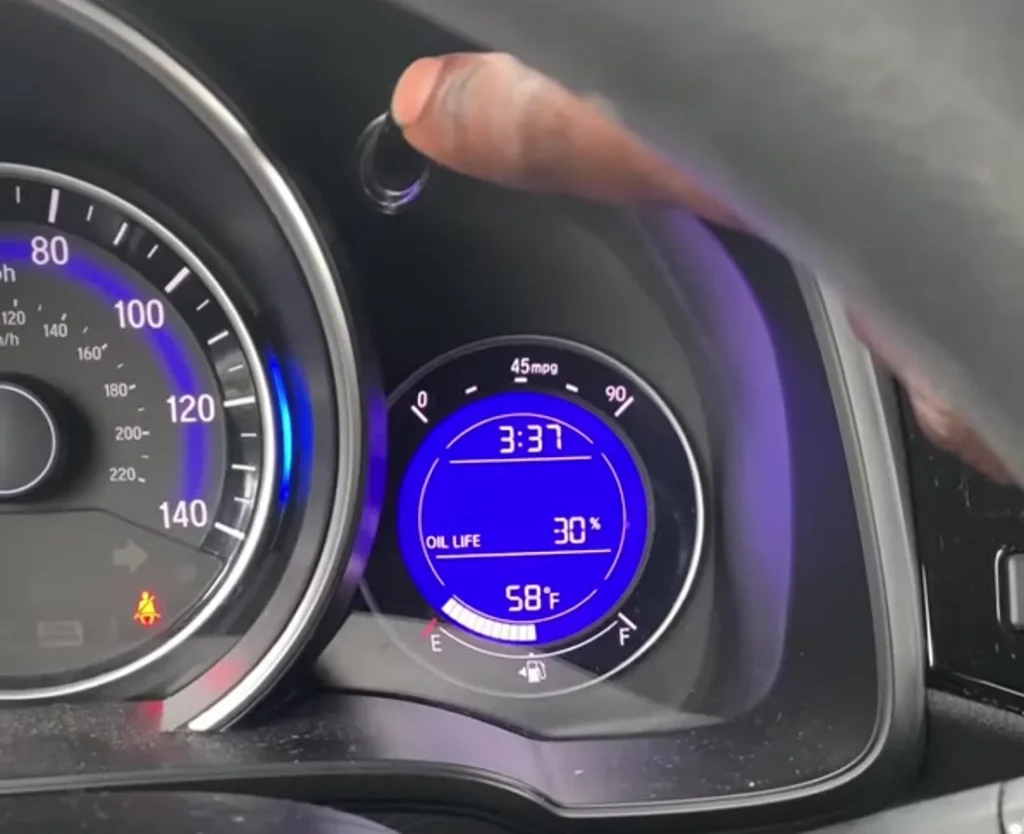
The Honda Jazz Mk3 (GK, 2015–2020) — Honda’s third-generation Jazz, sold globally as the Fit — uses Honda’s Maintenance Minder system with an Engine Oil Life readout in the cluster’s Multi-Information Display. You reset it with the cluster’s SEL/RESET button: cycle to the OIL LIFE screen, then press and hold until it returns to 100%. No diagnostic tool and no pedal sequence are needed.
When to Reset the Service Indicator
- After completing an oil and filter change.
- If the wrench / spanner icon with a “SERVICE” or maintenance message appears on the display at startup.
- If you bought the Jazz second-hand and the previous owner didn’t clear the indicator.
The Mk3 Jazz’s Maintenance Minder tracks each service item independently and shows codes like A1, B12 (see the FAQ for what they mean). Reset the Engine Oil Life after an oil change; clear the other items only when you have actually done that work.
Before You Start
- Park on a level surface and apply the parking brake.
- Complete the oil change (or other maintenance) before the reset — resetting the counter does not change the oil.
- Find the SEL/RESET button. On the Mk3 Jazz it is the small round button at the top of the instrument cluster, reachable through the top of the steering wheel; it also switches the trip-computer displays. Some trims place a matching SEL/RESET function on the steering-wheel spoke.
Tools and Supplies
None for the reset itself. For the oil change: fresh Honda-spec oil — 0W-20 for the 1.3 i-VTEC (L13B) petrol and 5W-30 / 0W-20 for the 1.5 i-VTEC (L15B) and the 1.5 Sport Hybrid (LEB) where fitted; a new spin-on filter (different parts for the L13 and L15 engine families); a 17 mm sump-plug socket; a torque wrench.
Service Indicator Reset — Step-by-Step
- Stop the vehicle on a level surface and apply the parking brake.
- Switch the ignition to ON without starting the engine — on push-button cars, press START/STOP once without your foot on the brake. Keep both feet off the pedals.
- Wait for the cluster to fully wake so the round Multi-Information Display is lit.
- Press the SEL/RESET button repeatedly to cycle through the display screens until the Engine Oil Life screen appears — it reads “OIL LIFE” with a percentage (for example, 30%).
- With the Engine Oil Life percentage shown, press and hold the SEL/RESET button.
- Keep holding. After a few seconds the oil-life value (and the maintenance-item indicator) begins to blink.
- Continue holding — about 10 seconds total — until the Engine Oil Life resets to 100% and the wrench / service indicator clears.
- Release the button and switch the ignition off to exit.
Verify the Reset Worked
Switch the ignition off, wait around 30 seconds, then turn it back on. The wrench / SERVICE warning should no longer appear at startup. Press SEL/RESET back to the Engine Oil Life screen — it should now read a fresh 100%.
Troubleshooting
- SEL/RESET just switches the trip display instead of resetting. A quick press only changes the screen. You must first stop on the OIL LIFE screen, then press and hold — the reset only starts once the oil-life value is the one on show and the button is held.
- The oil life won’t drop into “blink” mode. The ignition must be ON with the engine off, and the display must be showing Engine Oil Life (not the trip, range or clock screen). Cycle back to OIL LIFE and hold again.
- Reset succeeds but the spanner symbol returns on the next start. Two causes: (a) more than one service item was due and you only cleared the oil — cycle to any other flagged item and reset it too; (b) a weak 12V battery can stop the cluster storing the change — load-test the battery.
- Mk3 Jazz Hybrid — same procedure? Yes. The Sport Hybrid (Asia / Australia markets) shares the GK cluster and Maintenance Minder, so the SEL/RESET oil-life reset is identical.
- 2017 facelift Jazz — any difference? No. The 2017 update changed the styling and added Honda Sensing on some trims but kept the cluster and Maintenance Minder unchanged.
Frequently Asked Questions
What does the spanner symbol on the Honda Jazz mean?
On the Mk3 Jazz the spanner / wrench icon is the Maintenance Minder reminder. It lights when one or more service items are due. It does not indicate an engine fault — engine faults trigger the separate orange check-engine light (an engine-outline icon).
What are the Honda Maintenance Minder codes (A1, B12, etc.)?
The letter indicates the main service:
- A: Engine oil + filter
- B: Engine oil + filter + inspection items (tyres, brakes, suspension)
The numbers add sub-items:
- 1: Tyre rotation
- 2: Air cleaner + cabin filter + drive belt + dust filter
- 3: Transmission fluid
- 4: Spark plugs + valve lash check
- 5: Engine coolant
- 6: Differential / transfer fluid (where fitted)
A code like “A12” means: oil change + tyre rotation + air filter. Reset each item as you complete it.
How often does the Mk3 Jazz service indicator come up?
The Maintenance Minder adjusts to how the car is driven, but the Engine Oil Life typically calls for a change around 12,500 miles (20,000 km) or 12 months. Severe, short-trip driving can pull that interval well below 10,000 miles.
Does the reset clear engine fault codes?
No. The reset zeros the Maintenance Minder counter only. Stored engine codes need a scan tool. For DTC interpretation see autodtcs.com.
What about the Mk4 Jazz (GR, 2020+)?
The fourth-generation Jazz (GR, 2020 onwards, all-hybrid) uses the newer touchscreen system with a menu-driven reset path (Settings → Vehicle → Maintenance). Different procedure — we cover it in a dedicated Mk4 guide.
Will this procedure work on the Honda Fit (same generation, US/JP market)?
Yes. The Honda Fit is the same GK-generation car with the same cluster and Maintenance Minder firmware, so the SEL/RESET oil-life reset is identical. The video frame on this page is from a US-market Fit; the mechanism is the same as the European Jazz.
For DTC code interpretation on Honda vehicles see autodtcs.com.
Independent guide — not affiliated with Honda. Always follow your official service manual and safety precautions. Read our full disclaimer.