These instructions apply to the Kia Picanto (JA) 2017 - Present. For other models, please choose your vehicle here.
The Kia Picanto JA (2017–present) has a service reminder system that alerts the driver when maintenance is due. After an oil change or scheduled service, the reminder must be reset using the steering wheel buttons. Depending on the instrument cluster version, there are two slightly different control layouts.
Steering Wheel Button Layouts
There are two button configurations used on the Kia Picanto JA:
- Type 1: Separate OK button below the MOVE scroll switch.
- Type 2: No separate OK button — press the MOVE scroll switch inwards to confirm selections.
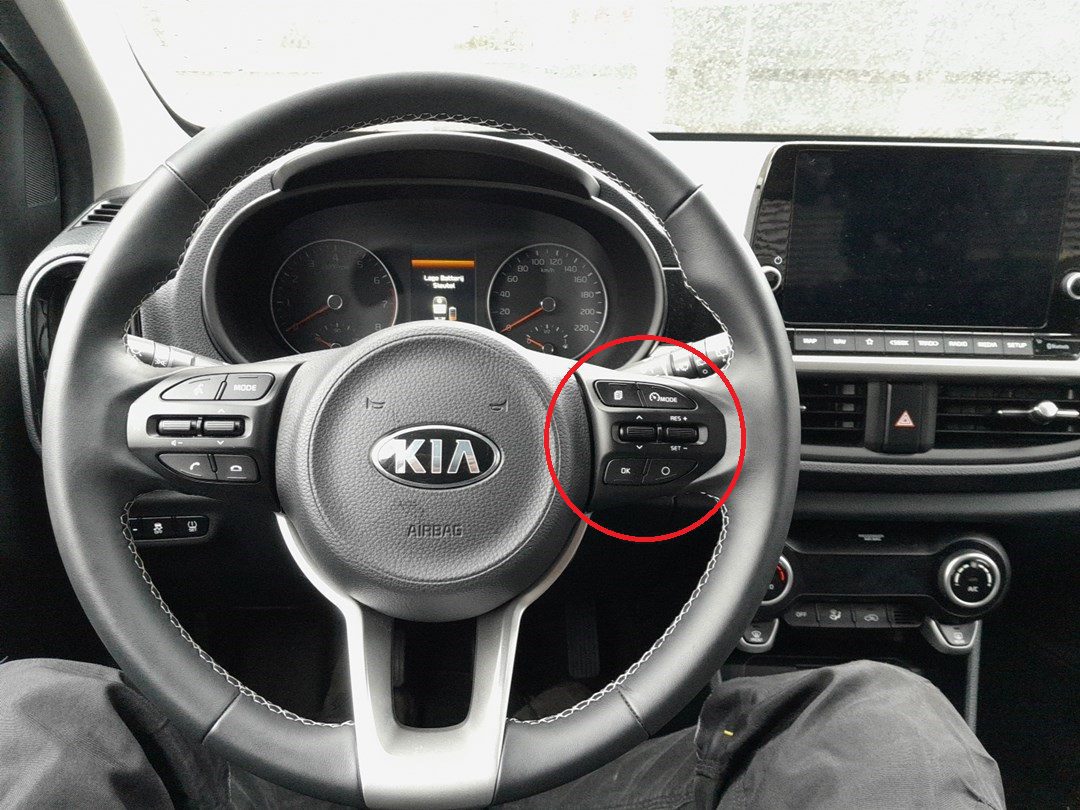
Manual Reset Procedure – Type 1 (Separate OK Button)
- Apply the parking brake.
- Switch the ignition to the ON position (do not start the engine).
- Press the MODE button to enter USER SETTING mode.
- Use the MOVE scroll switch to navigate through the menu.
- Select SERVICE INTERVAL and press the OK button to confirm.
- Scroll to RESET and press OK.
- Select YES and confirm with OK.
- The service reminder will now be cleared.
Manual Reset Procedure – Type 2 (No Separate OK Button)
- Apply the parking brake.
- Switch the ignition to the ON position.
- Press the MODE button to enter USER SETTING mode.
- Use the MOVE scroll switch to navigate through the menu.
- Select SERVICE INTERVAL and press the MOVE scroll switch inwards to confirm.
- Scroll to RESET and confirm by pressing the MOVE scroll switch inwards again.
- Select YES and confirm once more.
- The service reminder will now be cleared.
Troubleshooting & Tips
- If the service light does not clear, repeat the procedure — sometimes the confirmation press must be held slightly longer.
- Reset the reminder only after completing maintenance to keep service intervals accurate.
- If the indicator returns immediately, recheck that the correct interval is programmed in the menu.
Disclaimer: This guide is for general information. Always follow your vehicle’s official service information and safety instructions. Perform repairs at your own risk.
Disclaimer: The information on this page is provided for general guidance only. Always follow your official service manual and safety precautions when working on your vehicle. We are not responsible for errors, omissions, or any damage resulting from the use of this information.
This website is an independent resource and is not affiliated with, endorsed by, or sponsored by Kia. All trademarks and brand names belong to their respective owners.