These instructions apply to the Kia Picanto (JA) 2017 - Present. For other models, please choose your vehicle here.
The Kia Picanto JA (2017–present) is fitted with a Tyre Pressure Monitoring System (TPMS) that alerts the driver when one or more tyres lose pressure. After adjusting pressures, replacing tyres, or working on the suspension, the system must be re-initialized to correctly monitor the new values.
When a Reset Is Required
- After checking or adjusting tyre pressures
- After replacing or rotating wheels/tyres
- After suspension work that could affect tyre pressure readings
Manual Reset Procedure
- Park the vehicle on a flat, level surface.
- Adjust all tyres to the recommended cold inflation pressure (see driver’s door sticker).
- Start the engine and keep the car stationary.
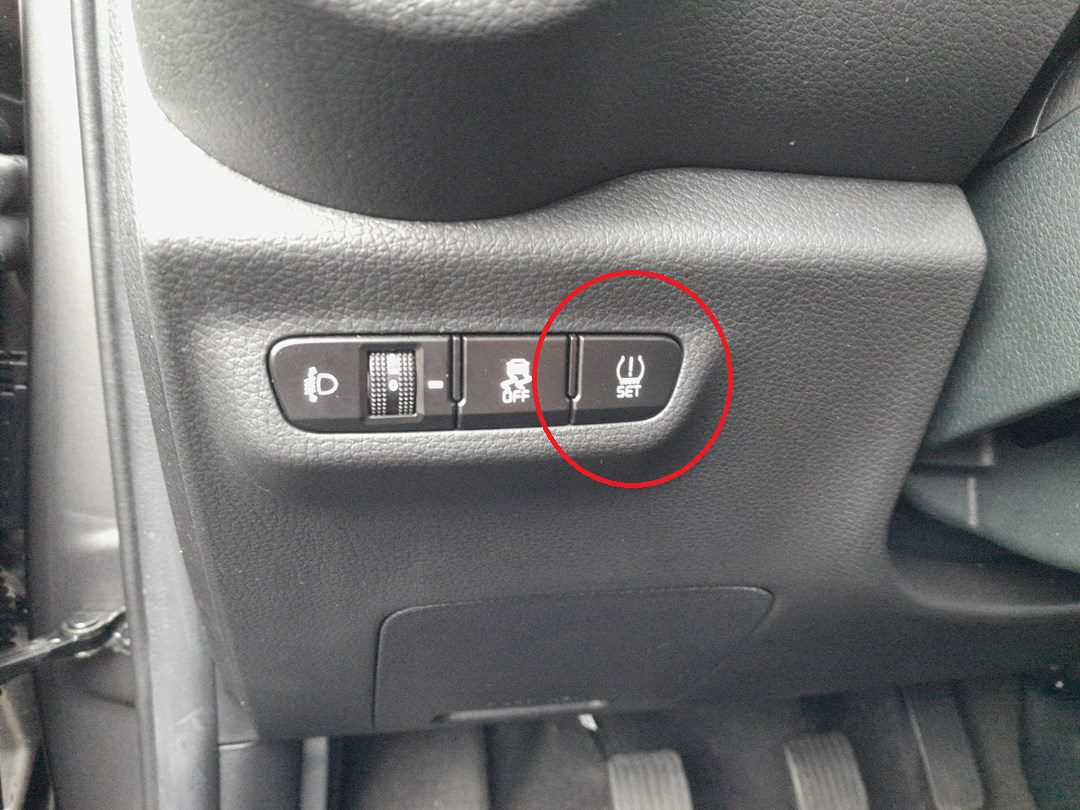
- Locate the TPMS reset button inside the vehicle (varies by market; often found near the steering column or lower dashboard).
- Press and hold the button for about 4 seconds.
- The TPMS warning light on the cluster will flash for around 4 seconds.
- A message such as “Tyre pressures stored” will appear on the display, confirming that the reset was successful.
Troubleshooting & Tips
- If the TPMS light stays on after reset, recheck all tyre pressures with a reliable gauge and repeat the procedure.
- Drive above 25 km/h (15 mph) for 10–15 minutes to allow the system to fully update.
- Low temperatures can reduce tyre pre
Disclaimer: The information on this page is provided for general guidance only. Always follow your official service manual and safety precautions when working on your vehicle. We are not responsible for errors, omissions, or any damage resulting from the use of this information.
This website is an independent resource and is not affiliated with, endorsed by, or sponsored by Kia. All trademarks and brand names belong to their respective owners.