These instructions apply to the Mazda 6 Mk3 (GJ/GL) 2012-Present.
For other models, please choose your vehicle here.
The Mazda 6 GJ/GL (2012–present) shows an oil or service reminder on the instrument cluster — either a small spanner symbol, a clock-and-spanner combination, or an “Oil Change Due” text alert, depending on trim. The reminder is based on an internal counter that combines mileage and engine running time, so simply waiting for the symbol to clear on its own isn’t an option. After an oil change or scheduled service, reset the counter using whichever of the four methods below matches your trim and your available tools.
When to Reset the Service Indicator
- After changing the engine oil and filter.
- When the maintenance reminder appears on the dashboard and the service has been done.
- After garage service work if the technician did not clear the reminder.
- After a battery disconnect if the reminder appears spuriously.
Before You Begin
- Park safely on a level surface, apply the parking brake.
- Follow ignition steps exactly — most methods need ignition ON without the engine running. Pressing START twice without the brake achieves this on push-button trims; on traditional-key trims, turn the key one position past ACC to ON.
- For Method 3 (workshop method), pay careful attention to which terminal you’re grounding. The wrong terminal can fault electrical control modules.
Tools and Supplies
- Methods 1, 4: none — dashboard buttons / touchscreen only.
- Method 2: Mazda M-MDS / IDS diagnostic tool (dealer or specialist garage).
- Method 3: a short jumper wire (a paperclip will do for the test terminal) and a familiarity with your engine-bay fuse-box diagnostic block.
Method 1 — Manual Reset Using the Trip Button
This works on most Mazda 6 trims from 2012 to 2018 and is the fastest at-home method.
- Switch the ignition OFF.
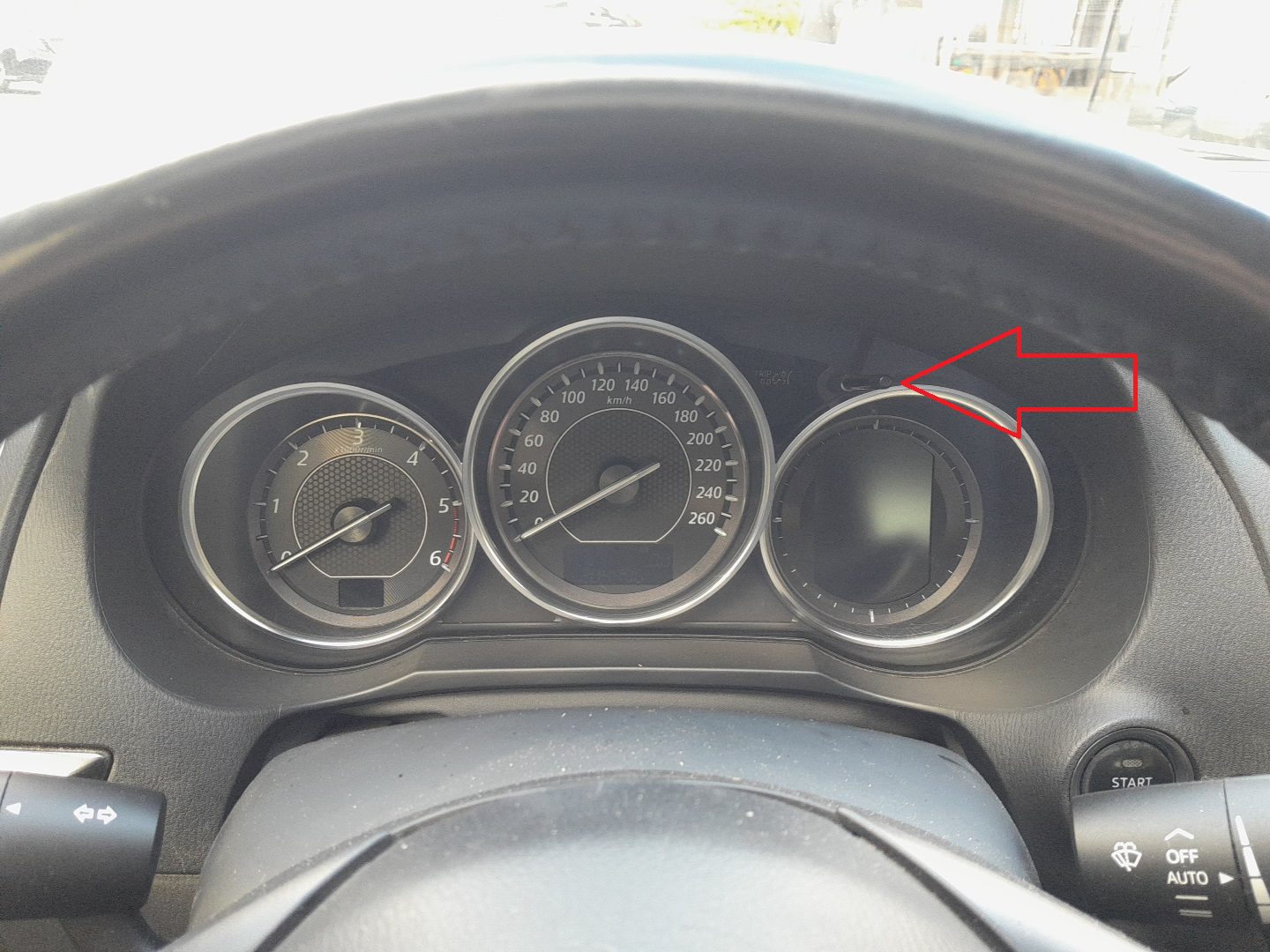
- Press and hold the trip / odometer button on the cluster.
- While continuing to hold the button, switch the ignition to ON (do not start the engine).
- Keep holding the button for about 5 seconds after the cluster fully powers up. The spanner / oil indicator will begin to flash.
- Release the button. The reset is complete.
Method 2 — Reset Using Mazda M-MDS Diagnostic Tool
The dealer-grade method. Use this if Method 1 fails or if your trim doesn’t expose the trip-button reset path.
- Connect the M-MDS (or IDS / FORScan with Mazda module support) to the OBD-II port under the driver’s-side dash.
- Switch the ignition ON.
- In the diagnostic-tool menu, select Powertrain.
- Navigate: Data Reset → Engine Oil.
- Follow the tool’s on-screen instructions to complete the reset.
Method 3 — Workshop Method Without a Scan Tool
Mazda’s official workshop reset that bypasses the scan tool. Useful if the trip-button method doesn’t work and you don’t have an M-MDS.
- Switch the ignition ON (do not start the engine).
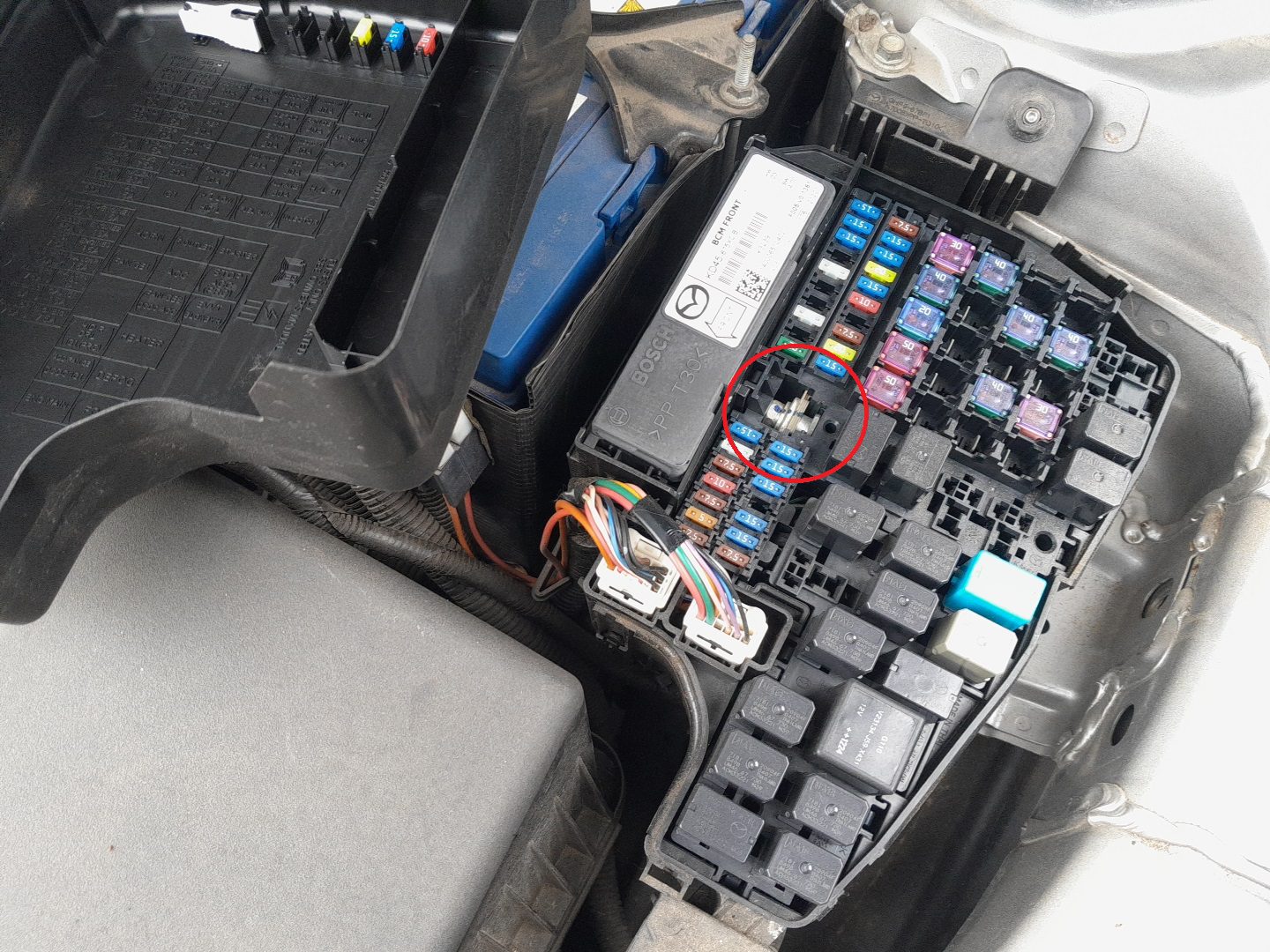
- Locate the engine-bay fuse box, find the diagnostic block, and identify the test terminal (the fuse-box lid diagram identifies it as TEN, T, or “TEST” depending on year).
- Ground the test terminal to a known chassis ground using a short jumper wire.
- Press and release the accelerator pedal five times within five seconds.
- The service indicator on the cluster will flash five times to confirm the reset has registered.
- Remove the jumper wire from the test terminal.
- Switch the ignition OFF.
⚠️ Warning: Only ground the correct test terminal. Grounding adjacent terminals can fault the ECU or set unrelated diagnostic codes that then require a scan tool to clear.
Method 4 — Reset Via Infotainment Display
On 2015+ Mazda 6 trims with the MZD Connect touchscreen, the cleanest method is through the infotainment menu — no buttons, no jumpers.
- Switch the ignition ON.
- On the infotainment screen, select Applications.
- Choose Vehicle Status → Maintenance → Oil Change.
- Tap Reset and confirm.
Verify the Reset Worked
Switch the ignition off, wait 5 seconds, then turn it back to ON. The spanner / oil indicator should no longer appear. On trims with a “distance to next service” readout in the trip computer, that value should now reflect the full interval (typically 10,000 km / 6,200 miles for the Mazda 6, market-dependent).
Troubleshooting
- Reminder returns after a few miles. The reset didn’t latch. Repeat the procedure — most often the trip-button hold (Method 1) was released too early. The indicator must fully flash before you release.
- No confirmation flashes in Method 3. Either the wrong terminal was grounded or the pedal-press timing was off. The five presses must fit within a five-second window — practice the rhythm before the real attempt.
- Method 1 doesn’t work on a 2018+ Mazda 6. The newer MZD Connect platform sometimes bypasses the trip-button reset. Use Method 4 (infotainment) on these trims.
- Indicator clears but reappears at the next start. The infotainment / cluster module isn’t persisting the reset. This is a known issue on certain 2014–2015 builds — a Mazda dealer can update the firmware to fix it.
- Workshop method (3) shows error codes after reset. A scan tool reading shows generic codes from the test-terminal short. Most of these clear automatically after a few drive cycles; if they persist, a scan-tool clear is required.
Frequently Asked Questions
What’s the recommended service interval on a 2012+ Mazda 6?
Mazda’s official European interval is 20,000 km or 12 months, whichever comes first, with the Skyactiv-G (petrol) engines. Skyactiv-D (diesel) is the same. North-American markets see a shorter interval (typically 12,500 km / 7,500 miles) due to different oil specs. The “Oil Life” countdown shown on later cluster firmware adjusts based on driving conditions and may shorten in severe service.
Does Method 1 work on a Mazda 3 or CX-5 of the same era?
Yes — the Skyactiv-platform Mazdas share the trip-button reset method. The Mazda 3 BM (2014–2018) and CX-5 KE (2013–2017) use the same procedure. Slight wording differences in the cluster menu but the button-hold pattern is identical.
Why does the reset have so many methods?
Different trims, different model years, different markets. The trip-button method (1) is the universal owner-level path. Method 3 is what Mazda’s own workshop manuals specify as a fallback when the trip method doesn’t work or the cluster is non-standard. Method 4 is the modern way on touchscreen-equipped cars. Method 2 is the dealer’s go-to — they have the tool and it’s the fastest button-click for them.
Will resetting the indicator affect any other system?
No — the oil/service reminder is a standalone counter. Resetting it doesn’t affect ABS, airbag, transmission adaptations, or any DTCs in the engine ECU. Some Mazda 6 trims also track tyre rotation, brake-fluid life and other items separately; those have their own reset paths.
(Additional Mazda 6 procedure guides are in progress — check back for TPMS reset, battery disconnect, electric handbrake and start/stop disable articles.)
Independent guide — not affiliated with Mazda. Always follow your official service manual and safety precautions. Read our full disclaimer.