These instructions apply to the Nissan Qashqai J12 (2021-present). For other models, please choose your vehicle here.
The Nissan Qashqai J12 (2021–present) is equipped with a service reminder that notifies the driver when maintenance is due. After completing the required service, the indicator should be reset through the vehicle’s menu system. This guide explains how to perform the reset using the steering wheel controls, without the need for diagnostic tools.
Before You Start
- Park the car safely and make sure it is stationary.
- Do not start the engine — the ignition should be switched to the ON position only.
- Ensure all routine maintenance has been carried out before performing the reset.
Manual Reset Procedure
- Switch the ignition to the ON position (do not start the engine).
- Using the multifunction steering wheel controls, scroll through the menu on the driver display.
- Select Settings from the menu.
- Navigate to Maintenance.
- Choose Service.
- Select Reset to clear the service reminder.
- The reset is now complete — the service indicator will be cleared until the next scheduled interval.
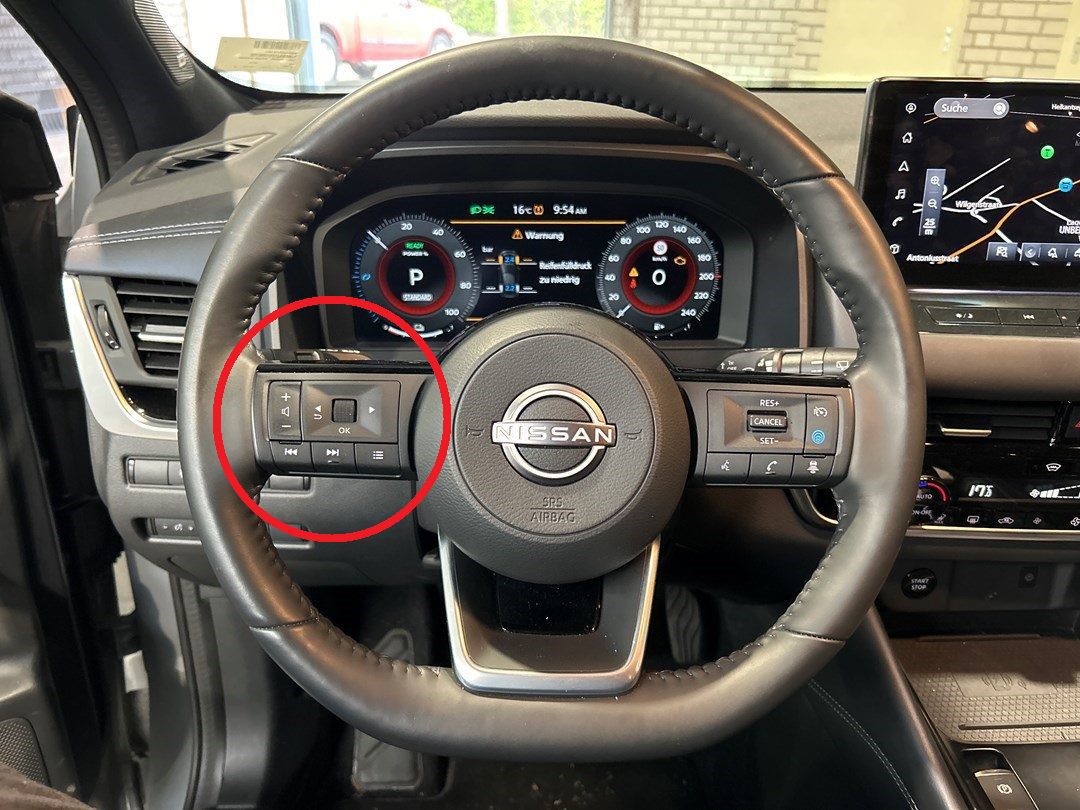
Troubleshooting & Tips
- If the service light does not clear, repeat the procedure carefully — holding the controls too briefly may cause the reset to fail.
- Only reset the reminder after the scheduled maintenance has been completed. Resetting early will result in incorrect service intervals.
- If the indicator continues to display even after several attempts, there may be a fault in the cluster that requires inspection by a professional.
Disclaimer: The information on this page is provided for general guidance only. Always follow your official service manual and safety precautions when working on your vehicle. We are not responsible for errors, omissions, or any damage resulting from the use of this information.
This website is an independent resource and is not affiliated with, endorsed by, or sponsored by Nissan. All trademarks and brand names belong to their respective owners.