These instructions apply to the Toyota Aygo Mk2 (B40) 2014-2021.
For other models, please choose your vehicle here.
If the small central screen in your Toyota Aygo (Mk2/AB40, 2014–2021) has frozen — unresponsive to touch, stuck, or gone black — a forced reboot of the head unit usually clears it. It’s a software hang, and the restart keeps your settings.
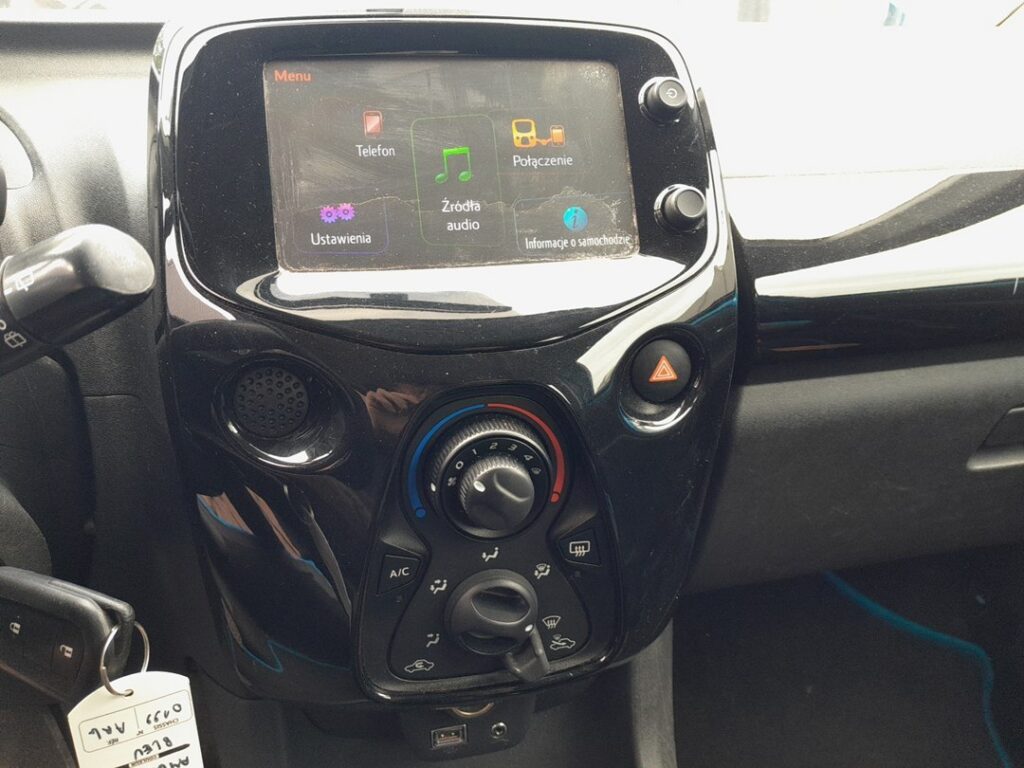
Which System Your Aygo Has
The Mk2 Aygo uses Toyota’s compact x-touch system, with x-nav being the navigation-equipped version — a 7-inch touchscreen unique to this city car (and shared with its Peugeot 108 / Citroën C1 cousins). It is a simpler unit than the Touch 2 found in larger Toyotas, with smartphone mirroring via MirrorLink on earlier cars rather than Apple CarPlay. There is a Power/Volume knob beside the screen. Being a basic unit, it can lag or freeze, and the reboot is the standard owner fix.
Soft Reset (Reboot the Screen)
- Switch the ignition on (engine running or accessory on), parked.
- Press and hold the Power/Volume knob beside the screen for about 10 to 15 seconds.
- Keep holding until the screen goes black and the unit restarts (the Toyota/x-touch splash reappears).
- Release. The system reboots and the home screen returns within about 30 seconds.
Safe — No Data Lost
The reboot is safe. Radio presets, paired phones and any navigation favourites survive — holding the knob simply power-cycles the head unit, the same as restarting a phone. Repeat it whenever the screen stops responding.
If It Stays Frozen
- Hold the knob the full 15–20 seconds if it doesn’t restart at first.
- Turn the ignition off, lock the car, and walk away for 5 minutes. Letting the car sleep cuts power to the unit and clears a deeper hang.
- Check for a software/map update. On x-nav, an out-of-date or interrupted map update can cause repeat freezing; a dealer can update it.
- Re-pair Bluetooth or re-connect MirrorLink if the freeze follows a phone connection — delete the phone from the car and the car from the phone, then pair again.
- As a last resort, disconnecting the 12V battery for a few minutes power-cycles the whole car including the head unit — but this clears other stored settings too.
Factory Reset (Erases Data)
If the unit keeps freezing, a factory reset clears corrupt data. Look under Setup → General → Delete personal data (some menus show Restore factory settings). This erases presets, pairings and favourites, so use it only after the reboot and an update fail.
Frequently Asked Questions
What is the difference between x-touch and x-nav?
x-touch is the Aygo’s 7-inch media/radio touchscreen; x-nav is the same unit with built-in navigation added. Both reboot the same way using the Power/Volume knob.
Does the Aygo Mk2 have Apple CarPlay?
Most Mk2 Aygos use MirrorLink for phone mirroring rather than CarPlay/Android Auto. A reset won’t add CarPlay; it depends on the unit’s hardware and software.
Will the reboot delete my saved stations?
No. The knob hold only restarts the unit; presets and pairings are kept. Only a factory reset from the menu erases them.
The screen is black but the radio still plays — how do I fix it?
That’s a display hang. The knob reboot usually restores the picture; if it returns often, the unit may be failing.
Is the x-touch unit the same as in the Peugeot 108 and Citroën C1?
Yes — the Aygo, 108 and C1 share the same compact head unit, so the reboot method is identical across all three.
If a fault code is stored with the freeze, look it up first on autodtcs.com.
Independent guide — not affiliated with Toyota. Always follow your official service manual and safety precautions. Read our full disclaimer.