These instructions apply to the Kia Picanto (JA) 2017 - Present. For other models, please choose your vehicle here.
The Kia Picanto JA (2017–present) is equipped with an automatic start/stop system that helps save fuel and reduce emissions by shutting off the engine when the vehicle is stationary. You can easily switch the system on or off using the start/stop control button.
Before You Start
- Always park the vehicle safely before adjusting system settings.
- For safety, deactivate the start/stop system before carrying out any work in the engine bay.
Deactivating the Start/Stop System
- Switch the ignition ON or start the engine.
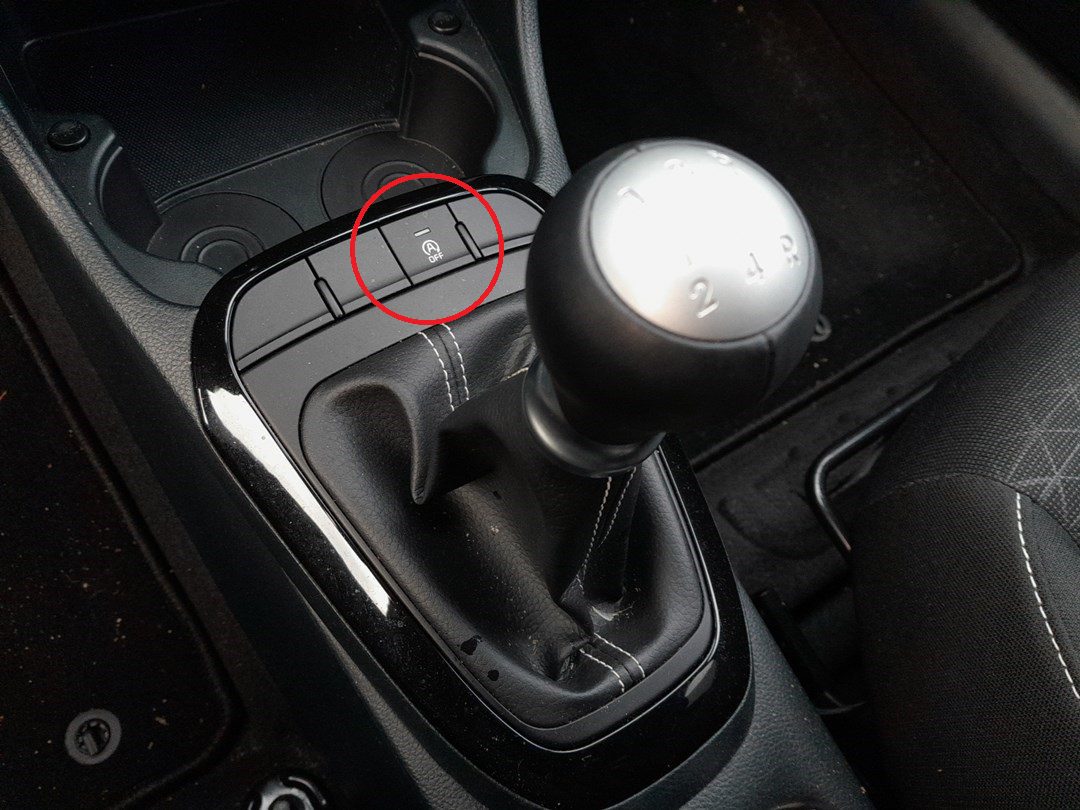
- Locate the start/stop button on the dashboard (usually marked with an “A” and circular arrow symbol).
- Press the button once to deactivate the system.
- The start/stop warning light will illuminate on the instrument cluster and a message will appear on the display to confirm deactivation.
Reactivating the Start/Stop System
- Press the start/stop button again.
- The warning light will turn off and the display will confirm the system is active.
Troubleshooting & Tips
- If the system does not reactivate, check that the battery is fully charged — low voltage can temporarily disable start/stop.
- Air conditioning demand, engine temperature, or seat belt status can also affect start/stop operation.
- For consistent fuel savings, leave the system activated during normal driving.
Disclaimer: This guide is for general information. Always follow your vehicle’s official service information and safety instructions. Perform repairs at your own risk.
Disclaimer: The information on this page is provided for general guidance only. Always follow your official service manual and safety precautions when working on your vehicle. We are not responsible for errors, omissions, or any damage resulting from the use of this information.
This website is an independent resource and is not affiliated with, endorsed by, or sponsored by Kia. All trademarks and brand names belong to their respective owners.