These instructions apply to the Hyundai i30 Mk1 (FD) 2007-2012.
For other models, please choose your vehicle here.
The driver’s window on a Hyundai i30 Mk1 (FD, 2007–2012) has a one-touch AUTO DOWN feature — a single tap drops it all the way. If that one-touch stops working after the car’s 12 V battery has been disconnected or run flat, the window controller has simply lost its memory of the fully-closed position and needs re-initialising. It is a ten-second job with no tools, done entirely from the driver’s switch.
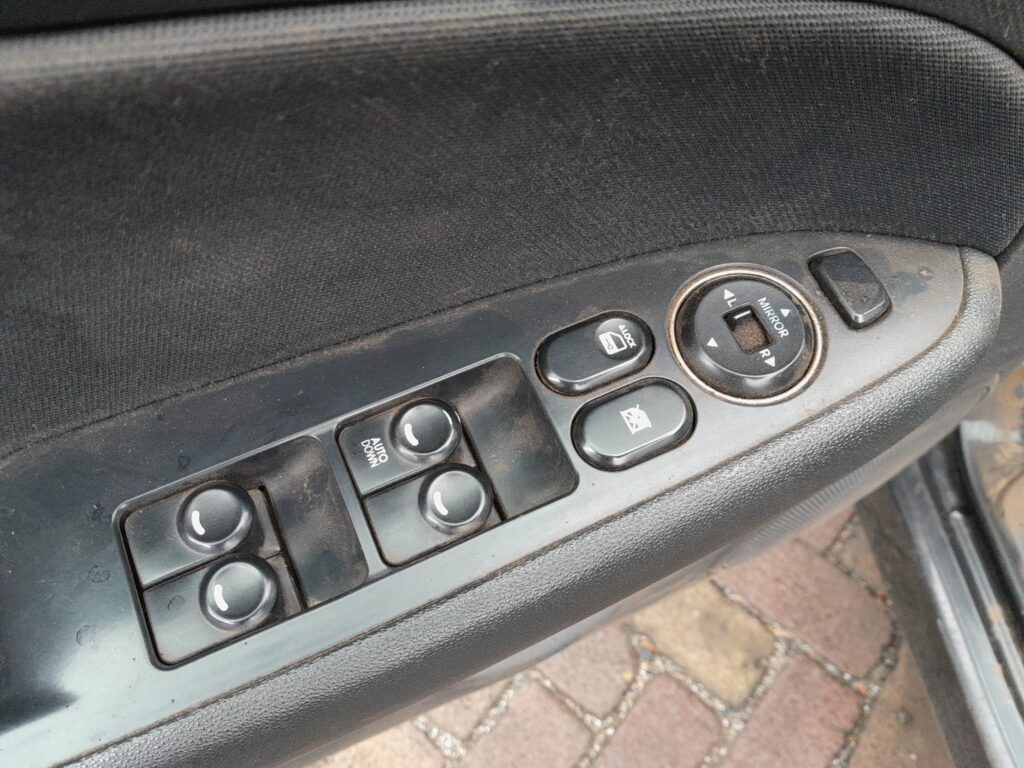
Why the One-Touch Needs Re-Initialising
The window motor learns where “fully up” is so the one-touch and any anti-trap behaviour work correctly. When power is cut — a flat battery, a battery swap, a blown window fuse — that memory is wiped. The window still moves when you hold the switch, but the single-tap AUTO DOWN may stop working until you teach it the top position again. It is a known quirk, not a fault.
Before You Begin
- Switch the ignition ON (engine running or not, both are fine).
- Make sure nothing is in the window’s path — hands, cables, phone leads.
- Work from the driver’s door switch for the driver’s window.
- If the window will not move at all, check the window fuse before assuming a re-init is needed.
How to Re-Initialise the Driver’s Window
- Raise the window fully using the switch and let it reach the top.
- Keep pulling the switch up for about one to two seconds after the window has closed, then release it. This registers the closed position.
- Now test the one-touch: tap AUTO DOWN once and the window should drop all the way on its own.
- If it still only moves while held, repeat steps 1–2, holding the switch up a little longer at the top.
If It Still Won’t Work
- Hold the switch long enough. The controller only learns the top position if you keep the switch pulled up for a moment after the glass has stopped.
- Check the fuse. A blown power-window fuse stops the window entirely — that is a fuse job, not a re-init.
- Battery health. If the 12 V battery is weak, the window may move slowly and fail to learn; sort the battery first.
- Only the driver’s window has one-touch. The passenger and rear windows move only while held, so there is nothing to re-initialise on those.
After the Reset
Once relearned, a single tap of AUTO DOWN sends the window all the way down again and it holds its memory until the next time power is lost. If you disconnect the battery again in future, expect to repeat this quick step.
Frequently Asked Questions
Why did my i30’s one-touch window stop working?
Almost always because the 12 V battery was disconnected or went flat, wiping the window controller’s memory of the closed position. Re-initialising it from the switch restores the one-touch.
Do I need any tools?
No. It is done entirely with the ignition on and the driver’s window switch — no tools, no diagnostic equipment.
Which windows have the one-touch on an i30 FD?
Only the driver’s window has the AUTO DOWN one-touch, so that is the only one that ever needs re-initialising. The others run only while you hold the switch.
My window won’t move at all — is that the same problem?
No. If it does not move even while you hold the switch, that points to a blown window fuse or a wiring/motor fault, not a lost one-touch memory. Check the fuse first.
Will re-initialising fix a window that closes then bounces back?
It can. If the anti-trap thinks it hit an obstruction it may reverse; relearning the top position often settles that. Make sure the window channel is clean and the glass is not binding.
If a warning light came on at the same time the windows played up — for example after a battery disconnect — it is worth reading any stored code. You can look one up on autodtcs.com.
Independent guide — not affiliated with Hyundai. Always follow your official service manual and safety precautions. Read our full disclaimer.