These instructions apply to the Toyota Auris Mk2 (E180) 2012-2018.
For other models, please choose your vehicle here.
The second-generation Toyota Auris (E180), sold from 2012 to 2018, tracks how far you have driven since the last oil change and displays a small spanner (wrench) symbol on the instrument cluster when a service is due. This maintenance reminder is purely a mileage-based counter, so once you or a garage has carried out the work it will keep showing until it is manually reset. The good news is that the whole procedure is done from the driver’s seat using the trip meter button, with no diagnostic tool required.
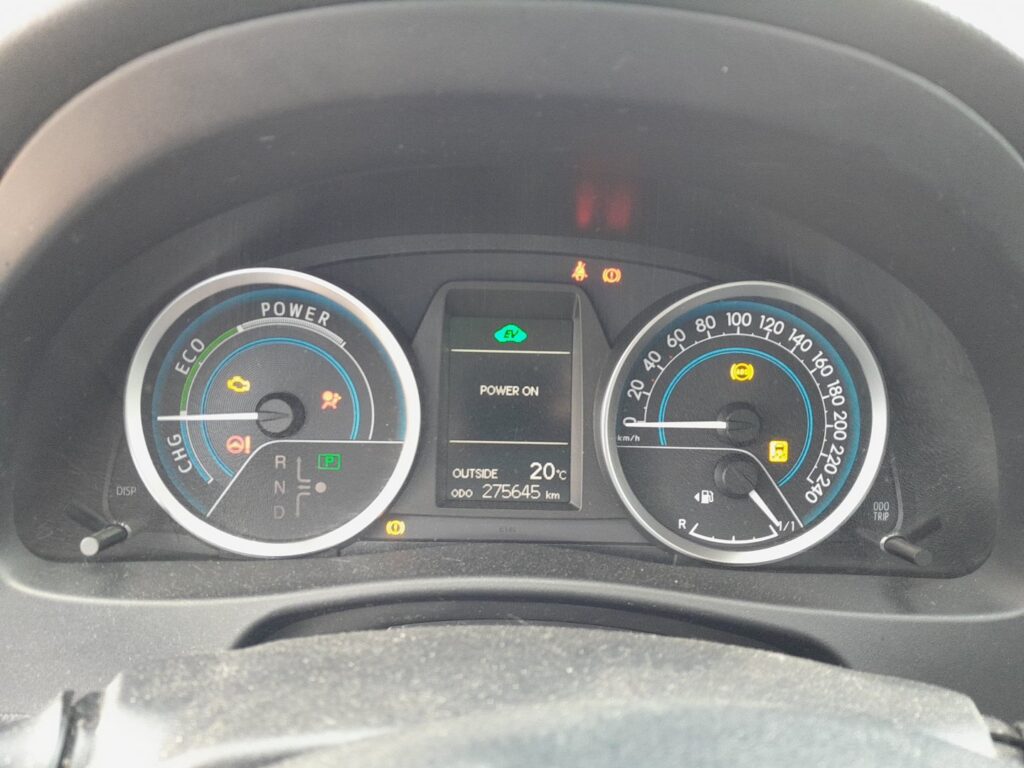
When to Reset
Reset the service indicator only after the scheduled maintenance has actually been completed on your Auris. That normally means an oil and filter change, but the reminder is also a general service prompt on many E180 cars. Clearing it before the work is done simply hides the reminder and leaves you tracking the wrong interval, which can lead to a missed oil change and, over time, extra engine wear. If the spanner has appeared and the car has just been serviced, resetting is exactly the right thing to do.
Before You Start
- Park on level ground, apply the handbrake and make sure the transmission is in neutral (manual) or Park (automatic).
- Have the engine switched off to begin with — the reset is carried out with the ignition on but the engine not running.
- Locate the trip meter reset button. On the E180 Auris it is the small stalk-mounted or dash-mounted button used to toggle between the odometer, Trip A and Trip B.
- Confirm the service has been done, so you are resetting an accurate counter rather than masking a genuine reminder.
How to Reset the Service Indicator
- Switch the ignition on (press the Start button without your foot on the brake, or turn the key to the second position) so the dash lights up, but do not start the engine.
- Use the trip meter button to cycle the display until it shows the Trip A reading.
- Switch the ignition back off.
- Press and hold the trip meter reset button, and while keeping it held, switch the ignition on again (engine still off).
- Keep the button held down. The trip display will begin to count down or the digits will show a series of dashes, and after a few seconds the spanner symbol clears and the counter returns to a full interval.
- Release the button, switch the ignition off, then start the engine normally to confirm the service light no longer appears.
On some E180 cars with the multi-information display you can instead scroll to the maintenance screen with the steering-wheel display buttons, hold the display button while the “reset?” style prompt is shown, and confirm. Either route achieves the same result — the mileage counter is set back to zero.
If the Light Won’t Clear
- Make sure the ignition was on but the engine was not running when you started the sequence; the reset will not take with the engine idling.
- Confirm the display was set to Trip A, not Trip B or the odometer, before you began.
- Hold the button longer — it can take several seconds of continuous pressing before the interval resets and the flashing stops.
- If a separate warning (such as a genuine engine or oil-pressure light) is showing rather than the service spanner, that is a fault code, not a reminder, and needs to be read with a scan tool.
- Try the whole sequence again from a fully off state; a mistimed step is the most common reason the reset appears to fail.
Frequently Asked Questions
How do I reset the service light on a 2012–2018 Toyota Auris?
Switch the ignition on, set the display to Trip A, switch off, then hold the trip meter button while switching the ignition back on with the engine off. Keep it held until the spanner symbol disappears and the counter resets.
Does the spanner light on the Auris mean something is broken?
No. On the E180 Auris the spanner (wrench) is a mileage-based service reminder, not a fault warning. It simply tells you the next scheduled maintenance interval has been reached.
Will resetting the reminder clear a check-engine light?
No. The trip-button reset only clears the maintenance reminder. A check-engine or other amber warning light is a stored diagnostic trouble code and must be diagnosed and cleared separately.
Do I need the engine running to reset the Auris service indicator?
No — the opposite. The ignition must be on but the engine off. If the engine is running the counter will not reset.
If your Auris is also showing a fault code rather than a simple service reminder, you can look it up on autodtcs.com.
Independent guide — not affiliated with Toyota. Always follow your official service manual and safety precautions. Read our full disclaimer.