These instructions apply to the Mazda 2 Hybrid (MXPH11) 2022-Present.
For other models, please choose your vehicle here.
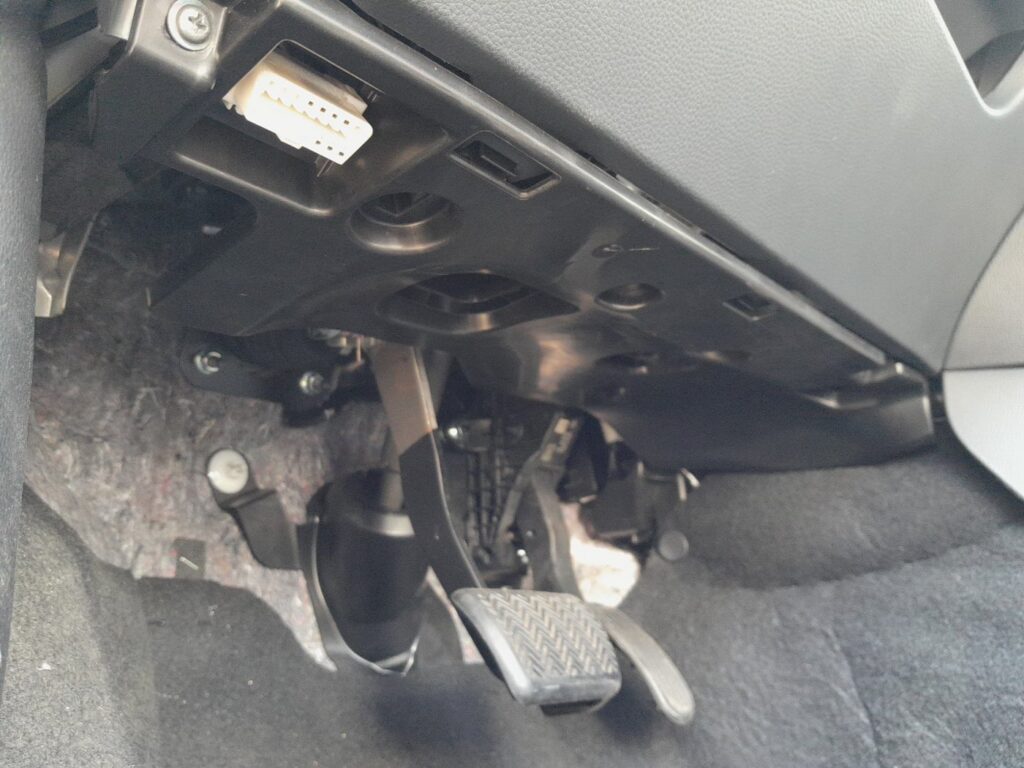
The Mazda 2 Hybrid (MXPH11, 2022–present) has a standard 16-pin OBD-II socket, so any generic code reader will plug in. It is the link to the car’s engine, hybrid and body control modules, and on this model it sits low on the driver’s side of the dashboard, above the pedals.
Where the Port Is
Look under the steering column, in the space above the pedals. On a left-hand-drive car it is on the left of the cabin; on a right-hand-drive car it is the mirror-image spot on the right. The white connector faces down and needs no tools to reach.
Using the Port
- With the ignition off, plug your scan tool into the 16-pin socket above the pedals.
- Switch the ignition on (dials lit) so the modules are powered.
- Read or clear fault codes as needed. A basic reader covers generic engine codes; hybrid-specific data may need a more capable tool.
If a warning light is on, look the stored code up on autodtcs.com before clearing it, so you know what triggered it.
Frequently Asked Questions
Do I need a Mazda dealer tool?
No for generic OBD-II codes — any standard scanner works. Deeper hybrid, ABS or airbag data can need a more capable or brand-specific tool.
Can I clear a hybrid warning through the port?
You can clear generic codes, but if the underlying fault remains the light will return. Diagnose the cause first rather than just clearing it.
Is the socket in the same place as a Toyota Yaris Hybrid?
Yes — the 2 Hybrid shares the Yaris Hybrid layout, so the 16-pin socket is in the same driver’s-side under-dash position.
Independent guide — not affiliated with Mazda. Always follow your official service manual and safety precautions. Read our full disclaimer.