These instructions apply to the Toyota Yaris Mk3 (XP130/P13) 2011-2020.
For other models, please choose your vehicle here.
The Toyota Touch 2 head unit in the XP130 Yaris hides an engineering “Service Menu” behind a button-and-knob combination. It lets you read multimedia fault codes, test the panel and touch switches, check live vehicle signals and view the unit’s version and part numbers. No scan tool is needed.
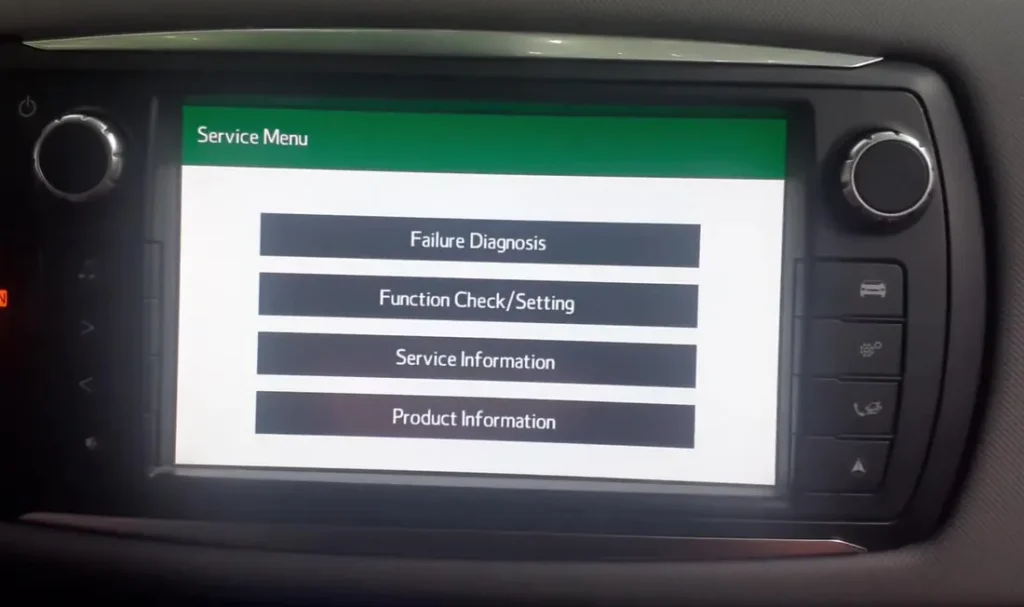
What the Service Menu shows
The green menu has four sections. Failure Diagnosis lists stored communication and unit codes (for example U0140, U0164, U0293) with a Code CLR option to clear them. Function Check/Setting tests the panel and steering switches, the touch screen and live vehicle signals (battery voltage, road speed, IG, parking brake, illumination). Service Information covers program and version information, and Product Information shows the head unit part number and serial. These are diagnostic read-outs and self-tests only.

How to open the hidden Service Menu
- Switch the ignition on. On the Hybrid, press POWER once without touching the brake so the system is in accessory/ignition-on mode; on key models turn the key to ACC/ON. Wait for the screen to finish booting past the “HYBRID” splash.
- Press and hold the head unit’s audio power button (the on/off/volume knob at the top-left of the screen).
- Keep holding it and turn the tune/scroll knob three times.
- Release the button. The green Service Menu opens with Failure Diagnosis, Function Check/Setting, Service Information and Product Information.
- Tap a section to explore it, then use Back to step out. To leave the menu, cycle the ignition off and on so the head unit restarts normally.
If it will not open
Make sure the screen has fully booted before you start, and hold the audio power button firmly the whole time you turn the knob. If nothing happens, try again from ignition-on and turn the knob a little slower. Some units respond instead to holding the audio button while cycling the ignition on and off three times. If the menu still refuses to appear, the head unit software or button may differ on that build; there is no harm in stopping and cycling the ignition to return to the normal screen.
FAQ
Is it safe to enter this menu? Yes. Failure Diagnosis, the switch tests and the signal read-outs only display information or exercise a control while you watch. Avoid the Code CLR option unless you specifically want to clear stored multimedia codes.
Will it reset my radio or navigation settings? No. Viewing the menu changes nothing. Only deliberate actions such as clearing codes have any effect, and they touch the multimedia unit only, not the engine or hybrid system.
What are codes like U0140 or U0293? They are communication (network) codes the head unit has logged between itself and other modules. They are often historic; note them before clearing, and if a warning returns have the network checked properly.
Does this work on the non-Hybrid Yaris? The Service Menu belongs to the Toyota Touch 2 head unit, which is fitted to both petrol and Hybrid XP130 models. The only difference is how you switch the ignition on.
Can this menu clear a dashboard warning light? No. It only handles multimedia (head unit) codes. Engine, airbag or ABS lights live in other modules and need the correct system’s procedure.
Chasing an actual fault code rather than exploring the menu? Look the code up on our sister site autodtcs.com to see what it means before you clear anything.
Independent guide — not affiliated with Toyota. Always follow your official service manual and safety precautions. Read our full disclaimer.