These instructions apply to the Hyundai i30 Mk3 (PD) 2017-Present.
For other models, please choose your vehicle here.
If the 12 V battery in your Hyundai i30 Mk3 (PD, 2017–present) is flat, you can jump-start it from another 12 V vehicle with jump leads. The battery sits in the engine bay, front-left. The key is the connection order — and earthing the last lead to the bodywork, not the battery’s negative terminal.
Before You Start
- Only use a 12 V donor battery or jump pack. Never push-start the car.
- Both cars off, in neutral (manual) with the handbrake on, and not touching each other.
- Don’t jump a battery that is frozen or visibly damaged.
How to Jump-Start the i30
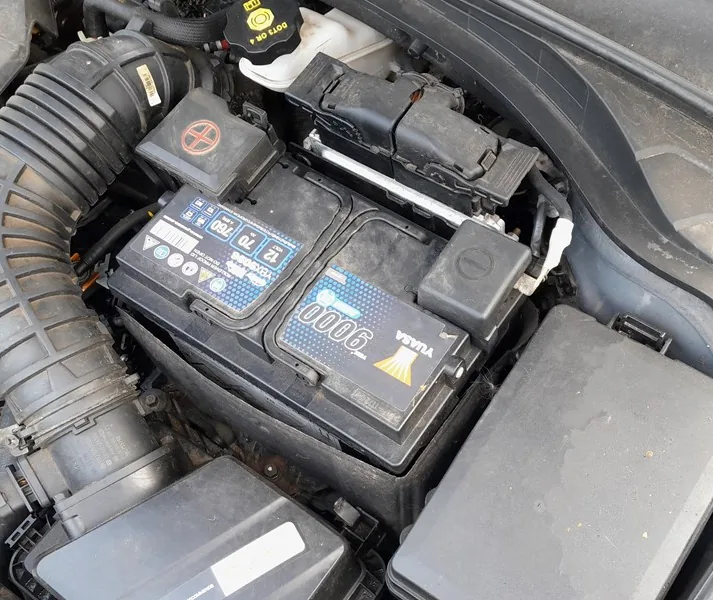
- Connect the red lead to the positive (+) terminal of your flat battery.
- Connect the other end of the red lead to the positive (+) terminal of the donor battery.
- Connect the black lead to the negative (−) terminal of the donor battery.
- Connect the other end of the black lead to a bare metal earth point on your i30’s body or engine — away from the battery and any moving parts. This keeps the final spark away from battery gases.
- Start the donor car, let it run at about 2,000 rpm for a few minutes, then start your i30.
- Once running, remove the leads in the exact reverse order: body earth first, then donor negative, then donor positive, then your positive.
After a jump-start the ABS warning light may briefly come on because of the low voltage — it’s not a fault and clears once the battery recovers. Drive for a good while (or charge the battery) so it can recharge.
Frequently Asked Questions
Where is the i30 battery?
In the engine bay, on the front-left. It’s a 12 V battery (about 70 Ah on the diesel).
Why connect the last lead to the body and not the battery?
A charging battery gives off hydrogen. Making the final connection on the body earths it away from those gases, so any spark can’t ignite them.
The battery keeps going flat — what now?
Repeated flattening means a tired battery or a drain. If it won’t hold charge, have the battery and charging system tested; a stored code can be read on autodtcs.com.
Independent guide — not affiliated with Hyundai. Always follow your official service manual and safety precautions. Read our full disclaimer.