These instructions apply to the Hyundai i30 Mk3 (PD) 2017-Present.
For other models, please choose your vehicle here.
The eight-inch Display Audio head unit in the Hyundai i30 Mk3 (PD, 2017–present) has a hidden Dealer Mode — a service menu that shows the software version and runs the system’s built-in self-diagnostics. It’s handy for seeing exactly which firmware your car runs before a software or map update. Dealer Mode is read-only, so it’s safe to look around. This page shows what’s in it, how to open it on this generation, and where to stop.
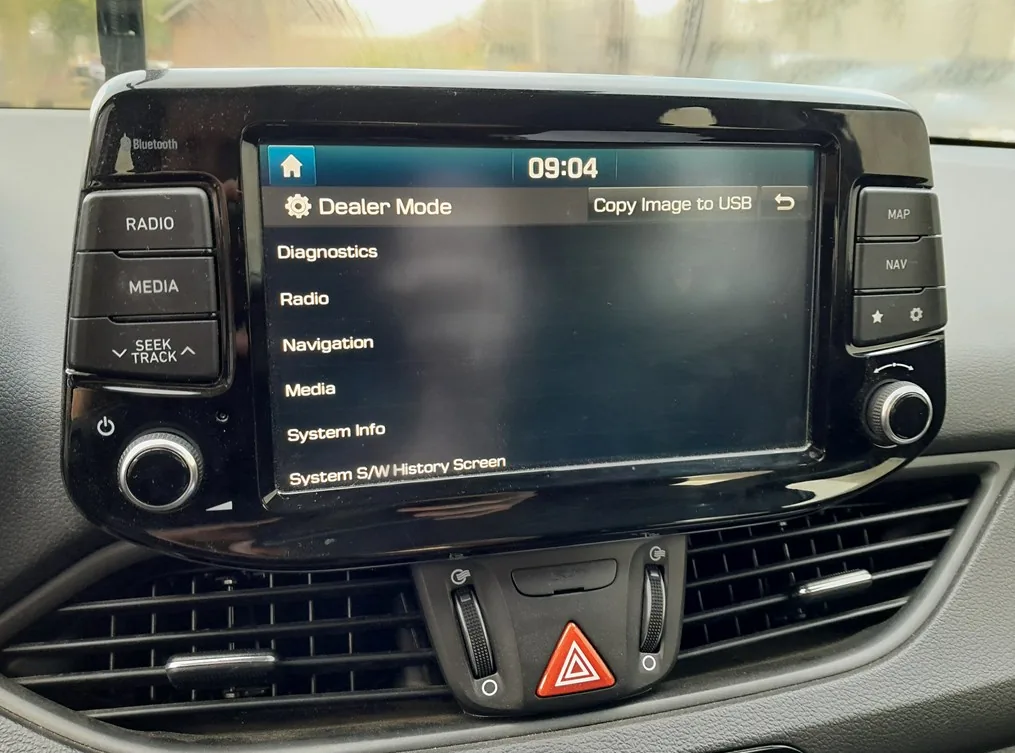
What Dealer Mode Contains
Once open, Dealer Mode lists several sections:
- Diagnostics — a self-test that reads the status of parts of the system (for example the steering-wheel remote keys and the DAB aerial), with a Read Status / Save option. It’s read-only — a built-in self-check of the head unit (a workshop would also scan the car over the OBD port with a dedicated tool).
- System Info / Version Info — shows the installed software version (and the map version on cars with built-in navigation). This is the part most owners want, to confirm whether an update applies to their car.
- Navigation / Media test screens — hardware checks for the screen, speakers and sources.

How to Open Dealer Mode
This is the sequence verified on our 2020 i30 (1.6 CRDi) with the eight-inch Display Audio. The unit has two identical rotary knobs — volume/power on the left, the tuner knob on the right — and the sequence uses both: you set the volume with the left knob and then press the tuner knob (the right one). Access codes can differ with other software versions and regions, so yours may not be the same.
- From the home screen, open Settings → General.
- Turn the volume to 7 and press the tuner knob (the right-hand knob, which looks identical to the volume knob); turn the volume to 3 and press the tuner knob again; turn the volume to 1 and press it once more.
- A numeric keypad appears (shown below). Enter the access code — 2400 on this car — and tap Send. Dealer Mode opens.

Important — Look, Don’t Change
Dealer Mode itself is read-only — you can view the version and run the self-tests, but you can’t change any settings from it, so exploring it won’t harm anything. What you should not go into is the separate, deeper engineering menu (reached a different way, with its own code): that one can change calibration, region and feature settings, and a wrong change there can disable features or need a dealer to put right. If all you want is to clear a frozen screen, use the normal reboot instead — see our i30 infotainment reset guide.
Frequently Asked Questions
Is it safe to open Dealer Mode on the i30?
Yes — Dealer Mode is read-only, so viewing the version and running the diagnostics can’t change anything on the car. Only the deeper engineering menu (entered separately, with its own code) can alter settings, so leave that one alone.
What is the Dealer Mode code?
On this 2020 i30 it’s 2400, typed on the keypad after pressing the tuner knob at volume 7, 3 and 1. Other head-unit software versions and regions use different codes, so the exact number can vary from car to car.
The sequence doesn’t work on my car — why?
The entry sequence and code depend on the head-unit software version and market, so a method that works on one i30 may not match another. Later firmware uses different sequences, and the higher 10.25-inch navigation unit differs from the eight-inch Display Audio shown here.
If a fault code is behind an audio or connectivity problem, you can look it up on autodtcs.com.
Independent guide — not affiliated with Hyundai. Always follow your official service manual and safety precautions. Read our full disclaimer.