These instructions apply to the Ford Transit Custom Mk1 (V362) 2012-2023.
For other models, please choose your vehicle here.
The Ford Transit Custom (V362, 2012–2023) shows an oil-life service reminder in the instrument cluster. You can clear it yourself in a minute — either through the display menu or with Ford’s brake-and-accelerator pedal method. No scan tool is needed for the oil reset; the separate inspection service is a dealer item.
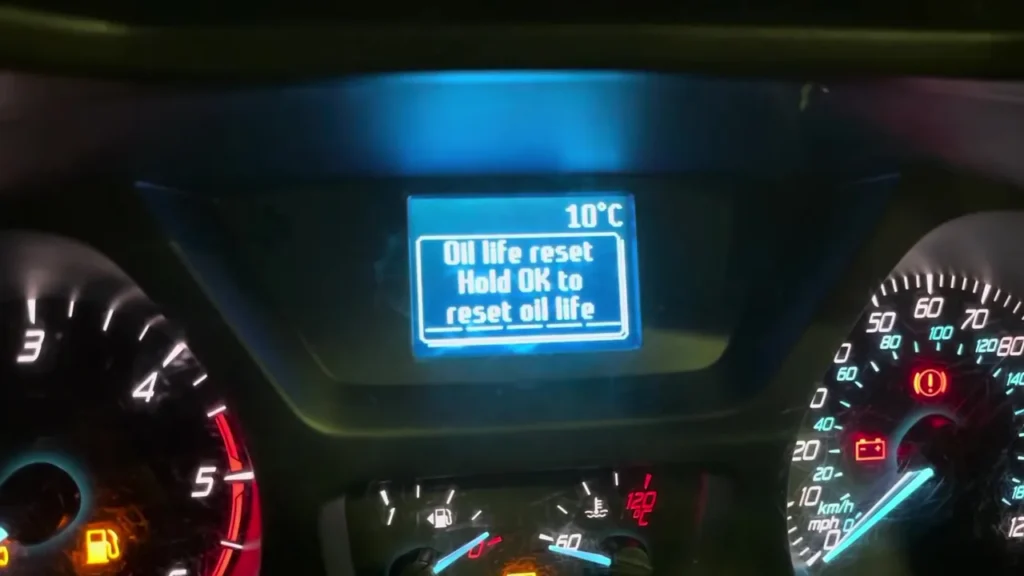
Method 1 — reset through the menu
- Switch the ignition on, but do not start the engine.
- Using the steering-wheel controls, scroll the cluster display to Settings.
- Select Convenience.
- Scroll until OIL LIFE RESET appears.
- Press and hold the OK button until a confirmation message is shown.
- Switch the ignition off to store it.
Method 2 — the pedal method (vans without the menu option)
- Switch the ignition on, but do not start the engine.
- Press the brake and accelerator pedals at the same time and hold them both down.
- Keep both pressed for at least 30 seconds, until a confirmation message appears.
- Release the pedals and switch the ignition off.
Why is my service light still on after resetting?
The oil-life reset above clears the oil service reminder. If a spanner or “service due” message stays on, that is usually the inspection interval, which is logged in the digital service record and cleared by a dealer or workshop with Ford diagnostics.
Does resetting the light actually service the van?
No. Resetting only clears the reminder. Change the oil and filter first, then reset so the next interval counts from the right point — important on a hard-working diesel van.
Independent guide — not affiliated with Ford. Always follow your official service manual and safety precautions. Read our full disclaimer.