Service ResetService Reset
  • Home
  • Guides
  • Diagnostics
  • Tools
    • Tire Pressure Calculator
    • Request a Guide
    • Wheel Offset Calculator
    • Tire Size Comparison
    • Tire Pressure Converter
    • Torque Converter
    • Coolant & Antifreeze Mix
  • Blog
  • About
  • FAQ
  • Contact Us
  • Home
  • Guides
  • Diagnostics
  • Tools
    • Tire Pressure Calculator
    • Request a Guide
    • Wheel Offset Calculator
    • Tire Size Comparison
    • Tire Pressure Converter
    • Torque Converter
    • Coolant & Antifreeze Mix
  • Blog
  • About
  • FAQ
  • Contact Us
Home/Ford/Transit Connect/Mk2 (PJ2) 2013-2022/Reset the Service Light

Reset the Service Light

Reviewed by the Service Reset editor · Updated October 20, 2026 · How we verify

These instructions apply to the Ford Transit Connect Mk2 (PJ2) 2013-2022.
For other models, please choose your vehicle here.

The Ford Transit Connect (PJ2, 2013–2022) shows an oil-life service reminder in the instrument cluster. You can clear it yourself — either with Ford’s brake-and-accelerator pedal method or through the display menu. No scan tool is needed for the oil reset; the separate inspection service is a dealer item.
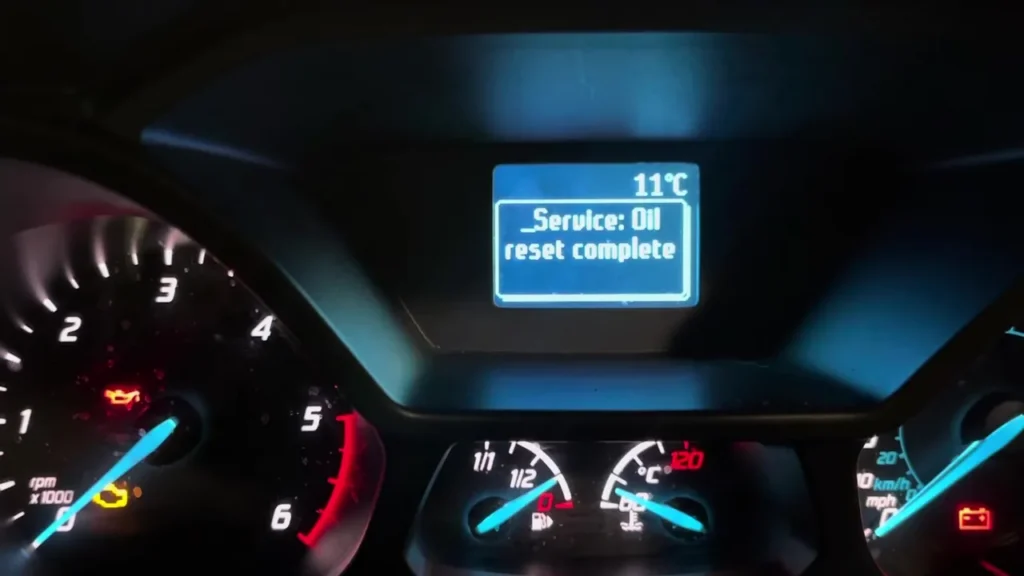
Ford Transit Connect cluster showing Service: Oil reset complete
“Service: Oil reset complete” on the Transit Connect cluster once the reset is done.

Method 1 — the pedal method

  1. Switch the ignition on, but do not start the engine.
  2. Fully depress the accelerator and brake pedals together and hold them.
  3. Hold for about 3 seconds until the service reset display appears.
  4. Keep holding and wait about 25 seconds, until a confirmation message is shown.
  5. Release the pedals and switch the ignition off.

Method 2 — through the menu

  1. Switch the ignition on.
  2. Using the steering-wheel controls, scroll the display to Settings.
  3. Select Information, then Oil life.
  4. Press and hold the OK button until a confirmation message appears.

Why is the service light still on after resetting?

The methods above clear the oil service reminder. If a spanner or “service due” message stays on, that is usually the inspection interval, logged in the digital service record and cleared by a dealer with Ford diagnostics.

Does the reset actually service the van?

No. Resetting only clears the reminder. Change the oil and filter first, then reset so the next interval counts from the correct point.

Independent guide — not affiliated with Ford. Always follow your official service manual and safety precautions. Read our full disclaimer.

Related Articles
  • Ford Transit Connect Specifications (PJ2)
  • Understand DPF Regeneration
  • Release the Gear Selector from Park
  • Top Up AdBlue and Clear the Warning
  • Replace a Headlight Bulb
  • Replace the Cabin Filter

On This Page: [hide]

Method 1 — the pedal method

Method 2 — through the menu

Why is the service light still on after resetting?

Does the reset actually service the van?

Service Reset

Independent step-by-step car reset & maintenance guides – not affiliated with any manufacturer. All trademarks belong to their respective owners.

© 2026 ServiceReset.net. All rights reserved.

POPULAR BRANDS
Toyota · Volkswagen · BMW · Ford · Audi · Mercedes · Nissan · Kia
EXPLORE
  • Guides
  • Blog
  • About
  • Contact
TOOLS
  • Dashboard Warning Lights
  • Tire Pressure Calculator
  • Tools
  • FAQ
  • Request a Guide
LEGAL
  • Privacy Policy
  • Terms of Use
  • Disclaimer
  • YouTube
  • Pinterest