These instructions apply to the Nissan Pulsar Mk1 (C13) 2014-2018.
For other models, please choose your vehicle here.
The Nissan Pulsar C13/C12/B17 (2014–2018) shows a maintenance reminder on the cluster when its internal counter reaches the next scheduled service interval. The reset is done through the cluster’s Service Menu using the steering-wheel multi-function controls — no scan tool required. The exact entry path differs slightly depending on whether your Pulsar has keyless entry (push-button start) or a traditional key.

When to Reset the Maintenance Indicator
- After completing an oil and filter change.
- After any other scheduled service item (cabin filter, fuel filter, brake fluid).
- If the indicator appears but the service has been done — common when a garage performed the work but didn’t reset.
⚠️ Only reset after the maintenance has been completed. The counter is the only reminder the system gives — resetting without the work loses the trigger for the next interval.
Before You Start
- Park on a level surface, switch off all electrical consumers.
- Confirm whether your Pulsar has keyless entry (push-button START on the dashboard) or a traditional key — the menu-entry steps differ.
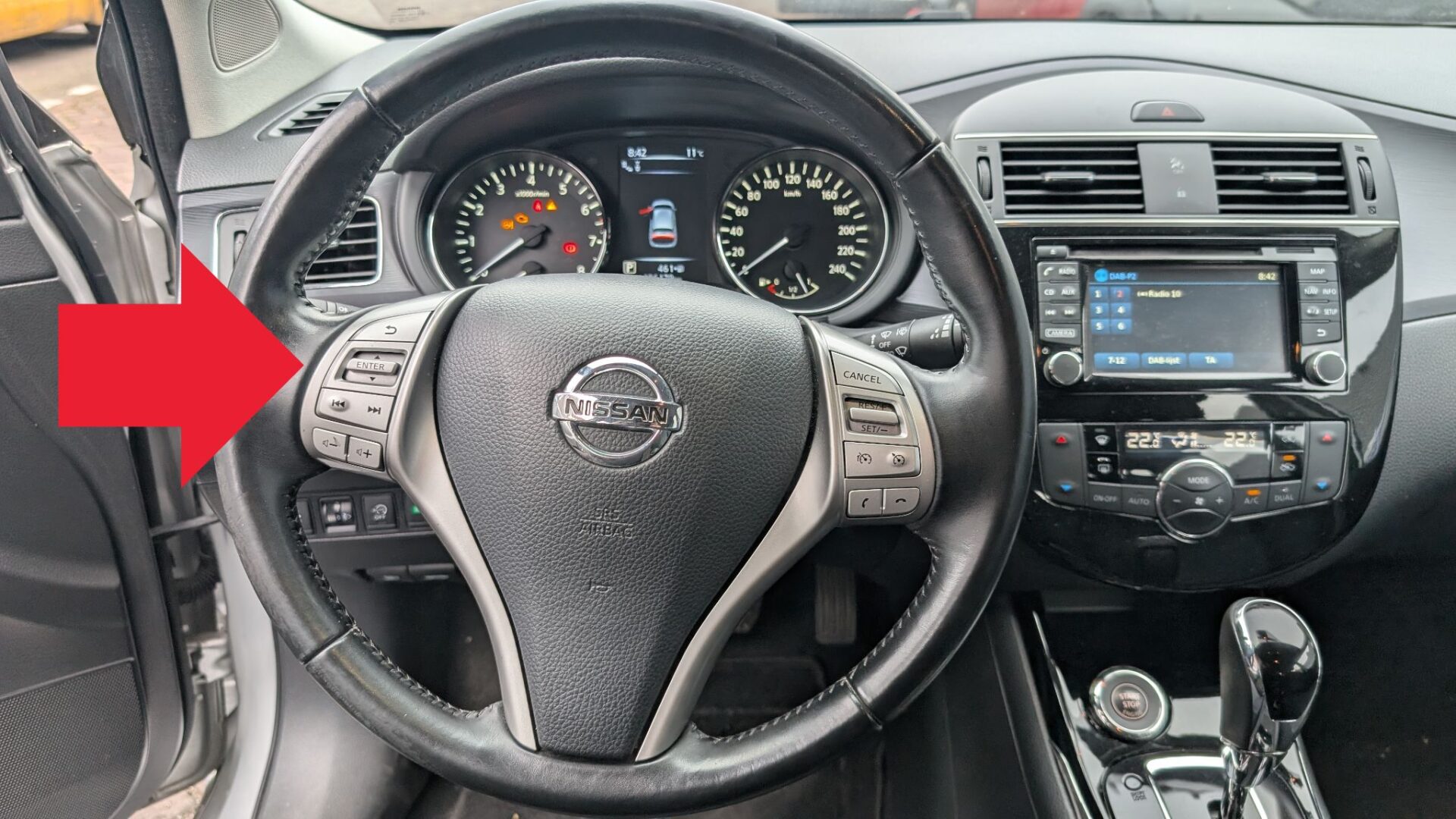
- Locate the steering-wheel control button on the right side of the steering wheel — it’s a multi-function joystick / scroller used for both the trip computer and the cluster menus. The same button serves both functions.
Tools and Supplies
None.
Vehicles Without Keyless Entry (Traditional Key)
- Turn the ignition to ON (do not start the engine).
- Use the steering-wheel display controls to navigate through the cluster menu — push up/down to move between options, push inward to confirm.
- Scroll to Maintenance and confirm with ENTER.
- Within the Maintenance submenu, scroll until Service Menu is highlighted.
- Choose Reset from the Service Menu options.
- Confirm by pressing ENTER on the joystick.
- The cluster will display a confirmation that the maintenance counter has been zeroed.
- Switch the ignition OFF.
Vehicles With Keyless Entry (Push-Button Start)
- Do not press the brake or clutch pedal — that would start the engine. The procedure needs ignition ON only.
- Press the START/STOP button twice in succession. Each press steps the ignition state: first press = ACC, second press = ON. The engine doesn’t start because your foot wasn’t on the brake.
- Use the steering-wheel display controls (same joystick / scroller) to navigate. Select Maintenance.
- Scroll until Service Menu is highlighted.
- Choose Reset and confirm with ENTER.
- The cluster confirms the reset.
- Press the START/STOP button once more to switch the ignition OFF.
Verify the Reset Worked
Switch the ignition back on after 10 seconds. The maintenance reminder should no longer appear. On Pulsars with the colour info display, the “distance to next service” readout should now show the full new interval (typically 30,000 km on diesel, 20,000 km on petrol).
Troubleshooting
- Maintenance option not visible in the menu. Base-trim Pulsars without the colour multi-info display may not expose the maintenance reset path through the cluster — on those cars the reminder either resets automatically after a few drive cycles or requires a scan tool. Check whether your trim has the colour TFT cluster.
- Joystick / scroller doesn’t respond. Make sure the ignition is fully ON (not ACC). On the keyless variant, two presses of the START button puts ignition in ON; one press leaves it at ACC.
- Service Menu shows “Service Now” rather than the reset option. The interval has expired. Complete the maintenance first, then run the reset — the menu refreshes to show Reset once you confirm the work is done.
- Reset confirmed but indicator returns after a few miles. The cluster firmware didn’t commit the reset. Most often this is a weak battery — the EEPROM write fails under low voltage. Have the battery load-tested.
- Reset works but distance value is wrong. Some Pulsar firmware versions allow editing the distance-to-next-service. Look for a “Set Interval” option within the Service Menu and choose the appropriate value for your maintenance schedule.
Frequently Asked Questions
What’s the service interval on a 2014–2018 Nissan Pulsar?
European-market Pulsars use 30,000 km or 24 months for the 1.5 dCi diesel and 20,000 km or 12 months for the 1.2 DIG-T petrol, whichever comes first. Severe-service conditions (heavy stop-and-go, dusty environments, frequent towing) tighten this by 30–50%. Check the maintenance schedule for your specific market.
Will resetting the maintenance counter affect engine codes or DTCs?
No — the maintenance counter is independent of the engine ECU’s diagnostic storage. Engine fault codes (P0xxx) need a scan-tool reset. See autodtcs.com for DTC interpretation.
Why are the procedures different for keyless vs traditional-key Pulsars?
The keyless Pulsar (push-button start) uses a different module to manage ignition states, so the “ignition ON without engine running” state has to be reached differently. Two presses of START get you there without cranking. Functionally the post-ignition steps (joystick navigation) are identical between the two variants.
Can I reset the maintenance indicator with FORScan or other generic tools?
FORScan supports the Pulsar’s body modules but the maintenance counter is in the cluster, which most generic tools don’t write to. Nissan-aware scanners (Autel MaxiCheck, Foxwell NT530 with Nissan license, Launch X431 with Nissan plug-in) can do it. The cluster-menu method above is simpler and free.
Independent guide — not affiliated with Nissan. Always follow your official service manual and safety precautions. Read our full disclaimer.