These instructions apply to the Toyota C-HR Mk1 (XW10) 2016-2023.
For other models, please choose your vehicle here.
The Toyota C-HR (2016–2023) resets its maintenance light from the cluster trip button — no tool needed. Show TRIP A, switch the ignition off, then hold the trip button while turning the ignition back on and keep holding until the display counts down to 000000. It works on every C-HR, petrol or hybrid.
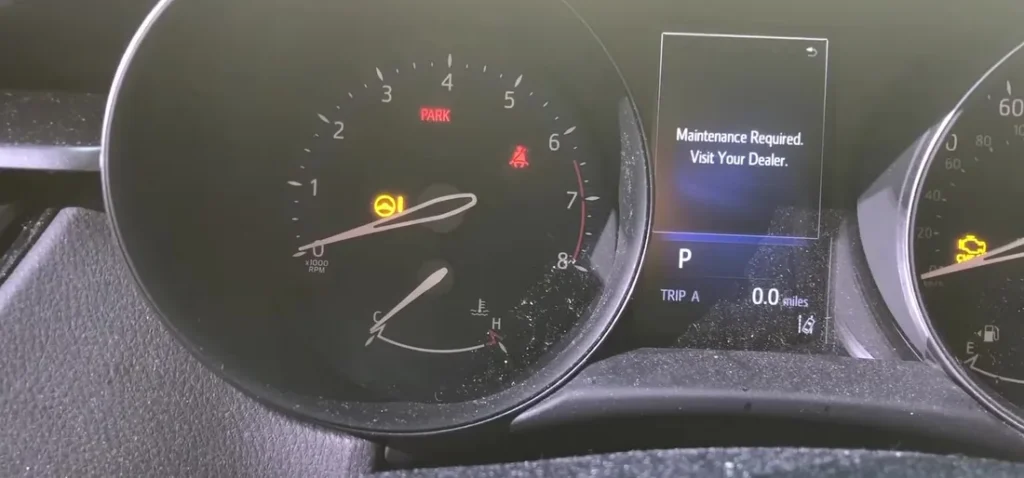
When to Reset the Service Indicator
- After completing an oil and filter change.
- If the spanner / wrench icon with “Maintenance Required” message appears at startup.
- If you bought the C-HR second-hand and the previous owner didn’t clear the indicator.
⚠️ Like other Toyota cluster reminders, the C-HR’s service indicator refers only to oil change. Other items (brake fluid every 2 years, coolant every 10 years on Toyota Super Long Life Coolant, hybrid transaxle fluid where applicable) aren’t tracked by the cluster — those follow the printed service schedule in the owner’s handbook.
Getting Ready
- Park on a level surface. Apply the parking brake (electronic on Hybrid trims).
- Complete the actual oil and filter change before the reset.
- Identify the cluster controls:
- Trip-recorder button — small button at the bottom-left of the speedometer face, used to cycle between Trip A / Trip B / Odometer. This is what Method 1 uses.
- Multi-information display (MID) controls on the steering wheel — up/down rocker on the right-hand spoke + OK button. This is what Method 2 uses.
- Both methods reach the same maintenance counter — pick whichever is easier on your specific C-HR trim.
Tools Required
None for the reset itself. For the oil change: fresh Toyota-spec oil — 0W-16 ACEA C2 / Toyota Genuine 0W-16 for the 1.8 / 2.0 Hybrid engines (the lighter 0W-16 grade is the official Toyota Hybrid Synergy Drive spec for the M20A-FXS / 2ZR-FXE engines), 5W-30 ACEA C2 / Toyota Genuine 5W-30 for the 1.2 D-4T turbo petrol; a new spin-on filter (different parts between 8NR-FTS turbo and the hybrid engines); a 14 mm sump-plug socket; torque about 30 Nm.
How to Reset the Service Light on the Toyota C-HR
- Start the engine. Yes — this method starts on running engine, not just ignition-on. Let the cluster fully wake.
- Press the trip-recorder button at the bottom of the speedometer face.
- Cycle the display until “TRIP A” is shown.
- Switch the ignition OFF (engine off — for Hybrid trims, press the START/STOP button once to exit READY mode).
- Press and hold the trip-recorder button.
- While still holding the button, turn the ignition ON again. Do not start the engine — on Hybrid trims, press START/STOP once without your foot on the brake (the press takes you into IGNITION ON without entering READY mode).
- Continue holding the button. A countdown begins on the cluster display.
- Wait until the display shows “000000”.
- Release the button. The service interval is reset.
- Switch the ignition off.
Method 2 — Steering Wheel MID Menu (Higher Trims with Multifunction Wheel)
- Turn the ignition ON with the engine off (Hybrid: one START/STOP press without brake).
- Using the steering-wheel up/down rocker on the right-hand spoke, scroll through the MID menu.
- Highlight “Vehicle settings” and press OK to enter.
- Scroll within Vehicle settings to “Maintenance System”.
- Press OK to enter.
- Follow the on-screen instructions. The MID prompts you to confirm — press OK.
- The cluster shows “Initialisation Completed”. The reset is complete.
- Switch the ignition off.
Verify the Reset Worked
Switch the ignition off, wait 30 seconds, then back on. The spanner / maintenance warning at startup should be gone. On Method 2 cars, scroll back to the Maintenance System menu — the remaining-distance value should now show the full new interval. Typical XW10 C-HR intervals: 10,000 miles (15,000 km) or 12 months for both the 1.2 D-4T petrol and the 1.8 / 2.0 Hybrid engines.
When It Won’t Cooperate
- (Method 1) The countdown doesn’t appear. Three common causes: (a) you released the button before turning the ignition on — the procedure requires the button to be held continuously through the ignition transition; (b) on Hybrid trims, you accidentally went into READY mode (foot on brake during START/STOP); (c) the cluster wasn’t on TRIP A before the engine was switched off — start from step 1.
- (Method 1) Display flashes briefly then returns to normal without showing 000000. The button was released too early. The countdown takes about 5-7 seconds — keep holding until you see the six zeros, not just the start of the countdown.
- (Method 2) Maintenance System menu doesn’t appear. The Vehicle settings menu only opens when the cluster is on its default driver-information view, not on a trip-computer detail screen. Press the up/down rocker repeatedly to step back through all menu layers first.
- Reset works but the spanner returns on the next start. 12V auxiliary battery condition is the usual cause on the C-HR Hybrid — the small auxiliary battery (different from the high-voltage hybrid battery) can be marginal even when the car drives normally. Load-test it; replace if older than 5 years. On petrol-only C-HR cars it’s the main 12V battery.
- I have a C-HR Hybrid — does the procedure differ? No. The 1.8 and 2.0 Hybrid variants use the same cluster and the same reset paths as the petrol 1.2 D-4T. The hybrid’s READY/IGNITION-ON distinction is the only thing to be careful about (see step 6 of Method 1).
- 2020 facelift C-HR — anything different? The 2020 facelift updated the front-end styling, added the 2.0 Hybrid powertrain, and updated the Toyota Touch 2 infotainment, but kept the cluster firmware and the reset paths unchanged. Both Methods work on pre-facelift and facelift cars.
- I have a C-HR GR Sport — same procedure? Yes. The C-HR GR Sport (cosmetic / sport-trim variant, 2020+) uses the standard C-HR cluster. Procedure unchanged.
Frequently Asked Questions
What does the spanner symbol on the Toyota C-HR mean?
On the C-HR the spanner / wrench icon is the oil-change maintenance reminder. Toyota’s documentation confirms it refers only to oil change — it does not indicate an engine fault. Engine faults trigger the orange check-engine light (an engine-outline icon, a different shape).
How often does the C-HR service indicator come up?
Toyota’s official European-market schedule for the XW10 C-HR:
- 1.2 D-4T turbo petrol (8NR-FTS): 10,000 miles (15,000 km) or 12 months.
- 1.8 Hybrid (2ZR-FXE): 10,000 miles (15,000 km) or 12 months.
- 2.0 Hybrid (M20A-FXS, post-2020 facelift): 10,000 miles (15,000 km) or 12 months.
UK severe-service / short-trip driving typically halves the interval to 5,000 miles or 6 months. The cluster doesn’t auto-adjust to driving conditions.
Does the reset clear engine fault codes?
Is this the “Maintenance Required” or oil reset?
Yes — on the C-HR the Maintenance Required light is tied to the oil-change interval, so the oil reset and the maintenance-required reset are this same procedure.
No. The reset zeros the oil-change counter only. Engine fault codes are stored in the engine ECU (or the hybrid system ECUs on Hybrid trims) and need a scan tool. For DTC interpretation see autodtcs.com.
Will this work on the new second-generation C-HR (X2/XH2, 2023+)?
No. The second-generation C-HR uses the new Toyota cluster with a fully digital instrument panel and a different menu structure. The reset path moves to Multi-Info Display → Settings → Vehicle → Maintenance → Reset. We’ll publish a dedicated 2023+ C-HR guide.
Is the procedure similar to the Toyota Corolla E210?
Yes. The current Toyota Corolla (E210, 2018+) shares the C-HR’s cluster generation and uses the same Method 2 MID menu path. Method 1 (trip-recorder) also works on the Corolla E210. We’ll publish a dedicated Corolla E210 guide.
What about the C-HR Plug-in Hybrid (PHEV)?
The C-HR Plug-in (sold in select markets from 2022, mainly Japan and China) shares the standard Hybrid cluster and reset path. Procedure unchanged. Note that the PHEV’s separate charging-port settings live under a different menu — those don’t affect the maintenance reset.
Toyota Touch 2 touchscreen — is there a faster reset path?
On C-HR trims with Toyota Touch 2 (most Excel / Dynamic / Excel Premium), you can also access maintenance through: Touchscreen → Car → Maintenance → Reset. Same result as Method 2 — either route reaches the same counter.
For DTC code interpretation on Toyota vehicles see autodtcs.com.
Independent guide — not affiliated with Toyota. Always follow your official service manual and safety precautions. Read our full disclaimer.