These instructions apply to the Mazda 2 Mk3 (DJ/DL) 2015-2022.
For other models, please choose your vehicle here.
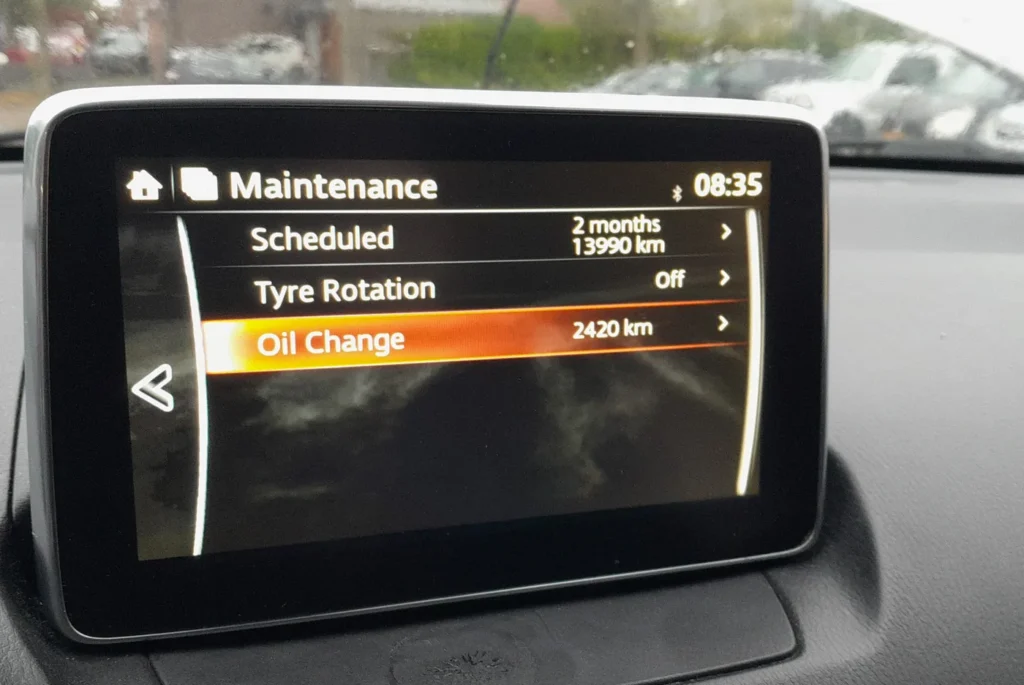
The Mazda 2 Mk3 (DJ/DL, 2015–2022) has three service-reset paths depending on trim. Basic SE cars reset from the instrument cluster using a trip-button and parking-light sequence; SE-L Nav and Sport Nav cars with the 7-inch MZD Connect touchscreen use the on-screen MAINTENANCE menu (the same approach as the Mazda 3 BM, CX-3 and CX-5). Pick the method below that matches your car.
When to Reset the Service Indicator
- After completing an oil and filter change.
- After a scheduled inspection service.
- After a tire rotation (touchscreen-trim Mazda 2s only — basic SE doesn’t track tire rotation).
- If the spanner / wrench symbol with “Service Required” appears at startup.
⚠️ The Mazda 2 with MZD Connect tracks three separate service items independently on touchscreen trims: Oil Change, Scheduled inspection, and Tyre Rotation. Each resets independently — clearing one doesn’t clear the others.
First, a Few Checks
- Park on a level surface with the engine off, then turn the ignition on without starting (push START with your foot off the brake on push-button cars; turn the key to “ON” on key-start cars).
- Complete the actual service work before the reset.
- Identify your trim — this determines which method to use:
- Basic SE / SE Connect: no rotary commander, no MZD Connect screen, instrument cluster only. Use Method 1 (trip-recorder + parking lights).
- SE-L Nav / Sport Nav / GT Sport: rotary commander between the front seats, 7-inch MZD Connect screen. Use Method 3 (MZD Connect menu).
- Workshop / Mazda dealer: Use Method 2 with the M-MDS tool.
- For Method 1: locate the trip-recorder button on the cluster — the small button on the lower-left of the speedometer face. Also confirm where the parking-lights switch is (on the indicator stalk, twist-collar) since you’ll cycle it 5 times.
Kit and Supplies
None for the reset itself. For the oil change, use fresh Mazda-spec oil — 0W-20 ACEA C5 / Mazda Genuine 0W-20 SKYACTIV for the 1.3 P3 and 1.5 P5 SKYACTIV-G petrol engines, 0W-30 ACEA C3 for the 1.5 S5 SKYACTIV-D diesel, and the same 0W-20 for the M-Hybrid E-SKYACTIV-G variant.
You’ll also want a new spin-on filter, a 14 mm sump-plug socket, and a torque around 30 Nm for the plug. Oil capacity is 3.4 L with filter on the 1.3 P3, 4.2 L on the 1.5 P5, and 5.1 L on the 1.5 S5 diesel. The M-Hybrid 24V system doesn’t change the engine-oil requirement but adds a separate 12V auxiliary battery (the 24V lithium pack is non-serviceable).
Method 1 — Cluster Trip-Recorder + Parking-Lights (Basic SE)
- Turn the ignition ON (engine off).
- Within the next 15 seconds, press and keep pressing the trip-recorder button on the cluster.
- Continue holding for 5 seconds.
- While still holding the trip-recorder button, turn the parking lights ON and then OFF.
- Repeat the parking-light ON/OFF cycle 5 times in total.
- Release the trip-recorder button.
- Turn the ignition off. Reset complete.
Method 2 — M-MDS Diagnostic Tool (Mazda Dealer / Workshop)
- Connect the Mazda M-MDS (Modular Diagnostic System) tool to the OBD-II port (driver’s footwell, above the pedals).
- Power-on the vehicle (ignition ON, engine off).
- In M-MDS, select ‘Powertrain’.
- Select ‘Oil Maintenance’.
- Select ‘Change settings’.
- Follow the on-screen instructions to complete the reset.
Method 3 — MZD Connect Touchscreen (SE-L Nav / Sport Nav / GT Sport)
The MZD Connect method matches our existing Mazda 3 BM, CX-3 DK and CX-5 KE guides — the same MAINTENANCE app, the same menu paths.
Oil Service Reset
- Turn the ignition ON.
- On MZD Connect, press HOME.
- Select Applications.
- Select MAINTENANCE.
- Select Oil Change.
- Select RESET, then confirm. Done.

MZD Connect asks you to confirm — tap Reset to zero the Oil Change counter.

Inspection Service Reset
- Turn the ignition ON.
- HOME → Applications → MAINTENANCE → Scheduled.
- Select RESET, then confirm. Done.
Tire Rotation Reset
- Turn the ignition ON.
- HOME → Applications → MAINTENANCE → Tyre Rotation.
- Select RESET, then confirm. Done.
Verify the Reset Worked
Switch the ignition off, wait 30 seconds, then cycle back on. The spanner / “Service Required” icon that was appearing at startup should be gone. On touchscreen trims, re-open MZD Connect → MAINTENANCE — the item(s) you reset should now show a fresh full interval.
Typical DJ Mazda 2 intervals after the reset:
- 1.3 P3 SKYACTIV-G petrol: 12,500 miles (20,000 km) or 12 months.
- 1.5 P5 SKYACTIV-G petrol: 12,500 miles (20,000 km) or 12 months.
- 1.5 P5 E-SKYACTIV-G M-Hybrid (2020+): 12,500 miles (20,000 km) or 12 months.
- 1.5 S5 SKYACTIV-D diesel (2015–2018): 12,500 miles (20,000 km) or 24 months.
UK severe-service / short-trip driving requires halving the interval manually. Most UK Mazda 2s are city cars by use, so the severe-use schedule is often the realistic one.
Common Snags
- (Method 1) The reset doesn’t take after 5 parking-light cycles. The trip-recorder button must be held continuously for the entire sequence — releasing for even a moment aborts it. Start over from step 1 (ignition off, then on, then start holding the trip button within 15 seconds). Make sure each parking-light cycle is a clean ON-then-OFF, not a flicker.
- (Method 1) I missed the 15-second window. Turn the ignition off, wait 10 seconds, and start over. The 15-second timer restarts on each ignition-on.
- (Method 3) MZD Connect doesn’t have a MAINTENANCE app. Very early 2015 Mazda 2s shipped with older MZD Connect firmware that hid the MAINTENANCE app in some markets. A Mazda dealer can update it via M-MDS; after the update the app appears in the Applications menu.
- I reset the oil but the spanner stays on. The Scheduled inspection or Tire Rotation is also due. Open MZD Connect → MAINTENANCE and reset each item that’s at 0% individually.
- Reset works but the warning returns after a few miles. Check the 12V battery condition — load-test it, and replace if older than 5 years. On M-Hybrid cars also check the small 12V auxiliary battery, which is separate from the 24V system.
- 2019 facelift Mazda 2 — anything different? The 2019 facelift updated the styling and some interior trim but kept the MZD Connect firmware and cluster unchanged. The procedure is the same across pre-facelift and facelift cars.
- Oceania-spec Mazda 2 — same procedure? HaynesPro notes the reset path “except Oceania” — Australia/NZ DJ Mazda 2s use slightly different cluster firmware. The MZD Connect Method 3 still works on Oceania-spec touchscreen cars; the Method 1 trip-button procedure may differ. For UK and European cars the procedures above are correct.
Frequently Asked Questions
What does the spanner symbol on the Mazda 2 mean?
On the DJ Mazda 2 the spanner / wrench icon is the maintenance reminder — it indicates that one or more of the tracked items (oil, scheduled inspection, or tire rotation on touchscreen cars) is due. It does not indicate an engine fault.
Do I need a diagnostic tool?
No. Method 1 (basic SE) and Method 3 (touchscreen trims) are owner-accessible. Method 2 (M-MDS) is a workshop alternative — useful when the cluster reset doesn’t take, or when the M-MDS is already connected for other work.
Does the reset clear engine fault codes?
No. The reset zeros the service-distance counter only. Engine fault codes need a scan tool. For DTC interpretation see autodtcs.com.
Is the procedure the same as the Mazda 3 BM / CX-3 / CX-5?
For MZD Connect touchscreen trims, yes — the Mazda 3 BM/BN, CX-3 DK and CX-5 KE all use the same MZD Connect MAINTENANCE app with identical menu paths. The basic SE Mazda 2’s Method 1 (trip-button + parking-lights cycle) is unique to the Mazda 2 — an older cluster firmware kept for the simpler SE trim.
How often does the Mazda 2 service indicator come up?
Mazda’s UK-market schedule for the DJ Mazda 2 is 12,500 miles (20,000 km) or 12 months on petrol and M-Hybrid, and 12,500 miles (20,000 km) or 24 months on the diesel. UK severe-use (mostly short trips around town, which describes most Mazda 2s) halves the interval.
What about the Mazda 2 Hybrid (ZV, 2022+)?
The Mazda 2 Hybrid (ZV, 2022–) is a badge-engineered Toyota Yaris Mk4 sold through Mazda dealers — mechanically the Yaris with Mazda trim. Its reset procedure matches the Toyota Yaris Mk4 (XP210) MID-menu method, not anything in the DJ Mazda 2 lineage.
What about the Mazda 2 Mk2 (DE, 2007–2014)?
The DE Mazda 2 uses a different, older cluster with a simpler trip-button reset. The DJ Method 1 with the parking-lights cycle doesn’t apply to the DE.
For DTC code interpretation on Mazda vehicles see autodtcs.com.
Independent guide — not affiliated with Mazda. Always follow your official service manual and safety precautions. Read our full disclaimer.