These instructions apply to the Hyundai i30 Mk3 (PD) 2017-Present.
For other models, please choose your vehicle here.
If the tyre-pressure warning on your Hyundai i30 Mk3 (PD, 2017–present) has come on — after adjusting pressures, rotating the wheels, or swapping to winter tyres — the system usually just needs to relearn by being driven. The i30 uses an indirect TPMS that works from the ABS wheel sensors, so there are no valve sensors to match and the reset is done from the driver’s seat. This guide shows how.
Hyundai i30 Mk3 (PD) Tyre Pressures
These cold pressures come from the label on the driver’s door pillar (code RB) and are confirmed in the owner’s manual. Set them cold, before driving. The temporary spare is a space-saver that runs at a much higher pressure.
| Load | Tyre size | Front | Rear |
|---|---|---|---|
| Up to 3 occupants | 195/65 R15 · 205/55 R16 · 225/45 R17 | 2.2 bar (32 psi) | 2.2 bar (32 psi) |
| Full load (5 + luggage) | 195/65 R15 | 2.35 bar (34 psi) | 2.5 bar (36 psi) |
| Full load (5 + luggage) | 205/55 R16 · 225/45 R17 | 2.35 bar (34 psi) | 2.75 bar (40 psi) |
| Temporary spare | T125/80 D15 / D16 | 4.2 bar (60 psi) | |
The label on your own car’s door pillar is the final authority — it lists the exact sizes and pressures for that build.
How the i30’s TPMS Works
Rather than a pressure sensor in each wheel, the i30 Mk3 watches how fast each wheel spins. A soft tyre is fractionally smaller and spins slightly faster, and the system flags it. Because it’s comparing wheels, it has to be told the current pressures are correct and then relearn them by driving.
How to Reset the i30 Mk3 TPMS
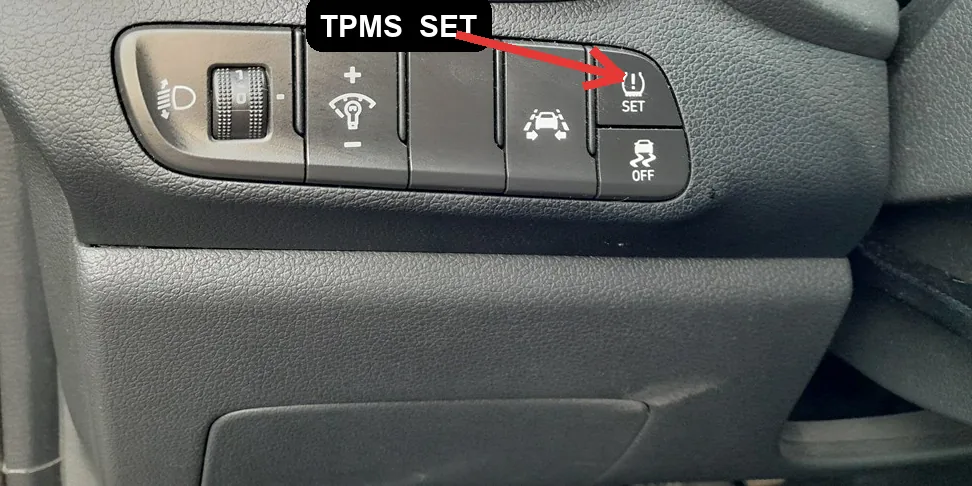
- Set all four tyres to the correct pressure (cold) — the figures are on the label in the driver’s door jamb.
- Turn the ignition on.
- Open the User Settings menu in the cluster, find the TPMS / Tyre Pressure option and select ‘Set’ (or ‘Reset’) to register the current pressures as the reference.
- Drive normally for around 20–30 minutes at a steady speed (above roughly 25 km/h / 15 mph). The system relearns and the warning clears.
On some i30 trims there is no menu ‘Set’ step — simply correcting the pressures and driving is enough for the light to go out by itself.
If the Warning Stays On
- Double-check every tyre, including the spare if it’s a full-size one that’s monitored.
- One tyre noticeably low — look for a slow puncture; the system is doing its job.
- It flashes then stays on — a flashing TPMS light points to a system fault rather than low pressure; have it scanned.
Frequently Asked Questions
Do I need a tool to reset the i30 TPMS?
No. It’s an indirect system — set the pressures, register them in the menu if your trim has that option, and drive. No relearn tool is needed.
How long until the light goes out?
Usually within 20–30 minutes of steady driving after registering the pressures.
Why did the light come on in cold weather?
Tyre pressure drops as temperature falls. Top the tyres back up to the door-label figure and re-register.
The light flashes for a while at start-up — is that a fault?
A brief check at start-up is normal; a light that keeps flashing indicates a TPMS fault — have it diagnosed.
If a fault code is stored, look it up on autodtcs.com. To clear a service reminder, see our i30 Mk3 service indicator reset guide.
Independent guide — not affiliated with Hyundai. Always follow your official service manual and safety precautions. Read our full disclaimer.