These instructions apply to the Lexus IS Mk2 (XE20) 2005-2012.
For other models, please choose your vehicle here.
When the remote on a second-generation Lexus IS (XE20, 2005–2012 — IS 250, IS 350, IS 220d and IS-F) starts dropping its range or lighting a key-battery warning, the fault is nearly always the coin cell inside rather than the car’s electronics. This generation came two ways depending on trim and market: the Smart Access proximity key — the flat, buttoned fob you can leave in a pocket while the car unlocks and starts on the button — and, on some earlier or base cars, a more conventional bladed remote key with the metal key attached. They use different cells and open differently, so this guide keeps the two apart.

How to Tell the Fob Battery Is Dying
- The range keeps shrinking. Where the IS once unlocked from across the car park, you now have to be right at the handle — the classic first warning.
- A key-battery message appears. On Smart Access cars the multi-information display shows a low-key-battery warning, and the car may ask you to touch the fob to the start button to start.
- The fob’s LED won’t light. The indicator should flash on each press; if it stays dark, the cell has usually dropped below transmitting voltage.
- Cold snaps expose it. A near-flat lithium cell sags in low temperatures, so trouble that shows up on a frosty morning and eases by afternoon points at the battery.
A fob cell in an IS generally lasts two to four years. A Smart Access fob left near the car overnight wakes constantly to look for it, and that steady draw shortens the life compared with a plain remote you only use to press a button.
The Battery You Need
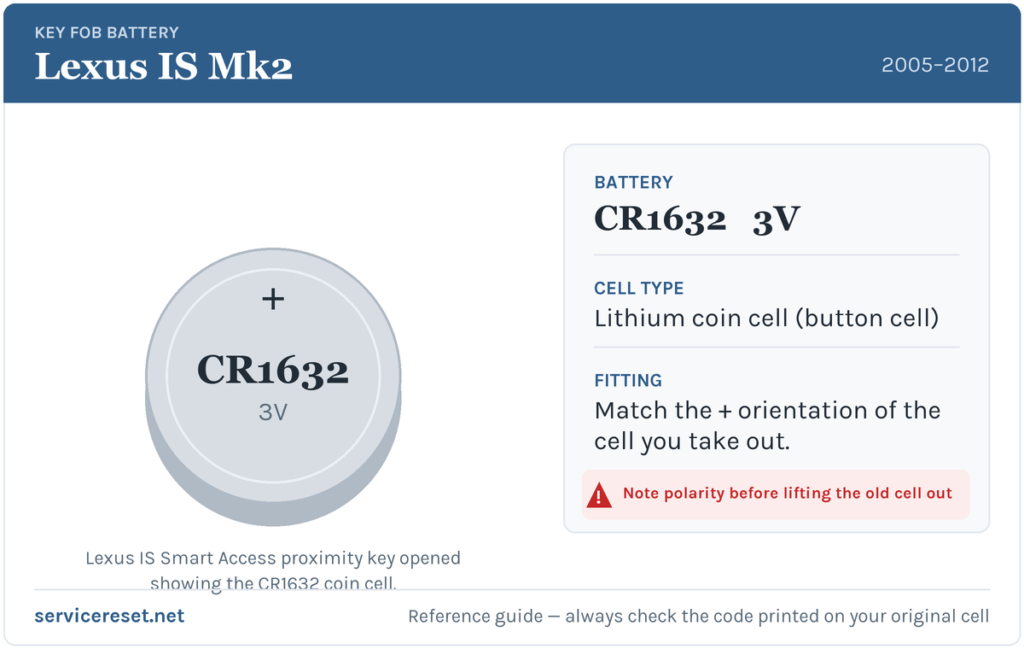
The Smart Access proximity key on the XE20 IS uses a single CR1632 — a 16 mm, 3-volt lithium coin cell. It’s a less common size than the CR2032, so it’s worth checking the shop has it before you set off; battery specialists and online sellers all stock it. Do not substitute a thicker CR2025 or CR2032 — they won’t seat properly and can strain the case or contacts.
If instead you have the older bladed remote key, it may take a different coin cell. Rather than guess, open it and read the code printed on the cell you remove, then buy that exact size — matching the printed code is the only reliable way on that variant.
Method 1 — Smart Access Proximity Key
- Press the small release button on the fob and slide out the mechanical (valet) key blade. That blade is your backup door key and the entry point for opening the case.
- Slot a flat plastic pry tool, or the metal blade itself, into the gap the blade left near its housing and work gently along the seam to unclip the two halves. Take it slowly so the plastic tabs release rather than snap.
- Ease out the old CR1632, noting exactly which way it sits before it comes free. Fit the replacement in the same orientation.
- Press the halves back together until they click all the way round, then slide the mechanical key blade home until it latches.
Method 2 — Bladed Remote Key
- Look for a small screw or a seam on the fob head. If there’s a screw, remove it with a jeweller’s cross-head driver; otherwise there’s a joint to prise.
- Ease the case apart with a flat plastic tool, working round the edge so the clips release cleanly.
- Photograph or note the old cell’s orientation, lift it out, read its printed code, and fit the matching new cell exactly the same way up.
- Close the case, refit any screw gently, and test each button.
⚠️ Copy the orientation of the cell you removed. A coin cell fitted the wrong way round won’t power the fob and can slowly discharge itself while it sits there mis-connected. Because the exact positive-side direction differs between fob designs, the safe rule on either IS key is to mirror the cell you took out rather than assume.
Did It Work?
Stand back a few metres and lock, then unlock, the car. Range should return immediately and, on a Smart Access car, any low-key-battery message clears once the vehicle reads a healthy fob again — occasionally only after the next drive cycle rather than on the spot.
If a Fresh Cell Doesn’t Fix It
- Recheck the orientation and seating. The cell must match the way the old one sat and press firmly under its clip against clean metal.
- Clean the contacts. Finger grease or light tarnish on the terminals can weaken the signal; a dry cloth usually restores it.
- Rule out the 12 V battery. A tired main battery can cause key-detection oddities; if the car is slow to wake, deal with that first.
- Try the spare key. If a known-good second fob acts the same way, the car’s receiver is the likelier suspect than either remote.
New Key or Spare — Why It’s a Dealer Job
Changing the cell leaves the fob’s coding untouched, so there’s no reprogramming to do — the key works the instant the case shuts. A genuinely new key is a different matter: the IS’s immobiliser has to be paired to the fresh fob with Lexus diagnostic equipment, and Smart Access keys are ordered against the car’s VIN. Keeping the battery in your spare fresh — and hanging on to that spare — is the cheapest insurance against a dealer key-coding bill.
Frequently Asked Questions
What battery does a Lexus IS Smart Access key use?
A single CR1632 3-volt lithium coin cell. It’s a 16 mm cell, smaller than the common CR2032 — don’t substitute a thicker one.
Which way up does the cell go?
Match the orientation of the cell you remove. Because the positive-side direction varies between fob designs, copying the old cell is the reliable way to get it right on an IS key; upside down leaves the fob dead and drains the battery.
My IS has a bladed key with buttons, not a flat fob — same battery?
Not necessarily. That older remote may take a different coin cell, so open it and buy the cell that matches the code printed on the one inside rather than assuming CR1632.
Do I need to reprogram the key after fitting a new battery?
No. A battery swap doesn’t affect the coding, so the fob keeps working with the car straight away. Only a brand-new key needs programming.
How long should the fob battery last?
Usually two to four years. A Smart Access fob kept beside the car wakes repeatedly to search for it and can run down a little sooner.
Can I still start the IS if the fob is completely dead?
Yes. Let yourself in with the mechanical blade, then hold the Smart Access fob against the push-button start so the car can read it directly, and press the brake to start. A flat cell won’t leave you stranded.
If the remote failed suddenly right after the 12 V battery was disconnected — rather than fading over weeks — the pairing is a more likely cause than the cell, and a stored fault code may be sitting behind it. You can look up what one means on autodtcs.com.
Independent guide — not affiliated with Lexus. Always follow your official service manual and safety precautions. Read our full disclaimer.