These instructions apply to the Opel Zafira Mk2 (A05) 2005-2014.
For other models, please choose your vehicle here.
The second-generation Opel Zafira B (also Vauxhall Zafira B in the UK, A05 chassis, 2005–2014) replaced the Zafira A’s relatively simple cluster reset with a more involved button-and-brake-pedal procedure. The InSP (Inspection Service) indicator illuminates when the service-interval counter has elapsed. Resetting requires holding the cluster reset button while pressing the brake pedal and cycling the ignition — a 30-second routine that takes no tools.
Before you start
The Zafira B’s service-interval system is interval-based (elapsed time + mileage + engine hours) with no oil-condition sensor. After an oil and filter change, the indicator does not clear automatically; you must reset it. The procedure is the same across all Zafira B engines: 1.6 16V, 1.8 16V, 2.2 16V, 1.7 CDTi, 1.9 CDTi (8V and 16V), 2.0 CDTi.
- Service-interval gate. If the time or mileage since the last reset exceeds the vehicle’s service limits, the manual reset is suppressed — the cluster reads this as “out of valid range” and won’t accept the input. This protects against accidental resets on long-overdue cars; the workshop fix is a Tech 2 reset that bypasses the gate.
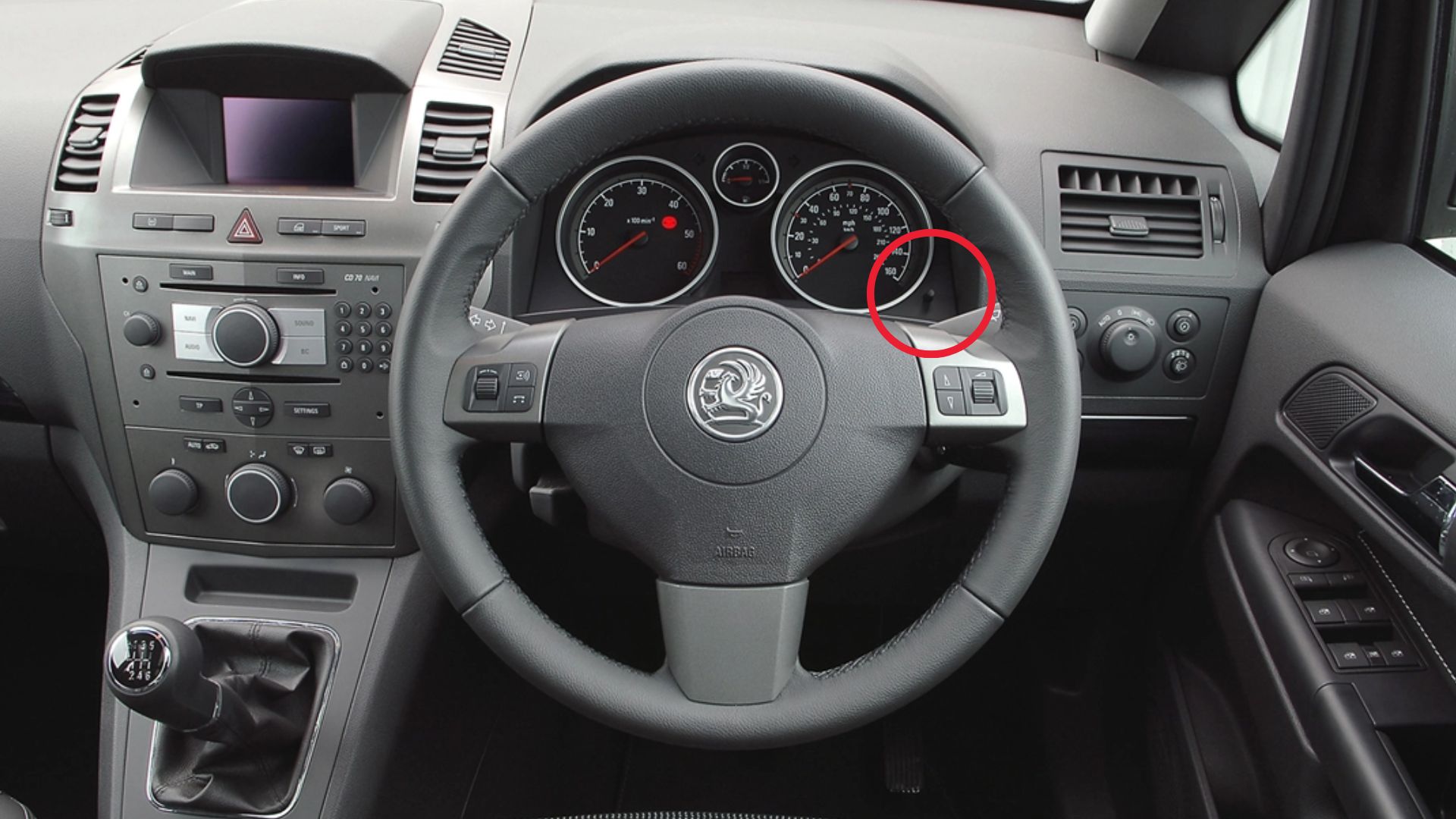
- The reset button is on the instrument cluster face. It’s a small recessed button labelled with a clock/maintenance icon. Some pre-facelift Zafira B variants have the reset on the trip-meter stalk on the steering column rather than the cluster; if your cluster has no obvious reset button, try the stalk button instead.
- Don’t start the engine. The procedure runs in ignition position II only.
- Do the procedure with the door closed. Door-ajar inputs interrupt the cluster’s button-input handler.
Tools required
None.
Reset procedure
- Switch the ignition OFF. Make sure the cluster has fully gone dark before continuing.
- Press and hold the reset button on the instrument cluster.
- While still holding the reset button, switch the ignition ON (key to position II — do not start the engine).
- Press and hold the brake pedal with your right foot. Firm pressure — the brake-switch needs to register the press.
- Continue holding both the brake pedal and the reset button. Don’t release either.
- After approximately 5 seconds, the display will show “InSP—-“ (InSP followed by four dashes). This is the reset trigger.
- Release the brake pedal and the reset button at the same time. Doing it sequentially can sometimes leave the procedure incomplete.
- Wait approximately 10 seconds. The cluster commits the reset to non-volatile memory during this pause.
- The display will update to show “InSP XX,000 km” where XX is the new interval (typically 20,000 km for petrol, 30,000 km for CDTi diesel under long-life servicing).
- The service indicator has now been reset. Switch ignition off and back on to verify the InSP icon is gone.
How to verify it has worked
- The InSP indicator is no longer illuminated on the cluster.
- Scrolling through the cluster menus shows “InSP” followed by the new service-interval value (e.g., InSP 20,000 km).
- The next engine start produces no service-reminder chime.
- If your cluster displays a remaining-distance figure (some facelift variants), it should show the full interval (e.g., 20,000 km on petrol).
Common Snags
“InSP—-” never appears even after 15 seconds of held button + brake. Most common cause: a faulty brake-pedal switch (a known Zafira B wear item — symptoms include brake lights staying on, cruise control unavailable, automatic gearbox refusing to shift out of P). Replace the switch (around £15, 10 minutes to fit).
The display shows “InSP 0 km” instead of the new interval. Either the cluster lost its expected-interval data (rare, indicates BCM memory fault), or the reset was committed at the moment of dropping below the threshold. Drive 10 km and re-check; the interval normally re-populates from the BCM.
Reset works but indicator reappears after the next start. The reset wasn’t committed to flash memory. Always wait the full 10 seconds in step 8. If the issue persists, the cluster has a stored fault — read with OP-COM or Tech 2.
The cluster shows an error code like “EE” or “—-” without “InSP”. Battery voltage too low at the moment of ignition-on; the cluster falls back to a degraded self-test mode. Charge the battery overnight and retry.
“Service interval exceeded” message blocks the reset. The car is more than one full interval overdue (typically 40,000+ km since the last reset). The manual reset is gated to prevent accidental clears; the workshop fix is Tech 2 or OP-COM with full BCM access. After a Tech 2 reset, the manual procedure will work normally again.
Frequently asked questions
Does this procedure work on the Vauxhall Zafira B (UK)?
Yes — same car, same procedure, only the badge differs.
Why does the Zafira B procedure include the brake pedal while the Zafira A doesn’t?
The brake pedal interlock is part of Opel’s anti-accidental-reset design that came in with the A05 platform. The Zafira A’s earlier T98 platform didn’t use this safety logic.
What about the Zafira B with 1.6 CNG or 1.6 LPG variants?
The procedure is the same — those variants share the standard cluster firmware. Service intervals match the 1.6 petrol (20,000 km / 12 months).
Will the reset work on the Zafira B with the Easytronic semi-automatic gearbox?
Yes. The procedure is gearbox-independent; the brake pedal input is the same on manual and Easytronic. Cars with Easytronic should have the gearbox in N (neutral) during the reset, but it’s not strictly required.
The cluster fades briefly during the reset — is something wrong?
On some Zafira B clusters the display dips briefly when the brake pedal is pressed during ignition-on. This is normal — the cluster is re-routing power between the lighting bus and the input bus. The reset still works.
Can I do this with an aftermarket head unit fitted?
Yes. The head unit is on a separate CAN segment and doesn’t interact with the cluster’s service-interval logic.
For DTCs related to the cluster or service-interval logic, see autodtcs.com.
Independent guide — not affiliated with Opel. Always follow your official service manual and safety precautions. Read our full disclaimer.