These instructions apply to the Hyundai i20 Mk2 (GB) 2014-2020.
For other models, please choose your vehicle here.
The Hyundai i20 Mk2 (GB/IB, 2014–2020) — the second-generation i20 supermini, built in İzmit (Turkey) for European markets and available as a 5-door hatchback, 3-door Coupe, and rugged-spec Active — uses a much simpler menu-driven reset than its bigger sibling the i30. There’s no diagnostic tool needed, and only one button matters: the steering-wheel OK button. The procedure is identical across every Mk2 i20 engine variant (1.2 MPi Kappa, 1.0 T-GDi turbocharged, 1.1 CRDi diesel, 1.4 CRDi diesel).
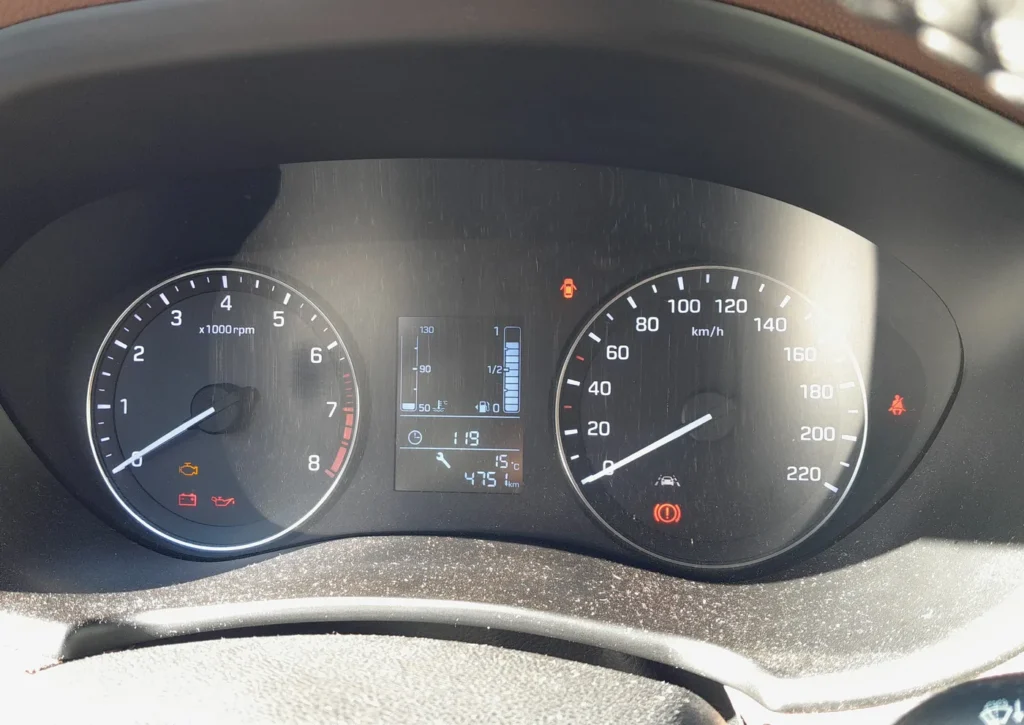
When to Reset the Service Indicator
- After completing an oil and filter change.
- If the spanner / wrench symbol with “Service due in” or “Service required” appears on the cluster at startup.
- If you bought the i20 second-hand and the previous owner didn’t clear the indicator.
⚠️ On the Mk2 i20 the service indicator tracks the oil-change distance counter. Other service items (brake fluid every 2 years, coolant, the timing chain on petrol variants which is non-serviceable for life, or the timing belt on the 1.1/1.4 CRDi diesels at 90,000 miles) aren’t tracked by the cluster — those follow the printed service schedule.
Before You Begin
- Park on a level surface with the engine off. Complete the actual oil and filter change before the reset.
- Identify the cluster control. The Mk2 i20 uses the steering-wheel multifunction controls on most trims:
- Scroll buttons — up/down rocker on the left-hand steering-wheel spoke. Used to cycle through cluster menu items.
- OK button — selection button next to the scroll rocker. The long-press of this button is what commits the reset.
- On lower trims (SE/S Air) without multifunction controls, the menu is driven by the cluster-mounted MENU/OK button at the bottom-right of the instrument cluster face.
What You’ll Need
None for the reset itself. For the oil change: fresh Hyundai-spec oil — 5W-30 ACEA A5/B5 for the 1.2 Kappa and 1.4 Kappa petrol engines, 5W-20 ACEA A5/B5 for the 1.0 T-GDi (the lighter oil grade was introduced for the small turbo engine for better fuel economy), 5W-30 ACEA C2/C3 for the 1.1 / 1.4 CRDi diesels with DPF; a new spin-on filter (different parts per engine); a 17 mm sump-plug socket (petrol) or 19 mm (CRDi); torque around 30 Nm.
Service Indicator Reset — Step-by-Step
- Turn the ignition ON with the engine off. Key position II on key-start trims; on Smart Key trims press START/STOP without a foot on the brake.
- Wait a moment for the cluster to fully wake.
- Use the steering-wheel scroll buttons (up/down rocker) to scroll through the cluster’s central menu display.
- Stop on the entry showing “Service due in” or “Service required” (the exact label depends on whether a service is currently due — if not yet due, it shows the remaining distance; if overdue, it shows “Service required”).
- Press and hold the OK button.
- Wait 5 seconds with the button still held.
- Release the button. The cluster shows a confirmation message and the service indicator clears.
- Switch the ignition off to exit the menu.
Verify the Reset Worked
Switch the ignition off, wait 30 seconds, then cycle ignition back on. The Service required / spanner warning should be gone. Scroll back to the Service due screen — the remaining distance should now show the full new interval (typically 10,000 miles / 15,000 km or 12 months for European-spec Mk2 i20 petrol; the 1.1 / 1.4 CRDi diesel uses 12,500 miles / 20,000 km or 24 months).
If Something Goes Wrong
- “Service due in” / “Service required” doesn’t appear in the menu. The Mk2 i20 cluster only displays this entry when there’s some kind of service-related screen to show. If your i20 has more than 1,500 miles remaining to the next service, the entry might be filed under “Vehicle information” instead of as a top-level menu item. Look for either label.
- The 5-second hold doesn’t trigger the reset. Common cause: you’re holding the OK button when the cluster is on a different screen than Service due. The hold-OK shortcut only works from the Service due screen specifically. Scroll to that screen first, then start the hold.
- Reset works but the spanner returns after a few miles. Battery condition. The Mk2 i20 cluster, like other Hyundai/Kia clusters of the era, is sensitive to voltage drops during cranking. Load-test; replace if older than 5 years.
- I have an i20 Active (raised crossover variant) — same procedure? Yes. The i20 Active (2015–2020, slightly raised ride height and plastic body cladding) shares the GB platform’s cluster and procedure.
- i20 Coupe (3-door) — same procedure? Yes. The 3-door Coupe is mechanically identical to the 5-door from the dashboard’s perspective. Procedure unchanged.
- 2018 facelift — does the menu look different? The 2018 facelift refreshed the front-end styling and the centre-stack infotainment but kept the instrument cluster firmware identical. Procedure unchanged.
- I drive a Mk2 i20 1.0 T-GDi N-Line — same procedure? Yes. The N-Line cosmetic package adds sportier trim but uses the standard i20 cluster. The full Hyundai i20 N (with proper performance pack) didn’t arrive until the Mk3 (BC) in 2020.
Frequently Asked Questions
What does the spanner symbol on the Hyundai i20 mean?
On the Mk2 i20 the spanner / wrench icon is the oil-change reminder. It’s a mileage timer set by the cluster, not a sensor-driven warning. It illuminates when the configured distance since the last reset has been reached. The icon does not indicate an engine fault — engine faults trigger the orange check-engine light (an engine-outline icon, a different symbol entirely).
How often does the Mk2 i20 service indicator come up?
Hyundai’s official European-market schedule for the Mk2 i20:
- 1.2 Kappa petrol: 10,000 miles (15,000 km) or 12 months.
- 1.4 Kappa petrol: 10,000 miles (15,000 km) or 12 months.
- 1.0 T-GDi turbocharged petrol: 9,000 miles (15,000 km) or 12 months — slightly shorter for the small turbo engine.
- 1.1 CRDi diesel: 12,500 miles (20,000 km) or 24 months.
- 1.4 CRDi diesel: 12,500 miles (20,000 km) or 24 months.
UK severe-service / short-trip driving typically halves the petrol interval to 5,000 miles or 6 months.
Does the reset clear engine fault codes?
No. The reset zeros the service counter only. Engine fault codes are stored in the engine ECU and need a scan tool. For DTC interpretation see autodtcs.com.
What about the Mk3 i20 (BC, 2020+)?
The third-generation i20 (BC) uses the new 10.25-inch Hyundai cluster (or 4.2-inch supervision cluster on lower trims) and a different menu hierarchy: User Settings → Service Interval → Reset. We’ll publish a dedicated BC guide.
And the Mk1 i20 (PB, 2009–2014)?
The first-generation i20 PB uses an older cluster with a different button layout. The reset path is similar in concept but uses the cluster-mounted MENU/OK rather than the steering wheel on most trims. We’ll publish a dedicated Mk1 i20 guide.
I drive a Kia Rio Mk4 from the same era — is the procedure similar?
The Kia Rio Mk4 (YB, 2016–2023) shares the i20 Mk2’s underlying platform and uses an essentially identical cluster firmware. The same 5-second OK hold from the Service due menu works on both. We’ll publish a dedicated Rio Mk4 guide.
Will resetting the indicator extend my Hyundai warranty?
No. Warranty depends on actual service work being performed (with documentation in the service book), not on what the cluster reports. The cluster reset is purely a convenience reminder for the owner.
For DTC code interpretation on Hyundai / Kia vehicles see autodtcs.com.
Independent guide — not affiliated with Hyundai. Always follow your official service manual and safety precautions. Read our full disclaimer.