These instructions apply to the Hyundai i30 Mk3 (PD) 2017-Present.
For other models, please choose your vehicle here.
Disconnecting the 12 V battery on your Hyundai i30 Mk3 (PD, 2017–present) — to change it, or to safely work on the electrics — is a straightforward owner job. The battery sits in the engine compartment. This guide covers safe disconnection, reconnection, and the few settings the car needs re-teaching afterwards.
Where the Battery Is
The 12 V battery is in the engine bay, on the left as you face the car, under a plastic cover. Even on ISG (idle stop & go) models the main 12 V battery lives here — there is no separate boot battery to find.
Disconnecting the Battery
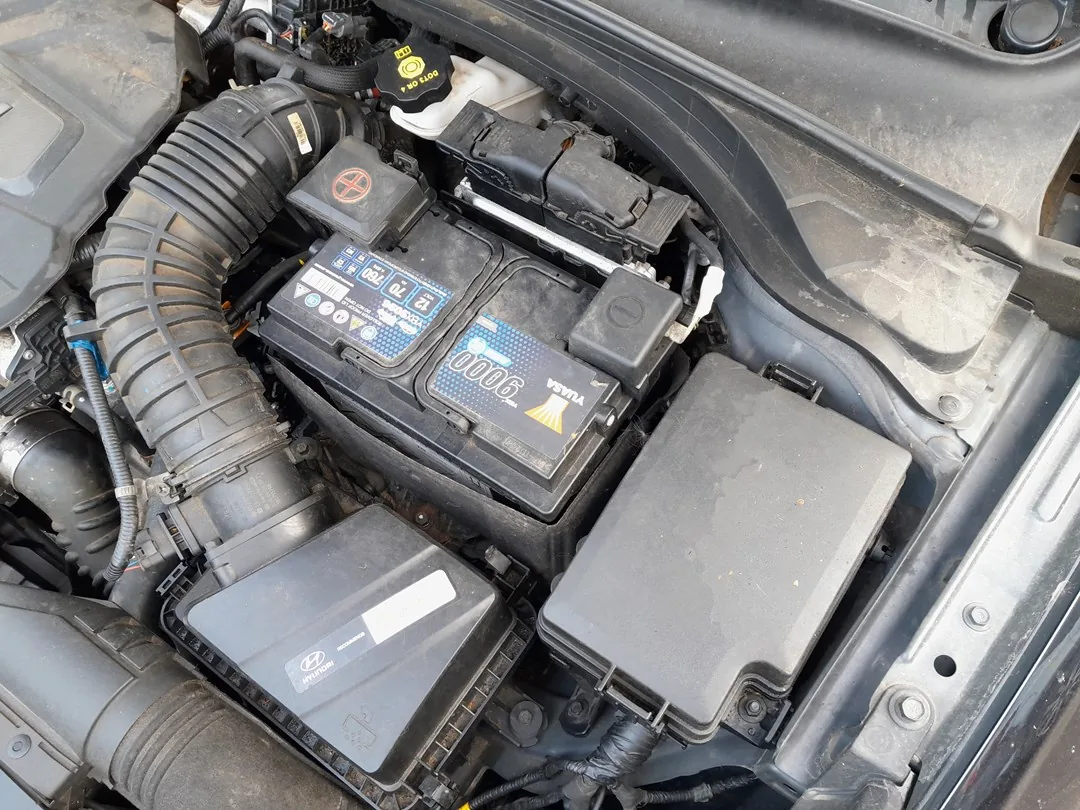
- Make sure the ignition is fully off and the key is out (or, with a smart key, well away from the car).
- Open the bonnet and lift off the battery’s plastic cover.
- Loosen the negative (−, black) terminal clamp first and lift the lead clear, tucking it aside so it can’t spring back.
- If fully removing the battery, loosen the positive (+, red) terminal next, then the hold-down clamp.
Airbag/pretensioner safety: if you’ll be working near airbags or seat-belt pretensioners, wait 3 minutes after disconnecting before going further, so the system fully powers down.
Reconnecting
- Refit the battery and hold-down clamp if it was removed.
- Connect the positive (+) terminal first, then the negative (−) last. Tighten both firmly.
- Refit the cover.
What to Re-set Afterwards
After power is restored the i30 needs a few things re-taught:
- Date and time — reset in the cluster/infotainment.
- Trip computer — check the average-consumption figures.
- Power windows — auto up/down may need re-initialising. See our i30 Mk3 window initialise guide.
- Sunroof (if fitted) — re-initialise the tilt/slide. See our i30 Mk3 sunroof guide.
Hyundai does not require the new battery to be coded on the i30 — fit, reconnect and re-teach the items above and you’re done.
Frequently Asked Questions
Which terminal do I remove first on the i30?
Always the negative (−) first when disconnecting, and reconnect it last. This avoids shorting against the bodywork.
Will I lose my radio code?
No — the i30’s factory audio isn’t code-locked. You’ll just need to reset the clock and re-pair nothing else.
Does the i30 need the new battery registered/coded?
No. Unlike some German cars, the i30 doesn’t require battery coding — just fit it and re-teach the windows/sunroof.
Why won’t auto-up work on my windows after this?
Cutting power clears the windows’ learned top position. Run the quick re-initialise routine to restore one-touch.
For any warning light that stays on after the work, look up the code on autodtcs.com. To clear the service reminder, see our i30 Mk3 service indicator reset guide.
Independent guide — not affiliated with Hyundai. Always follow your official service manual and safety precautions. Read our full disclaimer.