These instructions apply to the Kia Stonic Mk1 (YB) 2017-Present.
For other models, please choose your vehicle here.
The Kia Stonic (YB, 2017–present) has an Idle Stop & Go (ISG) system that switches the engine off at a standstill to save fuel. If you’d rather keep it running — in traffic, on a hot day, or before working in the engine bay — you switch it off with one button. The engine cutting out at a stop is completely normal and intended, not a fault. It’s the car trimming fuel use and emissions during the natural pauses in driving, and many Stonic owners simply prefer the engine to idle rather than shut down each time they halt.
How ISG Works on the Stonic
ISG only stops the engine when several conditions line up: the car is at a standstill, the engine is up to temperature, and the 12 V battery holds enough charge for a clean restart. On a manual that means neutral with the clutch released; on an automatic it means the brake held firmly. A battery sensor monitors charge constantly, which is why a healthy battery is central to smooth ISG operation. If any condition isn’t satisfied, the engine simply keeps idling — the system holding back on purpose, not failing.
Before You Begin
- No tools needed — it’s one dashboard button pressed from the driver’s seat.
- Do it with the ignition on, ideally right as you start your journey.
- Find the ‘A OFF’ (ISG) button first — an A inside a circular arrow, near the steering wheel or switch bank.
- Bear in mind the setting only holds for the current drive, so you’ll repeat it next time.
How to Turn Off Idle Stop & Go
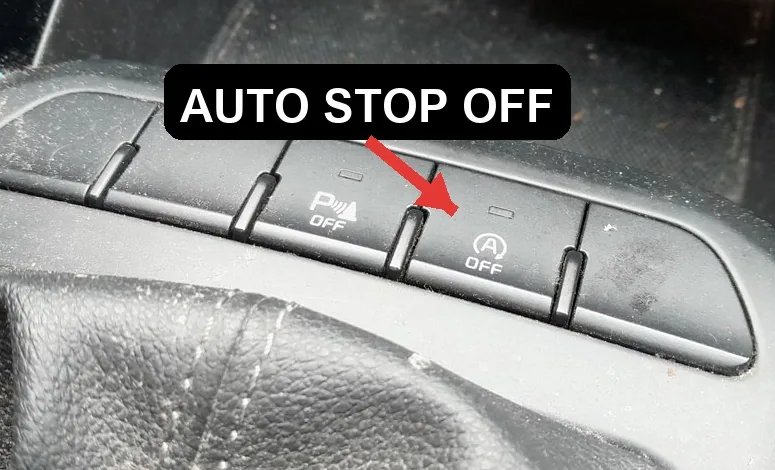
- Find the ‘A OFF’ (ISG) button on the dashboard, usually near the steering wheel or switch bank.
- Press it once — the indicator confirms ISG is off, and the engine will keep running when you stop.
It Resets Every Drive
Like nearly every car with this feature, the Stonic re-enables ISG each time you switch the ignition off and on. There’s no permanent factory ‘off’ — press the button once per journey if you don’t want it.
If the Engine Won’t Stop — or Won’t Stay Running
If ISG isn’t doing what you expect, run through these checks before assuming a fault:
- Weak or ageing 12 V battery — the most common reason the engine won’t cut out. The system needs a guaranteed restart, so it stands down when charge is marginal.
- Cabin not yet at temperature — strong heating or cooling demand on a hot or cold day keeps the engine running.
- Engine still cold — from a cold start ISG waits until the engine warms before it will stop.
- Manual not in neutral with clutch released, or you’re still creeping — settle into a full stop.
- Bonnet not fully latched or a door recently opened — some safety conditions inhibit the stop.
- Short trips or a steep hill — the battery may not have recovered enough charge to allow a stop.
- After a battery replacement, the new battery may need registering so the system trusts its charge readings.
After the Reset
Press A OFF (ISG) once and the indicator confirms the system is off; the engine then idles at every stop for the rest of that drive. Switch the ignition off and back on and ISG returns to its default on state, so the indicator clears and the engine will start cutting out again at standstills. The choice isn’t saved between journeys — just press the button whenever you next want it off.
Frequently Asked Questions
How do I turn off auto stop/start on a Kia Stonic?
Press the A OFF (ISG) button on the dashboard, near the steering wheel or in the switch bank. The indicator confirms ISG is off and the engine will keep idling when you stop. It’s a single press — no need to hold the button or work through a menu on this car.
Can I disable it permanently?
No — the Stonic resets ISG to on every time you cycle the ignition, and there’s no owner setting that keeps it off for good. This is standard on almost all cars with the feature. The practical fix is habit: make pressing the ISG button part of your start-up routine if you always prefer to drive without it.
Why did ISG come back on?
Switching the ignition off and on re-enables it automatically. The off setting isn’t remembered between journeys, so it’s active again each time you start the car. If it seems to re-arm mid-drive, that’s usually the system reacting to battery charge or climate demand rather than the button setting being lost.
Why won’t the engine stop sometimes?
A low battery, active climate demand, or a cold engine will all hold the engine running — that’s by design. ISG only shuts down when a smooth restart is assured and the cabin stays comfortable. On cold mornings or very short trips you may notice it rarely stops at all, which is entirely normal.
Does ISG wear out the battery or starter?
The Stonic uses a starter and battery rated for the extra cycling, so normal use doesn’t cause premature wear. The 12 V battery does work harder than in a car without the system, making it the part most worth keeping healthy. Fitting the correct replacement battery type keeps ISG working reliably.
Is it OK to leave ISG switched off all the time?
Yes — with ISG off the engine simply idles at stops like any older car, with no mechanical downside. You’ll use slightly more fuel in heavy traffic, but nothing is harmed. Many owners switch it off for stop-go commuting or engine-bay work and turn it back on for longer runs where it barely activates anyway.
If an ISG fault light shows instead of the normal indicator, look it up on autodtcs.com — a tired 12 V battery is the usual cause. See our Stonic battery guide.
Independent guide — not affiliated with Kia. Always follow your official service manual and safety precautions. Read our full disclaimer.