These instructions apply to the Mazda 3 Mk3 (BM/BN) 2013-2018.
For other models, please choose your vehicle here.
When the tire-pressure warning light comes on in your Mazda 3 Mk3 (BM/BN, 2013–2018), it usually just means the system needs to store your current pressures as the new reference after a check, top-up or wheel change. The Mazda 3 resets with a button. This guide shows how.
When to Reset
- After checking or adjusting the tire pressures (including seasonal changes).
- After changing or repositioning one or more wheels or tires.
- After disconnecting or reconnecting the battery.
Set Your Pressures First
The reset stores whatever pressures are in the tires at that moment, so they must be correct first. Park on level ground and set all four (cold) to the figures on the placard in the driver’s door aperture, using the laden column for a full load. Never reset with a tire already low.
Mazda 3 (BM) Tire Pressures
Set these cold, to the tire size fitted to your car. The final authority is always the label in the driver’s door aperture; the figures below match that placard for the common 16-inch fitment on this generation.
| Tire size | Load | Front | Rear |
|---|---|---|---|
| 205/60 R16 92V | Normal (up to 3 occupants) | 2.5 bar (36 psi) | 2.5 bar (36 psi) |
| Full load (5 occupants + luggage) | 2.8 bar (41 psi) | 3.2 bar (46 psi) | |
| Space-saver spare | T125/70 D16 | 4.2 bar (61 psi) | |
Cars on 18-inch wheels (215/45 R18) use slightly different figures — always go by your own door-pillar label. Re-run the reset above after any pressure change so the system stores the new values.
How to Reset the Mazda 3 TPMS
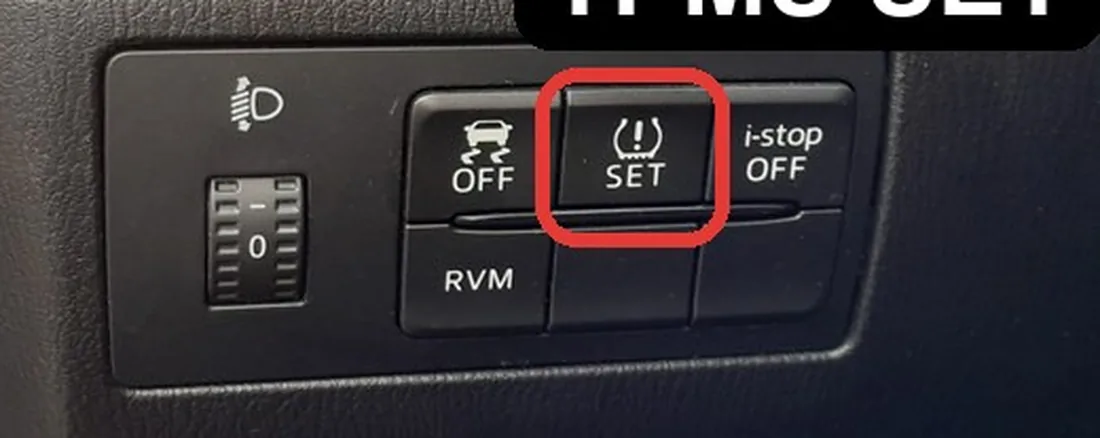
- Make sure all four tires are at the correct cold pressure and the car is on level ground.
- Turn the ignition on.
- Find the TPMS set button (low on the dash, near the steering column — its exact side differs between left- and right-hand-drive cars).
- Press and hold the button until a confirmation signal is heard.
- The TPMS warning light flashes twice to confirm. The procedure is complete.
A short drive lets the system settle and the light goes out.
Light Won’t Go Out? Work Through This
- A tire is genuinely low: the system is doing its job — find and fix the leak, re-inflate, then reset.
- Reset not stored: hold the button until the confirmation signal and the light flashes twice.
- Flashing (not steady) light: a flashing TPMS light points to a sensor fault — a flat sensor battery is common on older cars. The car may store a code you can look up on autodtcs.com.
Frequently Asked Questions
Where is the TPMS button on a Mazda 3?
Low on the dash near the steering column. Hold it with the ignition on until you hear the confirmation signal and the warning light flashes twice.
Do I have to reset after disconnecting the battery?
Yes — re-initialize the TPMS after any battery disconnection, with the correct pressures set.
Why does the light come back a few days later?
Either a tire is slowly losing air, or it was a little low when you reset. Re-check all four cold pressures and reset again.
Do I need to reset after just topping up the air?
Yes — any pressure change shifts the reference, so reset after any adjustment.
After tire or seasonal-wheel work it is worth confirming the service reminder is clear — see our Mazda 3 service indicator reset guide.
Independent guide — not affiliated with Mazda. Always follow your official service manual and safety precautions. Read our full disclaimer.