These instructions apply to the Mitsubishi Outlander Mk3 (GF) 2012-2021.
For other models, please choose your vehicle here.
The third-generation Mitsubishi Outlander (GF chassis, 2012–2020, including the PHEV from 2014 onwards) tracks scheduled service via the dashboard’s multi-information display. After an oil change or brake-fluid replacement the spanner or service icon illuminates. Resetting is owner-method: a sequence of presses and holds on the dashboard’s mode/select button — no scan tool, no Mitsubishi MUT-III, no dealer trip required.
Before you start
The Outlander GF is interval-based — there is no oil-condition sensor, so the counter tracks elapsed mileage plus engine duty cycle. Reset only after the actual service is done; resetting first starts a fresh interval running on stale data.
- Applies to all Outlander GF trims and engines: 2.0 4B11 petrol, 2.4 4B12 petrol (US/Japan markets), 2.2 4N14 diesel, and 2.0 PHEV (4B11 with twin electric motors and a 12 kWh traction pack). PHEV variants use the same cluster procedure as petrol/diesel.
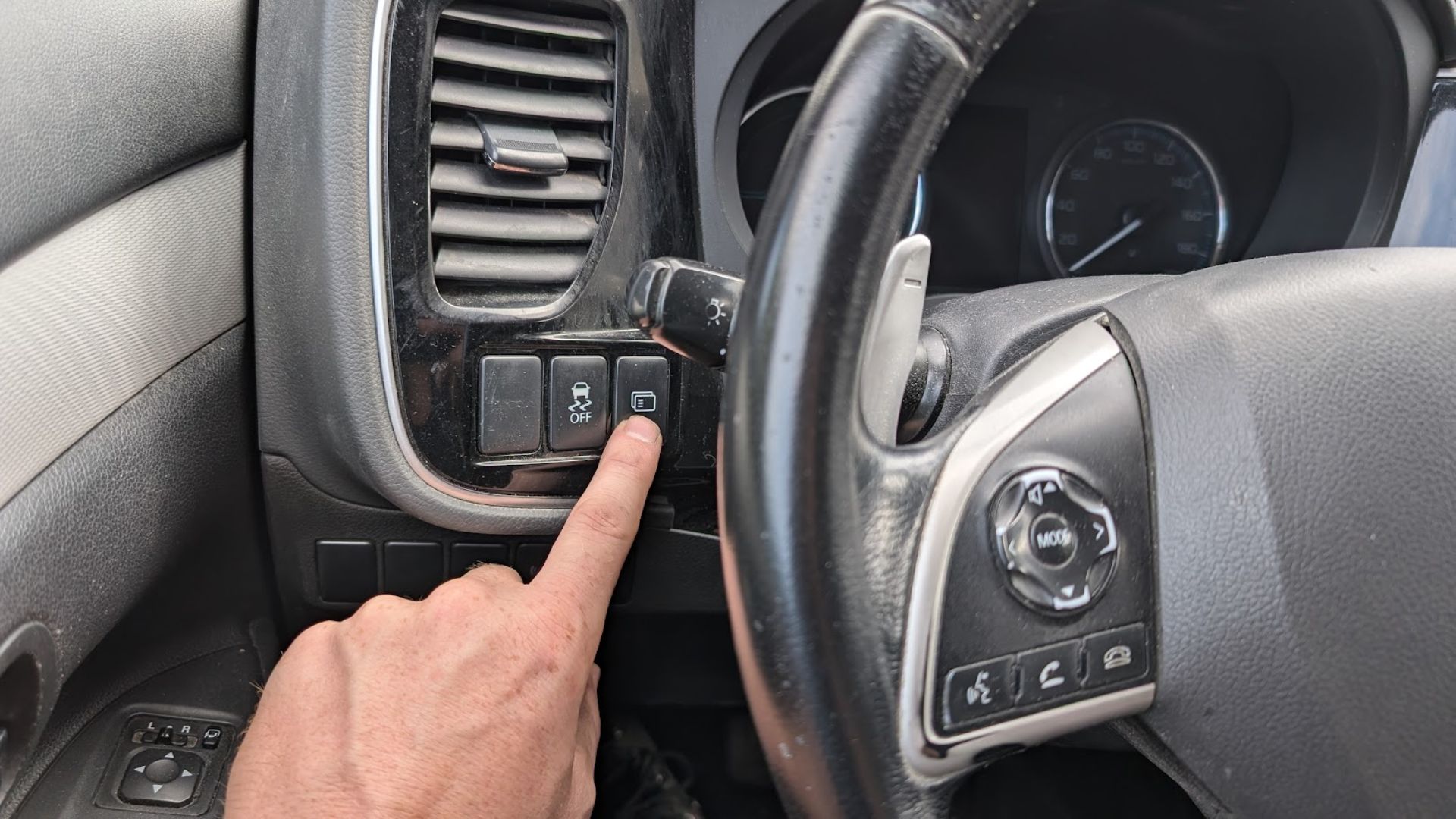
- The “dashboard button” is the multi-information display selector — usually a single push-button on the lower right of the steering-wheel cluster, marked with two arrows or “MODE/SET”. Some markets/trims use the trip-meter stalk on the steering column instead.
- 12 V battery state of charge matters, especially on the PHEV — its 12 V battery (separate from the high-voltage pack) runs all cluster and infotainment functions, and a tired one makes the cluster behave oddly during a reset.
- Start with the ignition OFF — key off / power button off, dashboard dark.
Reset procedure
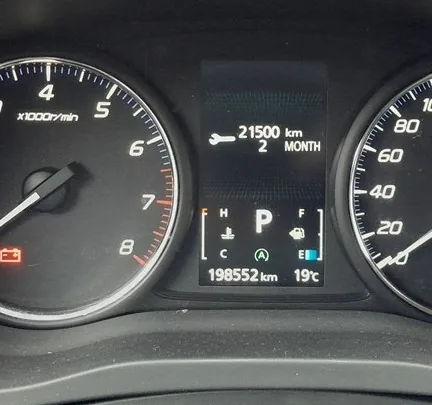
- Switch the ignition OFF (or, on push-button-start cars including the PHEV, ensure the power button is fully off — the dashboard is dark).
- Press the dashboard button (multi-information display selector) repeatedly until the service display appears. On most Outlander GFs this is the “SERVICE” or “SVC” entry, accessed by cycling through the trip-meter, instantaneous fuel-economy, average fuel-economy, average speed, range-to-empty, and finally service entries.
- A spanner or service key symbol will be shown on the display, along with the remaining mileage or time until the next scheduled service.
- Press and hold the button. Don’t tap-and-release; sustained pressure is needed.
- The service indicator will begin to flash after a few seconds, indicating the cluster has entered reset confirmation mode.
- Continue holding the button until the flashing stops and “CLEAR” (or “DONE”, or “Reset OK”, depending on display firmware) appears.
- Release the button. The cluster waits briefly.
- Press the button once more to confirm. The display returns to the service screen, now showing the full new service interval.
- The service interval is now reset. Verify by switching ignition fully on; the spanner icon should not illuminate.
How to verify it has worked
- The spanner / service icon is no longer illuminated on the cluster.
- Scrolling back to the service screen via the dashboard button shows the new interval value (typically 15,000 km / 12 months for the petrol 2.0, 20,000 km / 12 months for the 2.4 petrol and 2.2 diesel, or 15,000 km / 12 months for the PHEV petrol side).
- No service-reminder chime on the next engine start.
- On the PHEV, switching to EV-only drive doesn’t bring back the spanner — the service indicator covers both petrol and PHEV service intervals.
If Something Goes Wrong
The dashboard button cycles past the service screen without showing it. Some Outlander GF trims hide the service entry on lower-spec variants. Try the trip-meter stalk on the steering column instead — held during step 4 instead of the dashboard button. The behaviour is otherwise identical.
Reset completes but spanner returns at the next start. The reset wasn’t committed to non-volatile memory. Mitsubishi’s cluster requires the ignition to be cycled cleanly after the reset — switch off completely (or power button off on PHEV), wait 30 seconds, then start. If the issue persists, the cluster has a stored fault; needs MUT-III or aftermarket Mitsubishi-aware scan tool.
“Service interval exceeded” message blocks the reset. The car is significantly overdue — the reset is gated to prevent accidental clears. Workshop reset is required (Mitsubishi dealers use MUT-III to bypass the gate).
On PHEV: spanner clears but a separate “EV battery service” warning remains. These are independent. The spanner is the petrol-engine service indicator; the EV battery service is a separate Mitsubishi-specific scheduled task that resets via a different MUT-III procedure. Owners can’t reset EV battery service manually; needs Mitsubishi specialist.
Frequently asked questions
What service interval does the Outlander GF use?
2.0 4B11 petrol: 15,000 km / 12 months. 2.4 4B12 (US-spec, JDM-spec): 12,000 km / 12 months. 2.2 4N14 diesel: 20,000 km / 12 months under long-life servicing (or 12,000 km / 12 months under standard servicing). PHEV: 15,000 km / 12 months for the petrol side; the EV components have their own 30,000 km / 24 month schedule.
Does the procedure work on the Outlander Sport / ASX (the smaller sister model)?
No — the ASX (RVR in Japan, Outlander Sport in US) uses a different cluster and a different reset procedure. This guide is specific to the full-size Outlander GF.
What about the 2020-onwards Outlander (PHEV facelift)?
The 2020 PHEV facelift kept the same cluster firmware as earlier 2018–2019 cars. The procedure here works on it. The 2022-onwards fourth-generation Outlander uses a different procedure tied to the new MMI infotainment.
For DTCs related to the Outlander’s engine ECU, the PHEV’s hybrid system, or stored body-system codes that won’t clear, see autodtcs.com.
Independent guide — not affiliated with Mitsubishi. Always follow your official service manual and safety precautions. Read our full disclaimer.