These instructions apply to the Nissan Leaf Mk2 (ZE1) 2018-2024.
For other models, please choose your vehicle here.
The charge port on the second-generation Nissan Leaf (ZE1, 2018-2024) sits behind a flap in the front nose. There are two sockets under one flap: the CHAdeMO rapid-charge socket on the left (black cap) and the AC socket on the right. Open the flap with the button on the lower dash or the Intelligent Key.
How to open the charge port and charge a Nissan Leaf (2018-2024)
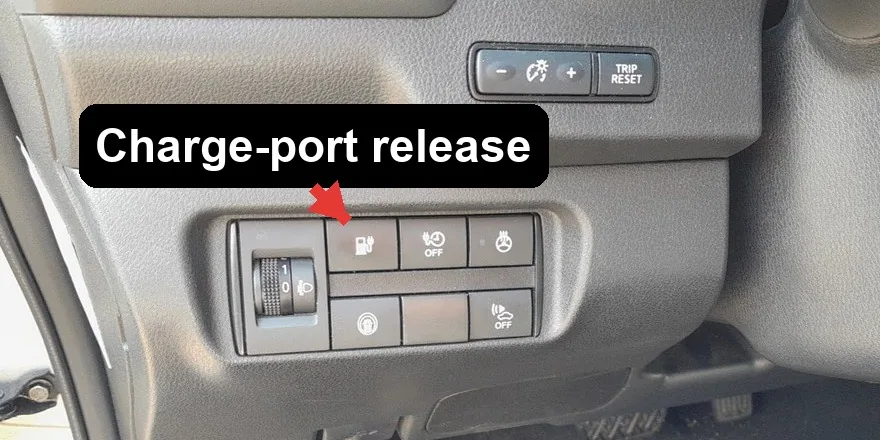
- With the car switched off, press the charge-port opener switch on the lower-left dash (next to the headlight-leveler dial, if your car has one), or press and hold the charge-port button on the Intelligent Key for about a second — the flap unlatches and the indicators flash.
- Lift the flap and remove the cap for the socket you need: the right-hand AC socket for home/public AC charging, or the left-hand CHAdeMO socket for DC rapid charging.
- Push the connector in fully until it clicks. On a home or public AC point, start the session at the charger or app; the connector locks while charging.
- When charging finishes, stop the session (or unlock the car), wait for the connector to unlock, then pull the plug straight out and refit the cap.
- Close the flap and press it until it latches.

Which plug and how fast does it charge?
The AC inlet depends on the market: Leafs sold in Europe use a Type 2 (Mennekes) socket, while North American cars use a Type 1 (SAE J1772) socket. DC rapid charging uses a CHAdeMO connector in every market.
On AC, the onboard charger is 3.6 kW on base 40 kWh trims and 6.6 kW on higher trims and all e+ models, so a full AC charge takes from roughly 6 to 13 hours depending on trim and battery size.
On a CHAdeMO rapid charger the 40 kWh Leaf peaks around 46 kW (about 10-80% in 40-45 minutes). The 62 kWh Leaf e+ is rated up to 100 kW but typically holds nearer 70 kW, reaching about 80% in roughly 45 minutes.
Timer charging
The Leaf can charge immediately or on a timer. In the center-screen charging menu (or the NissanConnect EV app) you switch between Immediate and AUTO charging and set the timer windows to charge on cheaper off-peak electricity.
If the car won’t start charging when you plug in, it is usually waiting for an AUTO timer window. Switch it to immediate charging on the dash charging screen to override the timer for that session.
Emergency release
If the charge-port flap won’t open, open the hood and look just behind the charge port for a small release lever; push it with a long flat-blade screwdriver to pop the flap open.

If a charging connector is locked and won’t come out, switch the car off, open the hood, remove the cover over the socket and use the manual connector release near the socket (your owner’s manual shows the exact location). Unlocking the car with the Intelligent Key also releases a locked connector.
Frequently asked questions
Does the Nissan Leaf use CCS?
No. Every ZE1 Leaf rapid-charges on CHAdeMO, not CCS. If a rapid site only has CCS connectors you cannot fast-charge there without a CHAdeMO unit; AC charging still works on the car’s standard AC socket.
Where is the charge port on a Nissan Leaf?
In the front nose, under a single flap, with the DC/CHAdeMO socket on the left and the AC socket on the right.
Can I charge a Leaf from a normal household socket?
Yes, using the portable EVSE cable supplied with the car, but it is slow (around 2-2.3 kW) and best kept for occasional top-ups. A wall box gives the full 3.6 or 6.6 kW AC rate.
Independent guide — not affiliated with Nissan. Always follow your official service manual and safety precautions. Read our full disclaimer.