These instructions apply to the Nissan Note Mk2 (E12) 2013-2017.
For other models, please choose your vehicle here.
The Tyre Pressure Monitoring System (TPMS) in the Nissan Note Mk2 (E12) watches the pressure in each tyre and lights an amber warning on the dashboard when one falls too low. After you adjust the pressures or change a wheel, the system needs to store the new values as its reference — on the European Note that is done with a short reset you run from the driver’s seat, using the trip-computer display button. No garage tool is needed for a routine reset.
Seeing the amber tyre symbol is not a sign of a fault with the car. It means a tyre has dropped below its target pressure, or that the car has lost its reference after a wheel change. Correct the pressures, run the reset, drive a short distance and the light goes out. It is a safety feature working as intended, not a warning you can safely ignore.
How the TPMS Works on the Note
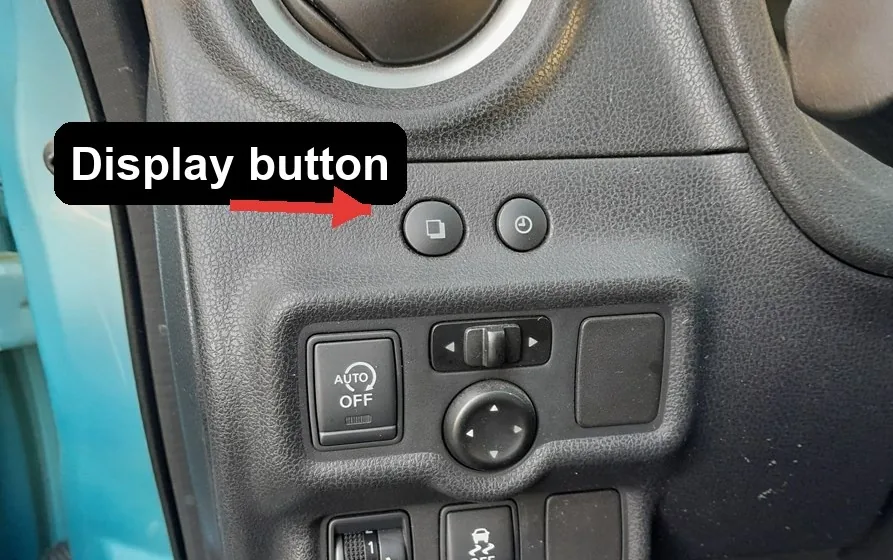
The Note Mk2 (E12) uses a direct system: a small sensor inside each wheel measures its own pressure and reports it to the car by radio. On European cars the vehicle-information display carries a TPMS settings screen, reached by cycling the trip-computer display button (the button with the twin-rectangle icon, to the left of the steering wheel). From that screen you tell the car to re-learn the current pressures — that is the “reset” below.
Before You Begin
- Set pressures when the tyres are cold — first thing, or after the car has stood a few hours.
- Use the figure on the driver’s door-pillar label — the correct pressures vary by tyre size, trim and load, so always read your own car’s label rather than a fixed number — and match the front and rear values it shows.
- Include the tyre that triggered the alert — one soft corner keeps the light on.
- Switch the ignition to ON but do not start the engine for the menu steps.
- Check and refit the valve caps to keep the sensor valves sealed.
Reset Procedure
- Set all tyres to the recommended cold inflation pressure from the door-pillar label.
- Switch the ignition ON (do not start the engine).
- Press the trip-computer display button — the twin-rectangle icon to the left of the steering wheel — repeatedly. The display cycles through fuel consumption, range, average speed and elapsed time until the TPMS settings screen appears.
- With the TPMS screen showing, press and hold the same button to start the reset. The SET indicator flashes about three times and the display then returns to the fuel-consumption screen.
- Drive the car between 25 and 100 km/h (15–62 mph) for a few minutes. The system re-reads the sensors and stores the current pressures as the new reference.
- The amber warning goes out once the reset completes and every tyre reads correct.

US Models (Versa Note): a Different Method
North-American Versa Note cars do not use the trip-computer reset above — there is no TPMS settings screen to hold. Instead, inflate every tyre to the cold pressure on the Tire and Loading Information label on the driver’s door pillar. The low-tyre-pressure light stays on until the pressures are correct, then goes out once you drive. Many US cars also have Easy Fill Tire Alert: while you inflate a tyre, the horn beeps once when it reaches the recommended pressure, so you don’t need a gauge. As on European cars, fitting new sensors or wheels — or rotating the tyres — means the sensor IDs must be re-matched with a TPMS tool at a dealer.
If the Warning Won’t Clear
- Recheck every corner with a reliable gauge, including the tyre that first triggered the alert — one still-soft tyre keeps the light on.
- Complete the drive — a few minutes in the 25–100 km/h band lets the sensors report; a very short crawl may not.
- Check the spare if you’ve just fitted it — a space-saver may carry no sensor or need its own pressure.
- Rule out a slow puncture — if one tyre keeps dropping, the alert is genuine; look for a nail or a weeping valve.
- Cold weather drops pressure by roughly 1 psi per 5 °C, so top up to the label figure when cold and reset again.
- If the pressures are all correct and the light stays on — especially if it flashes for about a minute and then stays lit — one or more TPMS sensors may be faulty and should be inspected by a professional.
After Fitting New Wheels or Sensors
The reset above re-learns the pressures reported by the sensors already fitted to the car. If you have fitted brand-new TPMS sensors (for example a new set of alloys), the car may also need those sensors’ IDs registered with a Nissan diagnostic tool at a garage. A routine top-up, or a like-for-like tyre change on the original sensors, only needs the driver reset.
After the Reset
Once the reset takes and the pressures are correct, the amber symbol goes out and stays off for the journey and beyond. If it returns a day or two later, treat it as a real low-pressure warning rather than a fault with the system and look for a slow leak. A light that flashes and then stays lit usually points to a sensor problem rather than a soft tyre.
Frequently Asked Questions
How do I reset the tyre pressure light on a Nissan Note?
Set all tyres to the correct cold pressure from the door-pillar label, switch the ignition on, then press the trip-computer display button (the twin-rectangle icon left of the wheel) until the TPMS settings screen appears. Press and hold it until the SET indicator flashes about three times, then drive between 25 and 100 km/h for a few minutes so the system stores the new pressures.
Is there a TPMS reset button?
There is no dedicated TPMS button, but the trip-computer display button to the left of the steering wheel doubles as it: cycle it to the TPMS settings screen, then press and hold to run the reset. The car re-learns the pressures on the next short drive.
Do I need a diagnostic tool?
Not for a normal reset after inflating or a like-for-like wheel change — the display-button procedure and a short drive do it. A workshop tool is only needed when brand-new sensors are fitted and their IDs have to be registered to the car.
Why won’t the light go out after I reset it?
The most common reason is that one tyre is still below the target pressure, so recheck every corner with a reliable gauge, including the one that triggered the alert. Make sure you completed the drive in the 25–100 km/h band. If everything is correct and it stays on, a sensor may be failing.
Why does the light appear on cold mornings?
Tyre pressure falls with temperature, so a cold night can drop a correctly set tyre just under the threshold. Top up to the door-pillar figure while the tyres are cold and reset. If it only appears when it is cold and then settles once the tyres warm, low pressure from the temperature is the cause.
It came on after a wheel change — is that normal?
Yes. A wheel change often disturbs the pressures and the stored reference, so set all four to the door-pillar figure and run the reset above. If the new wheels have different sensors fitted, the car may also need those sensor IDs registered with a Nissan tool — ask the fitter to do it.
Disclaimer: This guide is for general information. Always follow your vehicle’s official service information and safety instructions. Perform repairs at your own risk.
If the warning came on alongside other alerts, or a fault code is stored, decode it on autodtcs.com.
Independent guide — not affiliated with Nissan. Always follow your official service manual and safety precautions. Read our full disclaimer.