These instructions apply to the Skoda Karoq Mk1 (NU) 2017-Present.
For other models, please choose your vehicle here.
A “Service” or “Inspection” message on your Skoda Karoq (NU, 2017–present) means a maintenance interval is up. It’s a two-minute job from the driver’s seat using the trip-reset button — no workshop tester required. Always carry out the oil and filter change first. The reminder is exactly that — a scheduling prompt, not a fault. It tells you the car’s internal service counter has reached the end of its cycle and simply needs clearing so it can begin timing the next interval.
What the Service Message Means
The Karoq shows two related reminders. The oil-change service is the one most owners see between visits, and the inspection service covers the broader annual check. Depending on how your car was set up when new, it will follow one of two regimes. On the flexible (long-life) regime the car watches how far you drive, how long since the last service, engine temperature, and driving style, then decides when the oil change is genuinely due — so the message can appear at different points on different cars. On the fixed regime the reminder comes up at set distance and time limits regardless of how the car is driven, which suits short-trip and heavy-duty use. Either way the counter is only tracking mileage and elapsed time since it was last cleared, which is why resetting it is a genuine part of the service and not just a cosmetic step.
The important thing for owners: this message does not mean anything is wrong. It is not a warning about oil level or oil pressure, and it is separate from the engine warning light. If a red oil-can symbol, a flashing warning, or the engine-management lamp is lit instead of the service message, treat that as a fault to investigate rather than something to reset.
Getting Ready
- Reset the reminder only after the oil and filter have actually been changed — clearing it early just hides the prompt while the oil keeps ageing.
- Park on level ground and apply the parking brake so you can work calmly at the dashboard.
- You want the ignition on with the engine off. There is no need to start the engine at any point.
- No tools, scanner, or dealer visit are needed — everything is done from the driver’s seat.
Reset Only After the Work
The counter only tracks mileage and time since the last reset, so clearing it before the service just masks the reminder. Do the job, then reset.
How to Reset the Karoq Service Reminder

- If your Karoq has keyless entry, shut all doors, the boot and the bonnet.
- With the ignition off, press and hold the 0.0 / trip-reset button (wiper stalk or dash).
- Keeping it held, switch the ignition on, then let go.
- The display asks ‘Reset oil change service?’ — press the button once more to confirm.
- Repeat for the inspection counter if your display shows it separately.
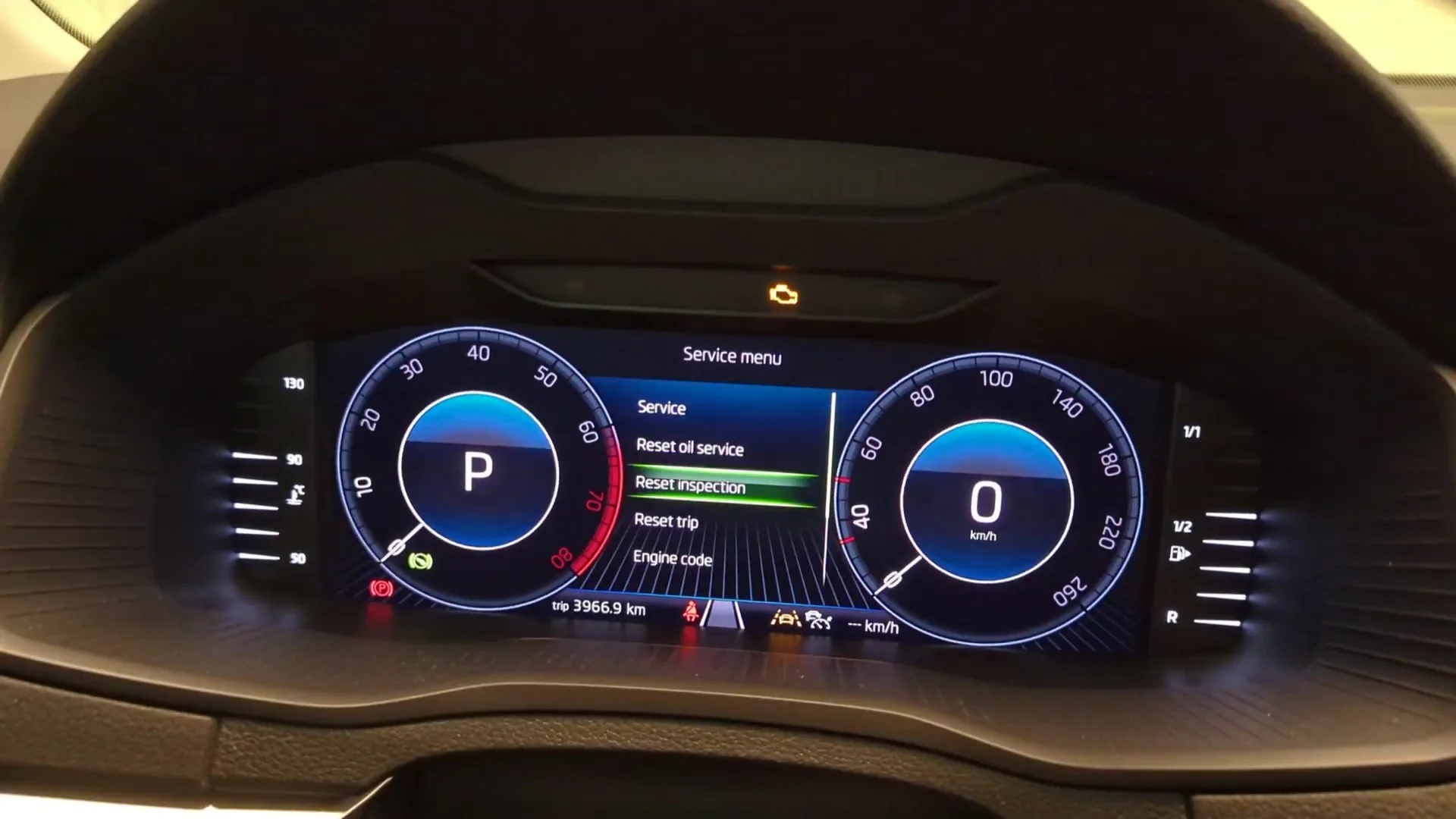
Cars with the Virtual Cockpit can also reset through Settings → Service in the menu.
If the Reset Doesn’t Work
- It reappears at the next start — the confirmation step was missed. Run the sequence again and make sure you press the button a second time at the prompt.
- Nothing comes up on the display — the ignition may only be at accessory. Switch it fully on (dash lights up, engine off) before holding the button.
- You released the button too soon — keep it held right through the ignition-on step, not just before it.
- Don’t start the engine mid-reset — if it fires up, switch off, wait a few seconds, and start the sequence again.
- It’s a different symbol — that’s a fault warning, not the service timer, and won’t clear with the trip button.
What Happens Next
Once the reset registers, the service message disappears and does not return the next time you start the car. The counter begins timing the next interval from zero. Nothing else is affected — your trip meters, radio, and personal settings are untouched, because the reset only clears the maintenance reminder. If the inspection counter was also due and you cleared it too, both prompts will now be gone.
How Often It Comes Up
Reset the reminder every time the oil and filter are changed, right after the work. How far apart those services fall depends on which regime your Karoq uses and on your engine and driving pattern, so follow the schedule in your owner’s handbook rather than a fixed number in your head. Frequent short journeys, towing, and heavy urban use all tend to bring the service forward. Clearing the counter without doing the work only lets the real interval drift out of step with the display.
Frequently Asked Questions
How do I reset the service light on a Skoda Karoq?
Ignition off, hold the trip-reset button, switch the ignition on, release, then press again at the ‘Reset oil change service?’ prompt.
Do I need a diagnostic tool?
No — the trip-button method does it from the dashboard.
Why two separate resets?
Skoda counts oil-change and inspection intervals independently; reset whichever is prompted, and both after a full service.
Does the engine need to run?
No — ignition on with the engine off is correct.
The message came straight back — what did I miss?
Almost always the confirmation press. The first hold brings up the ‘Reset oil change service?’ question; you then have to press the button once more to accept it. Repeat the whole sequence and confirm.
Can I reset it through the Virtual Cockpit instead?
Yes. On cars with the digital cluster you can go to Settings → Service and confirm the oil or inspection reset there, which some owners find clearer than the trip button.
If a warning light came on with the service message, identify it on autodtcs.com. After battery work, see our Karoq battery guide.
Independent guide — not affiliated with Skoda. Always follow your official service manual and safety precautions. Read our full disclaimer.