These instructions apply to the Skoda Superb Mk3 (3V) 2015-Present.
For other models, please choose your vehicle here.
When the spanner/oil or “Service now” reminder appears on your Skoda Superb Mk3 (3V, 2015–present), it just means a service interval (oil or inspection) has elapsed. After the work is done you can clear it in seconds using the trip-reset button. This guide shows the Skoda routine for both the oil service and the inspection reset.
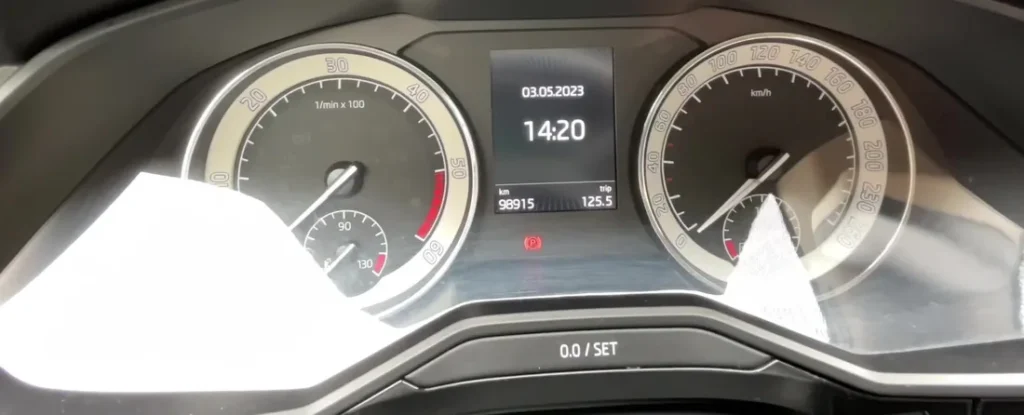
What the Service Message Means
The Superb’s service reminder is a maintenance timer, not a fault warning. The instrument cluster counts down the distance and time since the last reset, and when the interval runs out it shows a spanner symbol with an ‘Oil’ or ‘Service’ prompt for a few seconds each time you switch on. Nothing is wrong with the engine — the car is simply telling you that a scheduled service is due.
Skoda tracks two things separately: the oil-change service and the wider inspection service. That is why the Superb has two reminders and two resets. Depending on how the car was set up, it may follow a fixed schedule or a variable (LongLife) one that stretches the interval based on how the car is driven. The exact distance and time between services is listed in your service handbook; if you are unsure which regime your car uses, treat the reminder as the trigger and check the book for the figures rather than guessing.
Before You Begin
Only reset the reminder once the service has actually been done. Clearing it early just hides the prompt while the oil and filters keep ageing. The reset uses the reset (0.0) button on the wiper stalk or instrument panel together with the ignition.
- Do the oil and filter (or the inspection work) first — the reset only zeroes the counter, it changes nothing mechanical.
- Park on level ground with the handbrake applied.
- Switch the ignition on with the engine off for the reset — you do not start the car.
- No tools, no diagnostic gear — just the dashboard button and the ignition.
How to Reset the Superb Mk3 Oil Service
- Turn the ignition off.
- Press and hold the reset (0.0) button.
- While still holding it, turn the ignition on.
- ‘Reset oil change service?’ appears on the display.
- Release the button, then press it again to confirm — the oil service is reset.
How to Reset the Inspection Service
Repeat the same button-and-ignition sequence; instead of the oil prompt you’ll see ‘Delete inspection?’. Confirm to clear the inspection reminder.
Cars with the Virtual Cockpit / Larger Display
On Superbs with the digital cockpit you can also reset through the menu: Settings → Service (or via the infotainment CAR → Service menu), then choose the oil or inspection reset and confirm.
If the Reset Doesn’t Work
If the message is still there after your first attempt, work through these before assuming anything is wrong:
- Ignition, not engine. The reset expects the ignition on with the engine off. If the engine fired up, switch off and try again with the ignition only.
- Wait for the right prompt. Hold the button while switching on and let the ‘Reset oil change service?’ (or ‘Delete inspection?’) question appear before you confirm — releasing too early cancels it.
- Confirm the second press. The reset only sticks once you acknowledge the on-screen question; a single press that clears the prompt without confirming won’t save it.
- Cycle and repeat. Switch the ignition fully off, wait a moment, and run the sequence again from the start.
- Right reminder. If the car is showing the inspection prompt, resetting the oil counter won’t clear it — reset whichever one the display is asking about.
If the Reminder Comes Straight Back
- It reappears at start-up: the confirmation wasn’t completed — repeat and confirm the prompt.
- A separate warning light is on: that’s a fault, not the service timer — the reset won’t clear a genuine fault code.
After the Reset
Once the reset takes, the spanner and the ‘Service now’ prompt stop appearing when you switch on, and the service counter starts again from a full interval. Nothing else on the dash changes — the reset only affects the service reminder, so any other warning lights stay exactly as they were.
How Often You’ll Need This
Reset the reminder after every completed oil or inspection service — each time the work is done, clear the matching counter so the next prompt lands when it should. The Superb’s interval depends on whether it’s on the fixed or variable (LongLife) schedule, so use the distance and time figures in your own service handbook rather than a one-size-fits-all number.
Frequently Asked Questions
Where is the reset button on the Superb?
It’s the trip-reset (0.0) button — on the end of the wiper stalk or on the instrument panel, the one you use to zero the trip distance.
Why are there two resets (oil and inspection)?
Skoda tracks oil-change and inspection intervals separately. Reset whichever the display is prompting; you can do both after a full service.
Does the engine need to be running?
No — the engine should be off. You hold the button, switch the ignition on (without starting), then confirm.
The light stays on after resetting — why?
If it’s the service reminder, the confirmation wasn’t completed. A different warning (engine, oil pressure) is a fault needing diagnosis, not a service reset.
Do I need a diagnostic tool to reset the Superb service light?
No — the oil and inspection resets are both done from the driver’s seat with the trip button and the ignition. A tool is only needed for actual fault diagnosis, not the service reminder.
Will resetting the reminder pass a service that wasn’t done?
Clearing the counter doesn’t service the car — it only restarts the timer. Always change the oil and filter (or complete the inspection) first, then reset, so the reminder stays honest.
If a warning light appeared alongside the service message, look up the code on autodtcs.com. After any battery work, see our Superb battery guide.
Independent guide — not affiliated with Skoda. Always follow your official service manual and safety precautions. Read our full disclaimer.