These instructions apply to the Suzuki Vitara Mk4 (LY) 2015-2024.
For other models, please choose your vehicle here.
If the one-touch (auto up/down) function on your Suzuki Vitara Mk4 (LY, 2015–2024) has stopped working — usually after a battery disconnection, a flat battery or a fuse being pulled — the windows need re-initialising so they relearn their end positions. The Vitara’s routine has one extra step (briefly pulling the power-window fuses) that most cars don’t, so follow it carefully. No diagnostic tools are needed.
Why One-Touch Stops Working
Each window motor remembers its fully-open and fully-closed positions so the auto and anti-trap (pinch protection) functions know the limits. Cutting power clears that memory — the window still moves while you hold the switch, but won’t run on its own until re-taught.
How to Re-initialise the Vitara Windows
Do the driver’s window first, then repeat for the passenger’s:
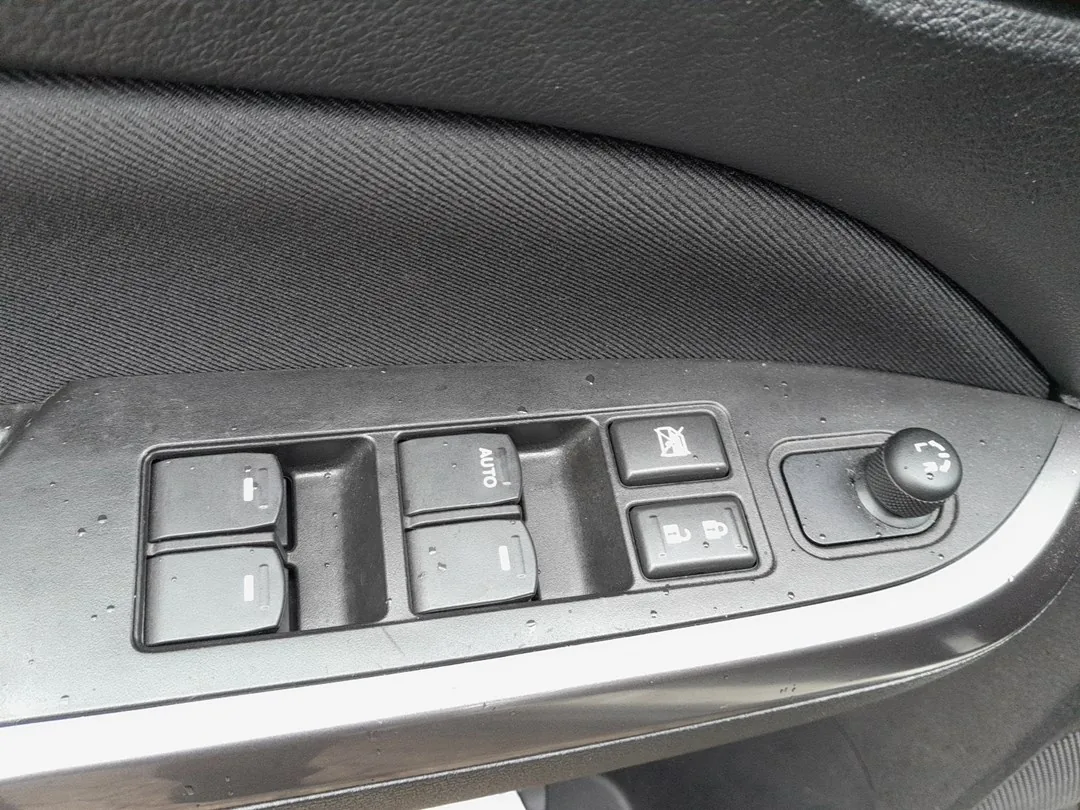
- Turn the ignition off.
- Disconnect the “P/W T” and “P/W” fuses (the power-window fuses — the layout is on the fuse-box lid or in the handbook).
- Pull and hold the window CLOSE switch and wait 15 seconds, then release it. (This discharges the motor circuit.)
- Reconnect the “P/W T” and “P/W” fuses.
- Turn the ignition on.
- Press and hold the window OPEN switch until the window is fully open.
- Pull and hold the window CLOSE switch until the window is fully closed, then keep holding for 2 more seconds.
- Check the one-touch function works, then repeat for the passenger’s window.
If It Still Won’t Auto-Close
- Repeat the procedure — the 15-second hold and the 2-second hold at full-close must be observed.
- Make sure the glass reaches the very top and bottom — dirt or ice in the runner can stop it short and block the relearn.
- After a battery disconnection, also re-check the tyre-pressure system, which also loses its settings.
Frequently Asked Questions
Why do I have to pull a fuse on the Vitara?
Suzuki’s relearn routine starts by clearing the motor circuit — pulling the P/W fuses and holding the close switch resets it. After reconnecting the fuses you teach each window its limits as normal.
Which fuses do I pull?
The ones labelled “P/W T” and “P/W” in the fuse box — check the diagram on the fuse-box lid or in your handbook for their exact location.
Do I have to do both windows?
Yes if both lost one-touch — after a battery disconnection that’s usually the case. Each is initialised from its own switch.
The window goes up a bit then stops — why?
That is the anti-trap protection reacting because the limits aren’t learned. Complete the routine and it clears.
To clear a service reminder after maintenance, see our Suzuki Vitara service indicator reset guide. For warning lights, look up the code on autodtcs.com.
Independent guide — not affiliated with Suzuki. Always follow your official service manual and safety precautions. Read our full disclaimer.