These instructions apply to the Toyota Yaris Mk3 (XP130/P13) 2011-2020.
For other models, please choose your vehicle here.
If the 12V battery is flat or the car has no power, the gear selector on the Toyota Yaris Mk3 stays locked in Park. A shift-lock override releases it so you can move the lever to Neutral and roll or load the car. Here is how to use it safely.
Steps
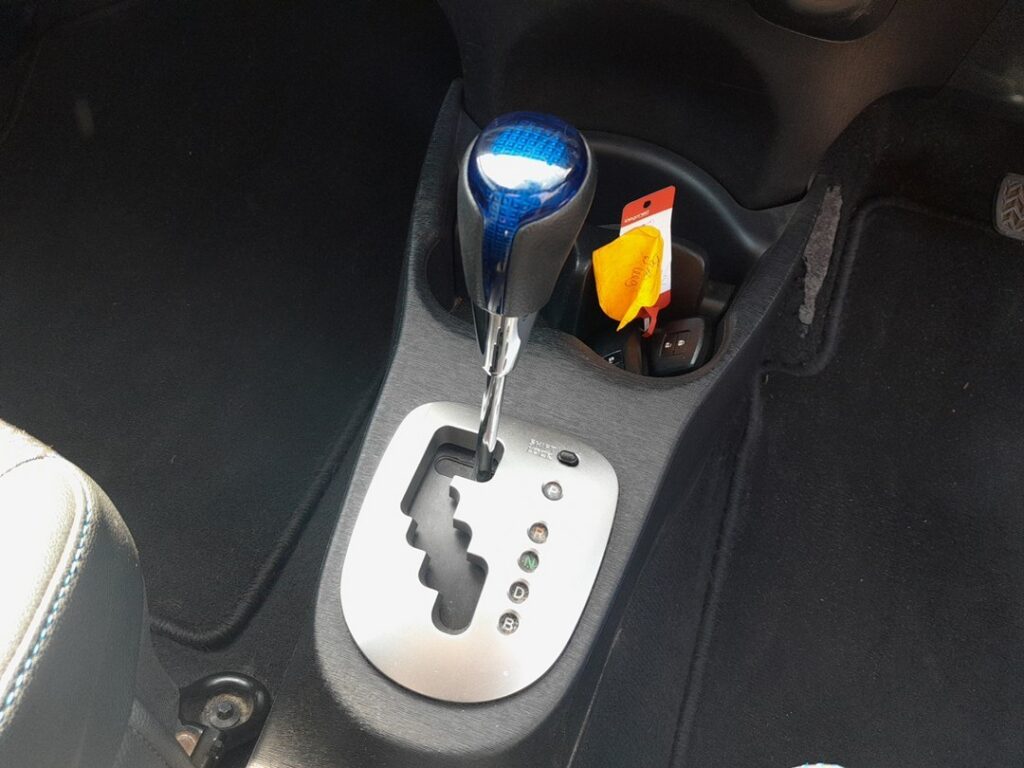
- Apply the handbrake firmly and chock a wheel so the Yaris cannot roll once it leaves Park.
- If the car still has some power, switch the ignition to ACC or ON and press the brake pedal — that releases the shift-lock the normal way.
- If the 12V battery is dead, find the shift-lock override on the selector surround: the small button (sometimes under a cap) next to the P–R–N–D–B gate.
- Press and hold the shift-lock override button.
- While holding it, squeeze the release button on the side of the selector and move the lever from P to N.
- Release both buttons. The Yaris is now in Neutral and can be moved by hand or winched onto a transporter.
Note: Neutral lets you move the car a short distance or load it, but Toyota advises against flat-towing the hybrid on its own wheels — carry it on a flatbed to protect the transaxle.
FAQ
Where is the shift-lock override on the Yaris Mk3?
It sits on the trim around the gear selector, right beside the P–R–N–D–B slots — a small marked button or a cap you press in.
The lever still will not move — what am I missing?
With power available the system also needs the brake pedal pressed. Remember to press the selector’s own side release button at the same time as the override, otherwise the lever stays latched in P.
If a warning light or fault code showed up at the same time, you can look up what it means on autodtcs.com.
Independent guide — not affiliated with Toyota. Always follow your official service manual and safety precautions. Read our full disclaimer.