These instructions apply to the Hyundai i20 (PB) 2009 - 2014. For other models, please choose your vehicle here.
The Hyundai i20 (2009–2014) is equipped with a 12 V battery that supplies power to all vehicle systems, including the ECU, airbag modules, and infotainment. To avoid accidental short circuits or data loss, it’s important to follow the correct disconnection and reconnection steps. This guide explains the safe procedure and what to reinitialize afterward.
Before You Start
- Switch the ignition OFF and remove the key from the ignition switch.
- Ensure all electrical consumers (lights, radio, HVAC) are turned off.
- Wait at least 3 minutes before disconnecting the battery to allow the airbag and seatbelt pretensioner systems to fully power down.
- Use insulated tools and avoid touching both battery terminals simultaneously.
Battery Location
The 12 V battery is located in the engine bay on the left-hand side (driver’s side on LHD vehicles), secured by a metal bracket.
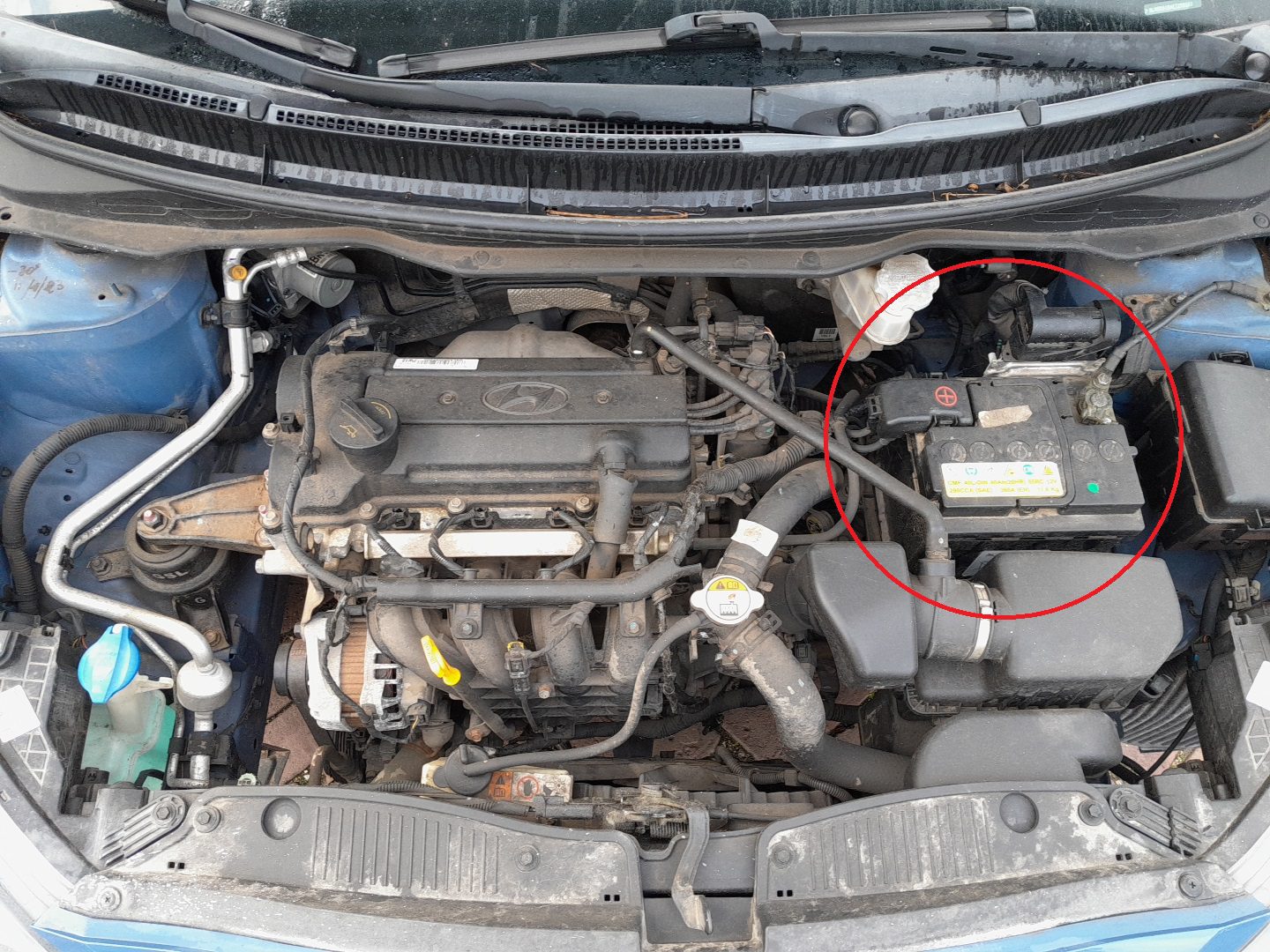
How to Disconnect the Battery
- Make sure the ignition is OFF.
- Loosen and remove the negative (–) terminal first.
- Then loosen and remove the positive (+) terminal.
- If removing the battery completely, undo the hold-down bracket and lift the battery out carefully — use both hands, as it’s heavy.
How to Reconnect the Battery
- Position the battery correctly in the tray and secure it with the hold-down clamp.
- Connect the positive (+) terminal first and tighten securely.
- Connect the negative (–) terminal last.
- Check that both clamps are tight and cables are properly seated.
After Reconnecting
- Reset the clock and radio presets.
- Initialize power windows: close each window fully, hold the switch up for 2 seconds, then open fully and hold down 2 seconds.
- Initialize the sunroof (if equipped) by opening and closing it once completely using the switch.
- Start/Stop system: cycle ignition ON → OFF once to re-enable the system.
- Check that all warning lights extinguish after a short drive.
Safety Tips
- Always disconnect the negative terminal first and reconnect it last.
- If the vehicle will not be used for more than 2 weeks, consider using a memory saver or battery maintainer.
- Do not allow battery acid to contact paint or metal surfaces — rinse with water if spilled.
Disclaimer: The information on this page is provided for general guidance only. Always follow your official service manual and safety precautions when working on your vehicle. We are not responsible for errors, omissions, or any damage resulting from the use of this information.
This website is an independent resource and is not affiliated with, endorsed by, or sponsored by Hyundai. All trademarks and brand names belong to their respective owners.