These instructions apply to the Honda Accord Mk7 (CL/CM) 2003-2008.
For other models, please choose your vehicle here.
Disconnect the battery on a 7th-generation Honda Accord (the European CL/CM saloon and Tourer, 2003–2008, sold as the Acura TSX in North America) and the factory audio unit locks itself, showing a CODE prompt instead of playing. Here is how to key in the anti-theft code and get your radio working again.
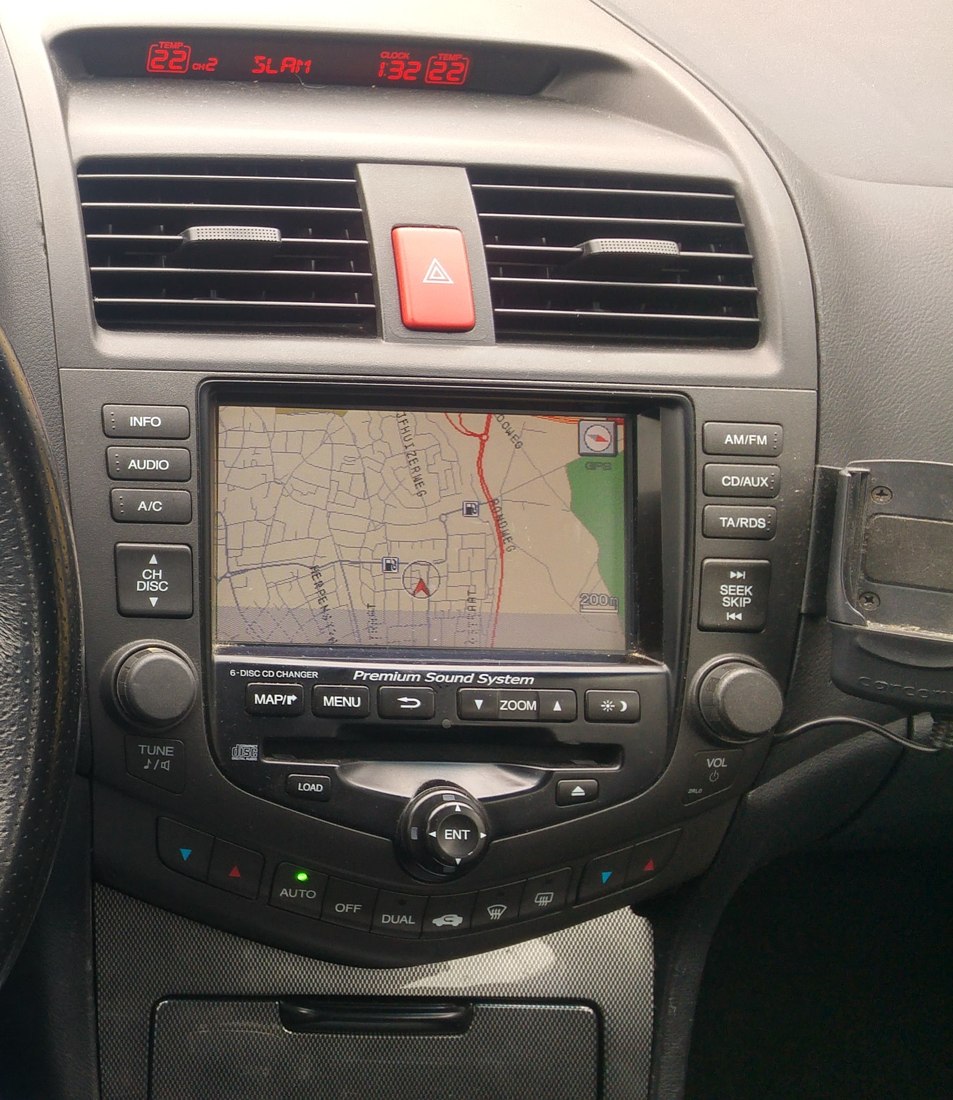
Before you start
- Locate your anti-theft ID card and note the audio code (and the unit’s serial number) printed on it — the card usually lives in the glovebox or with the owner’s handbook.
- Check whether your car has the factory navigation system, as the first step differs slightly for nav-equipped units.
- Make sure the battery is reconnected and switch the ignition to ON before you begin.
Entering the Code — Step by Step
- Switch the ignition on and turn the audio unit on. It should display a CODE or error prompt rather than playing.
- If your car has the navigation system, press the TUNE knob once first — a starting digit of “0” appears, ready for your first entry.
- Enter the first digit of your code. You can either turn the TUNE knob until the correct digit shows, or use the numbered radio preset buttons to select it.
- Press and release the TUNE knob to store that digit and move on to the next position.
- Repeat for each remaining digit — select the digit with the TUNE knob or presets, then press and release the knob to confirm it.
- When every digit of the code is entered correctly, the audio unit accepts it and the radio begins to play. The lock is now cleared.
If the Code Won’t Take
- If the display still shows an error, you have almost certainly entered a wrong digit — double-check the number on your ID card and re-enter it carefully, one digit at a time.
- You get 10 attempts. If you use all ten without success, leave the audio system switched on for one full hour before you try the code again.
- Lost the anti-theft card? A Honda or Acura dealer can retrieve your code from the audio unit’s serial number, so have the car’s details to hand.
- If an “Err” or CODE message persists even with the right code, confirm the battery connections are secure and the ignition is ON, then attempt entry once more.
Frequently Asked Questions
Where do I find my radio code?
The code is printed on the anti-theft ID card supplied with the car, usually kept in the glovebox or with the owner’s manual. The card also lists the audio unit’s serial number, which a dealer needs if the card has been lost.
What happens if I’ve used all my attempts?
After 10 failed tries the unit locks you out temporarily. Leave the audio system switched on for a full hour, then enter the correct code again from the start.
Do I need the code after every battery change?
Yes. Any time the audio unit loses power — a flat battery, a disconnection for other work, or a battery replacement — it disables itself and asks for the code again on the next power-up.
Is code entry different on the navigation version?
Slightly. On nav-equipped cars you press the TUNE knob once to bring up a starting “0” before entering the digits; otherwise the method is the same — select each digit with the TUNE knob or the preset buttons and press the knob to store it.
While you have the car powered up, it is a good moment to check for any stored fault codes — if a warning light appeared after the battery work, you can look up what it means on autodtcs.com before clearing it.
Independent guide — not affiliated with Honda. Always follow your official service manual and safety precautions. Read our full disclaimer.