These instructions apply to the Kia Venga Mk1 (YN) 2010-2019.
For other models, please choose your vehicle here.
The Kia Venga (YN, 2010–2019) keeps its 12 V battery in the engine bay. Disconnecting it for a swap or electrical work is simple, but a few systems need re-initialising once power returns, and cars with Stop & Start (ISG) use a specific battery you must match. Always work negative-first.
Before You Start
- Switch the ignition off and take the key out.
- Have the audio security code ready if your Venga’s radio uses one.
- Wait a couple of minutes before disconnecting so the airbag capacitors discharge.
- ISG cars use an uprated AGM/EFB battery — replace like-for-like, as a standard battery won’t survive the stop/start cycling.
Battery Location
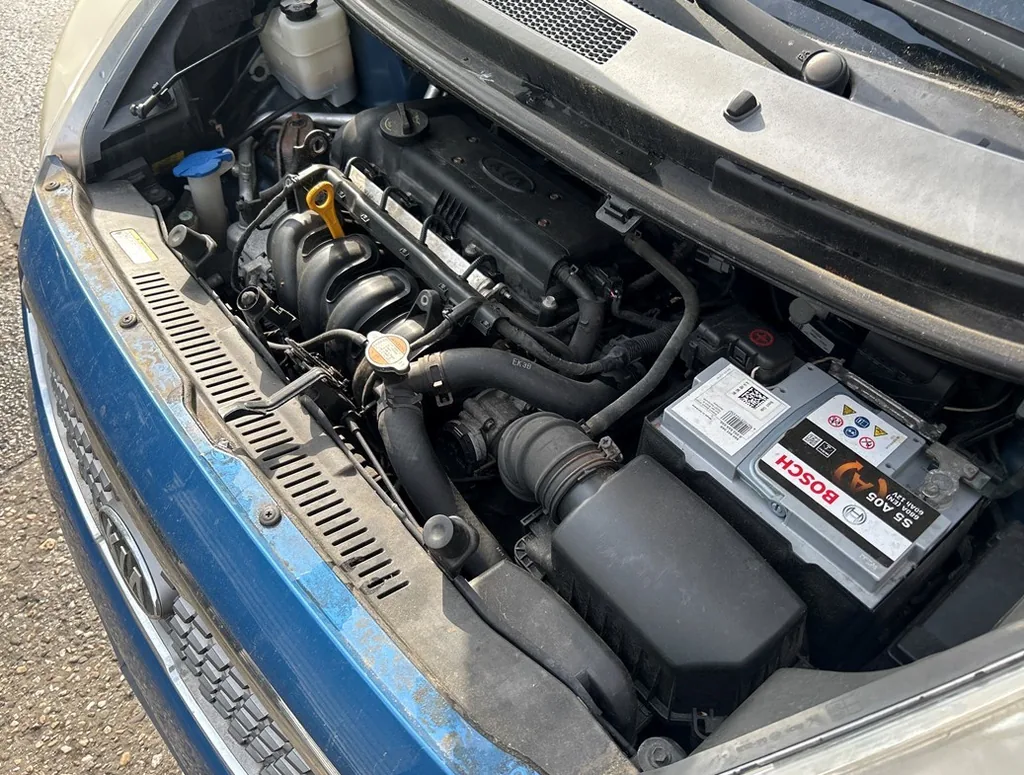
The 12 V battery sits on the right-hand side of the engine bay, held by a clamp bracket.
How to Disconnect and Reconnect
- With the ignition off, open the bonnet and remove any terminal cover.
- Loosen and remove the negative (–) terminal first, then the positive (+).
- Do your work, or lift the battery out after undoing the hold-down clamp.
- Refit the battery, connect the positive (+) first, then the negative (–) last, and tighten both clamps.
- Refit the terminal cover.
After Reconnecting
- Clock and radio presets — reset; enter the audio code if prompted.
- Power windows — re-initialise the one-touch AUTO on each window.
- Sunroof (if fitted) — re-initialise the sliding/tilting roof.
- Stop & Start (ISG) — the system won’t operate until the battery sensor re-learns; it settles after the battery is fully charged and a few drive cycles.
- Take a short drive and check the warning lights go out.
Frequently Asked Questions
Where is the battery on a Kia Venga?
In the engine bay on the right-hand side, held by a clamp bracket. It is a conventional under-bonnet 12 V battery.
Does my Venga need a special battery?
If it has Stop & Start (ISG), yes — it uses an AGM or EFB battery designed for frequent restarts. Fit the same type; a standard flooded battery will fail early on an ISG car. Cars without ISG take a conventional battery.
Will I lose my radio code?
If the head unit is code-protected it may ask for the code after reconnection. Enter the code from your owner’s pack; a Kia dealer can retrieve it with proof of ownership.
If a warning light stays on afterwards, look the code up on autodtcs.com.
Independent guide — not affiliated with Kia. Always follow your official service manual and safety precautions. Read our full disclaimer.