These instructions apply to the Nissan Qashqai Mk1 (J10) 2006-2013.
For other models, please choose your vehicle here.
When your Qashqai’s remote loses range, or the lock and unlock buttons stop responding, the coin cell inside the key fob is usually flat. Swapping it takes a few minutes with a small flat screwdriver and a fresh battery, and the key carries on working exactly as before.
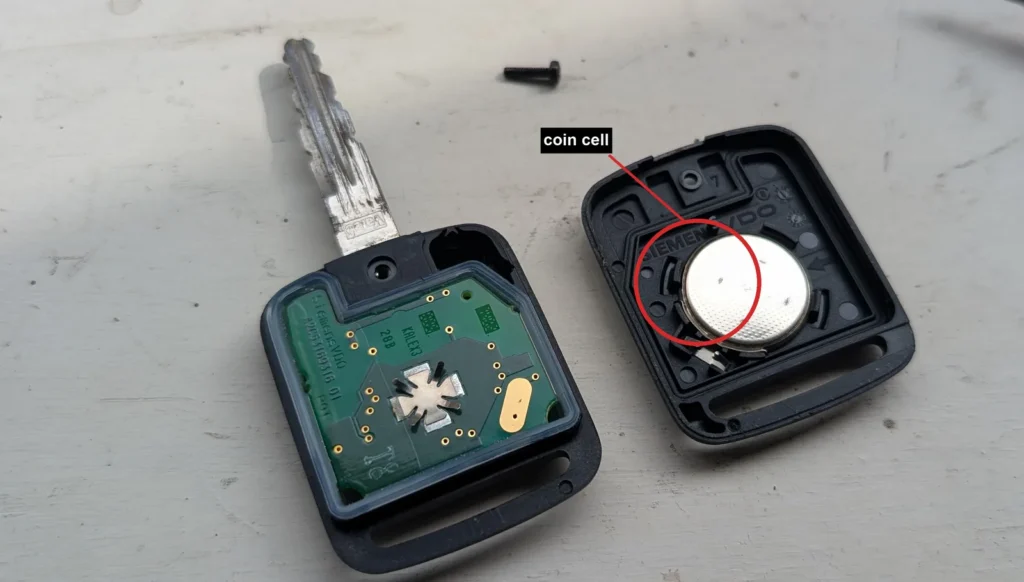
- Slide out the emergency key blade, then remove the key cover to expose the seam between the two halves of the case.
- Gently prise the two halves apart with a small flat screwdriver worked into the seam. Take care not to crack the case and do not touch the printed circuit board inside.
- Lift out the old coin cell from its holder.
- Fit a fresh CR2032 cell with the positive (+) side facing downwards, seating it fully under the contact.
- Clip the two halves of the case back together, refit the emergency blade, and press a button to confirm the remote locks and unlocks the car.
Good to know
There are two key styles on the J10. The common clip-together case above takes a CR2032 cell. The other style has a case held by one or more small screws: remove the screw or screws, split the halves the same careful way, and fit a CR2016 cell instead before screwing it back up.
A battery change does not re-pair anything. The key stays married to the car, so it keeps working straight away. Only pairing a brand-new remote to the car needs a Nissan dealer diagnostic tool.
FAQ
What battery does the Qashqai key fob take?
The clip-together key uses a CR2032 coin cell. The screwed key style uses a smaller CR2016. Check which case you have before buying, or open it first and read the marking on the old cell.
Do I need to reprogramme the key after changing the battery?
No. Replacing the coin cell does not wipe or unpair the remote, so no reprogramming is needed. Only registering a genuinely new remote to the car requires a dealer diagnostic tool.
The remote still doesn’t work after a new battery — what now?
Open the fob again and check the cell is the right way round and sitting firmly against the contacts, and that the terminals are clean. If it still fails, the fob’s electronics or the car’s receiver may need checking, and you can fall back on the emergency blade to unlock the door.
Independent guide — not affiliated with Nissan. Always follow your official service manual and safety precautions. Read our full disclaimer.