These instructions apply to the Toyota RAV4 Mk2 (XA20) 2000-2005.
For other models, please choose your vehicle here.
The MAINT REQD reminder on a second-generation RAV4 lights up roughly every 7,500 miles (12,000 km), or on a set time interval, to prompt an oil change and service. After the work is done you clear it yourself in under a minute using the trip-meter reset knob and the ignition.
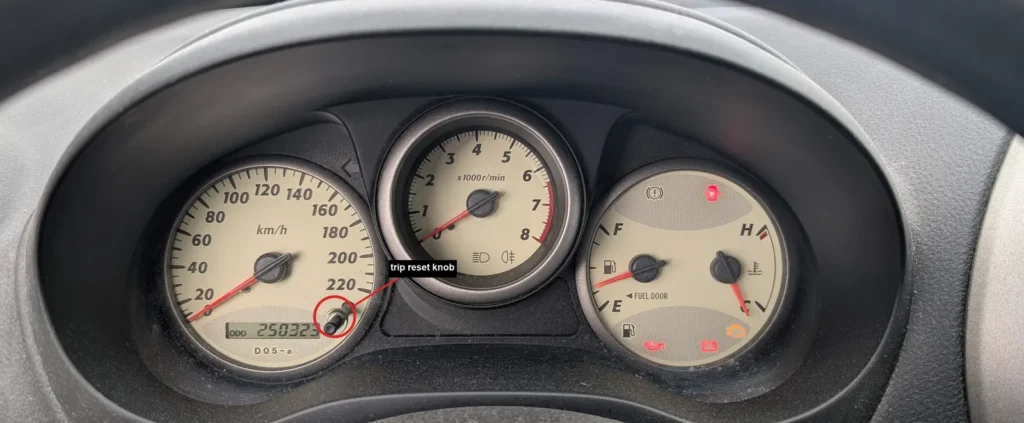
- Turn the ignition off.
- Check that the odometer is showing the total mileage (ODO), not a trip reading.
- Press and hold the trip-meter reset knob on the instrument cluster.
- While still holding the knob, turn the ignition to ON (position II) – do not start the engine.
- Keep holding the knob for about 5 seconds. The MAINT REQD light blinks and then goes out, and the display may briefly show 000000.
- Release the knob and turn the ignition off. The reminder is now reset.
Good to know
The MAINT REQD light is only a mileage and time reminder, not a fault warning – it does not mean anything is wrong with the car. It simply counts up to the next service interval and asks you to reset it once the oil and service have been done.
If it did not clear, make sure the odometer was showing ODO rather than TRIP, and that you were already holding the knob before and while you turned the ignition on, then repeat the steps. Do not confuse this reminder with the separate engine-shaped check-engine light, which does indicate a fault and needs a diagnostic scan to read the stored diagnostic trouble code.
FAQ
Does the MAINT REQD light mean something is wrong?
No. It is a service and mileage reminder that appears at each interval, roughly every 7,500 miles (12,000 km) or on time. It is not a fault code and does not point to a mechanical problem.
Do I need a scan tool or dealer visit to reset it?
No. The whole reset is done with the trip-meter reset knob and the ignition key. No diagnostic tool, software or workshop visit is needed.
How do I reset the reminder?
With the ignition off and the odometer on ODO, hold the trip-meter reset knob, turn the ignition to ON without starting the engine, and keep holding for about 5 seconds until the light blinks and goes out.
Why will the light not reset?
Almost always because the display was on a TRIP reading instead of ODO, or the knob was not already held down before the ignition was switched on. Set the display to ODO, press and hold the knob first, then turn the ignition on and hold for five seconds.
Independent guide — not affiliated with Toyota. Always follow your official service manual and safety precautions. Read our full disclaimer.