These instructions apply to the Toyota RAV4 Mk2 (XA20) 2000-2005.
For other models, please choose your vehicle here.
Disconnecting the 12V battery cuts all power to the car, which you need for accessory fitting, long-term storage, or clearing an electrical fault. On the second-generation RAV4 the battery sits in the engine bay at the front, so both terminals are easy to reach.
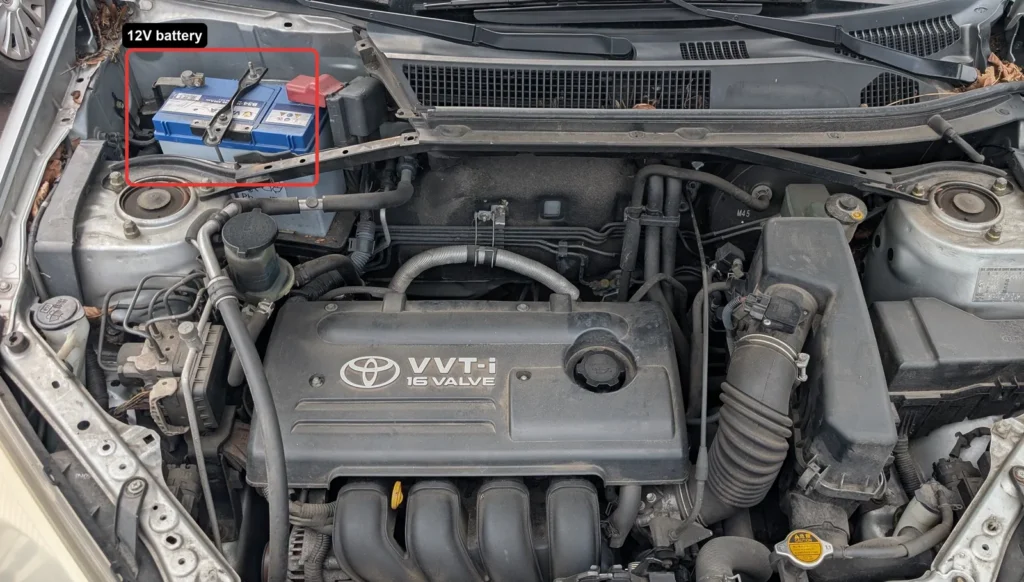
- Turn the ignition off, remove the key, and switch off all electrical consumers such as lights, heater and radio.
- Wait 1 minute after switching the ignition off before you touch the battery.
- Disconnect the negative (minus) terminal first, then move the clamp aside so it cannot spring back onto the post.
- Disconnect the positive (plus) terminal.
- If you will be working near pyrotechnic components such as the airbags or seat-belt pretensioners, wait 90 seconds after disconnecting before you start that work.
- To reconnect, reverse the order: fit the positive terminal first, then the negative last, and tighten both clamps securely.
- Wait 10 seconds after reconnecting before you start the engine.
Good to know
Wear eye protection and keep sparks and naked flames well away from the battery — the gases it gives off are explosive. Work in a well-ventilated space.
Disconnecting the battery clears the clock and the radio presets, so you will need to reset them afterwards. If the radio is security-coded, have the code ready before you disconnect or you will not be able to re-enable it. Reconnecting the same battery on this generation needs no coding or registration.
FAQ
Which terminal do I remove first?
Always take the negative (minus) terminal off first and move it clear of the post. When reconnecting, do it the other way round: positive first, negative last.
How long should I wait?
Wait 1 minute after switching off the ignition before disconnecting. If you will work near the airbags or seat-belt pretensioners, wait a further 90 seconds after disconnecting. After reconnecting, wait 10 seconds before starting the engine.
What will I lose when the battery is disconnected?
The clock and your radio presets are erased and will need resetting. If the radio is security-coded, you will also need the code to switch it back on.
Do I need to code the battery?
No. On the second-generation RAV4 you can refit the same battery and it will work straight away — there is no battery registration or coding step.
Independent guide — not affiliated with Toyota. Always follow your official service manual and safety precautions. Read our full disclaimer.