Service ResetService Reset
  • Home
  • Guides
  • Tools
    • Tire Pressure Calculator
    • Check DTC Codes
    • Request a Guide
    • Wheel Offset Calculator
    • Tire Size Comparison
    • Tire Pressure Converter
    • Torque Converter
    • Coolant & Antifreeze Mix
  • Blog
  • About
  • FAQ
  • Contact Us
  • Home
  • Guides
  • Tools
    • Tire Pressure Calculator
    • Check DTC Codes
    • Request a Guide
    • Wheel Offset Calculator
    • Tire Size Comparison
    • Tire Pressure Converter
    • Torque Converter
    • Coolant & Antifreeze Mix
  • Blog
  • About
  • FAQ
  • Contact Us
Home/Kia/Sorento/Mk2 (XM) 2009-2014/Reset the Service Indicator

Reset the Service Indicator

Reviewed by the Service Reset editor · Updated September 3, 2026 · How we verify

These instructions apply to the Kia Sorento Mk2 (XM) 2009-2014.
For other models, please choose your vehicle here.

After a routine service on the second-generation Sorento (XM), the maintenance reminder in the instrument cluster stays lit until it is cleared. You can reset it yourself in under a minute using the cluster RESET button, with the ignition on and the engine off. No diagnostic tool is needed.
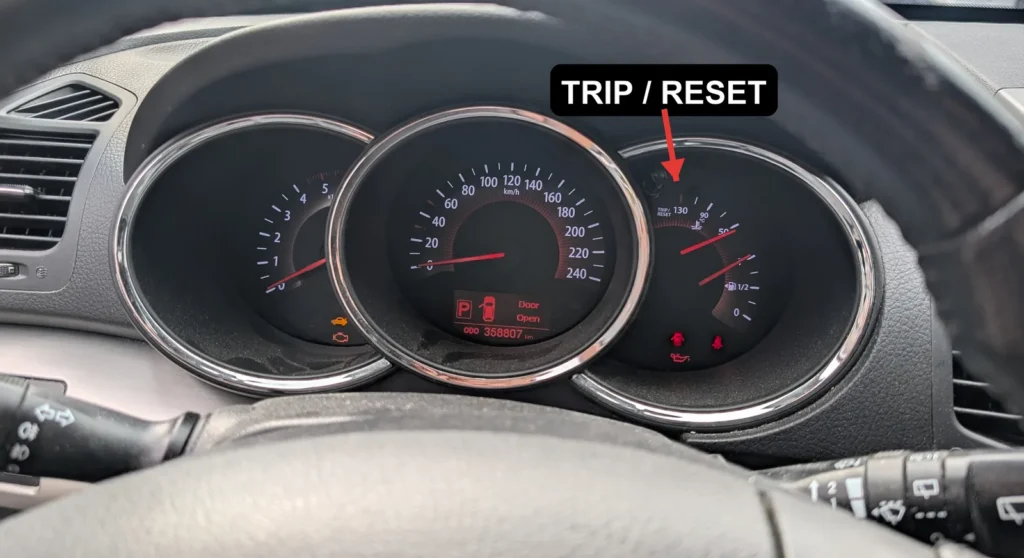
Kia Sorento XM instrument cluster with the TRIP/RESET button arrowed
The service reminder is cleared with the cluster TRIP/RESET button (arrowed).

  1. Turn the ignition switch to ON, but leave the engine off.
  2. Press and hold the RESET button on the instrument cluster for 5 seconds.
  3. Press and hold the same button again for 3 seconds.
  4. Release the button. The service reminder is now reset.

Good to know

The whole procedure is done from the cluster RESET button (the same trip/reset button), so there is no need for a scan tool or a workshop visit.

If the reminder comes back on, check that the ignition was on with the engine off when you started, then repeat the two-part hold: 5 seconds, release, then 3 seconds. Both holds must be completed for the reset to register.

FAQ

Do I need a scan tool to reset the Sorento service light?

No. On the XM Sorento the reminder is cleared entirely from the instrument cluster RESET button, so no diagnostic tool or dealer visit is required.

How do I reset the service reminder?

Turn the ignition on with the engine off, hold the cluster RESET button for 5 seconds, then hold it again for 3 seconds and release. The reminder clears once both holds are done.

Why does my service light keep coming back?

The most common cause is an incomplete reset. If only one of the two holds was finished, or the ignition was not on with the engine off, the cluster will not store the reset. Repeat the full two-part hold and it should stay off.

Independent guide — not affiliated with Kia. Always follow your official service manual and safety precautions. Read our full disclaimer.

Related Articles
  • Find the OBD2 Diagnostic Port
  • Initialize the Power Windows
  • Reinitialise the Sunroof
  • Replace the Key Fob Battery
  • Reset the Tyre Pressure Warning Light
  • Disconnect and Reconnect the Battery

On This Page: [hide]

Good to know

FAQ

Do I need a scan tool to reset the Sorento service light?

How do I reset the service reminder?

Why does my service light keep coming back?

Service Reset

Independent step-by-step car reset & maintenance guides – not affiliated with any manufacturer. All trademarks belong to their respective owners.

© 2026 ServiceReset.net. All rights reserved.

POPULAR BRANDS
Toyota · Volkswagen · BMW · Ford · Audi · Mercedes · Nissan · Kia
EXPLORE
  • Guides
  • Blog
  • About
  • Contact
TOOLS
  • Dashboard Warning Lights
  • Tire Pressure Calculator
  • Tools
  • FAQ
  • Request a Guide
LEGAL
  • Privacy Policy
  • Terms of Use
  • Disclaimer
  • YouTube
  • Pinterest