These instructions apply to the Kia Sorento Mk2 (XM) 2009-2014.
For other models, please choose your vehicle here.
When the remote’s range drops or the lock and unlock buttons stop responding, the coin cell inside the Sorento’s key has usually gone flat. The key uses a common CR2032 cell, and swapping it does not unpair the remote — it keeps working exactly as before.
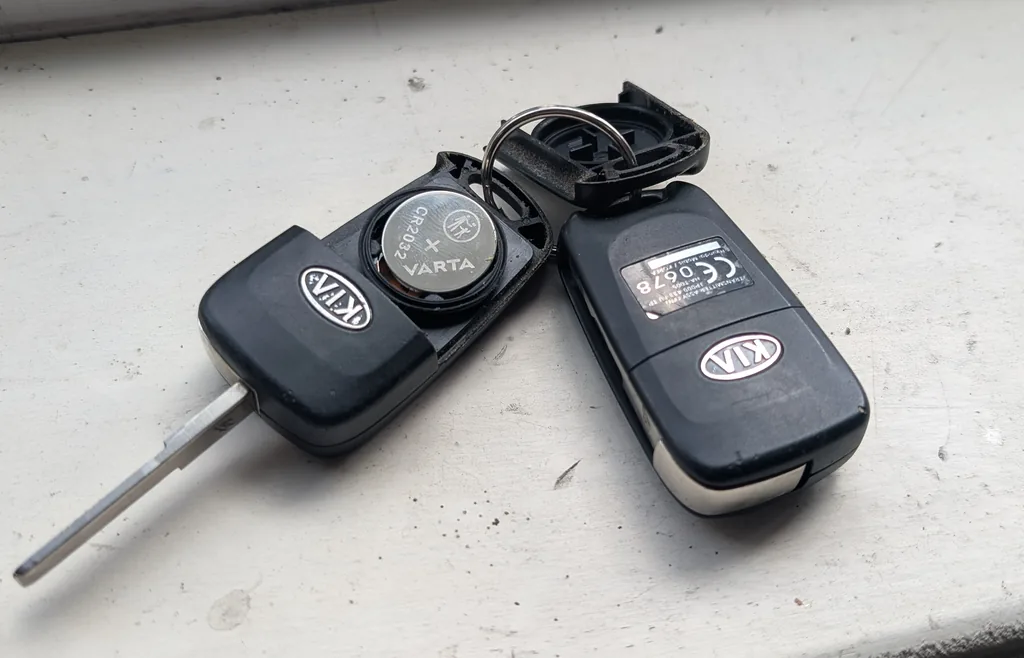
- Slide the release catch and pull the mechanical key blade fully out of the fob.
- Find the seam around the case and gently prise the two halves apart with a small flat-blade screwdriver until the cover lifts off.
- Note which way the old CR2032 sits, then lift it out. Do not touch the exposed circuit board.
- Fit the new CR2032 with the positive (+) side facing downwards, matching the way the old cell came out.
- Press the cover back on until it clicks, then slide the mechanical blade back into the fob.
- Test the lock and unlock buttons on the car to confirm the remote responds.
Good to know
Some Sorento keys are the fixed-cover style rather than a folding blade. These take the same CR2032, but the cell fits with the positive (+) side facing upwards — the opposite of the flip key. Always check the orientation of the old cell before fitting the new one so you get it the right way round.
A battery change never needs any reprogramming. Programming a brand-new remote is a different job: it requires a Kia dealer with a diagnostic tool, and a lost or broken key can only be ordered through a dealer.
FAQ
What battery does the Sorento key take?
A single CR2032 3-volt lithium coin cell, sold in any supermarket or hardware shop.
Which way up does the coin cell go?
It depends on the key. On the folding flip key the positive (+) side faces downwards; on the fixed-cover key it faces upwards. Check how the old cell sat before you remove it and copy that.
Do I need to reprogramme the remote after changing the battery?
No. The remote stays paired to the car through a battery swap, so it works straight away once the new cell is in.
The remote still does not work after a new battery — what now?
Check the cell is the right way up and wipe the metal contacts clean, as a fingerprint or corrosion can break the connection. If it still fails, the remote itself may be faulty, and a genuinely new key needs dealer programming.
Independent guide — not affiliated with Kia. Always follow your official service manual and safety precautions. Read our full disclaimer.