These instructions apply to the Kia Sorento Mk2 (XM) 2009-2014.
For other models, please choose your vehicle here.
Every XM-generation Sorento carries a standard 16-pin OBD-II diagnostic socket, the same trapezoidal connector used industry-wide, so any code reader, Bluetooth dongle or workshop scan tool plugs straight in. You need it whenever a warning light appears and you want to read what the car is reporting.
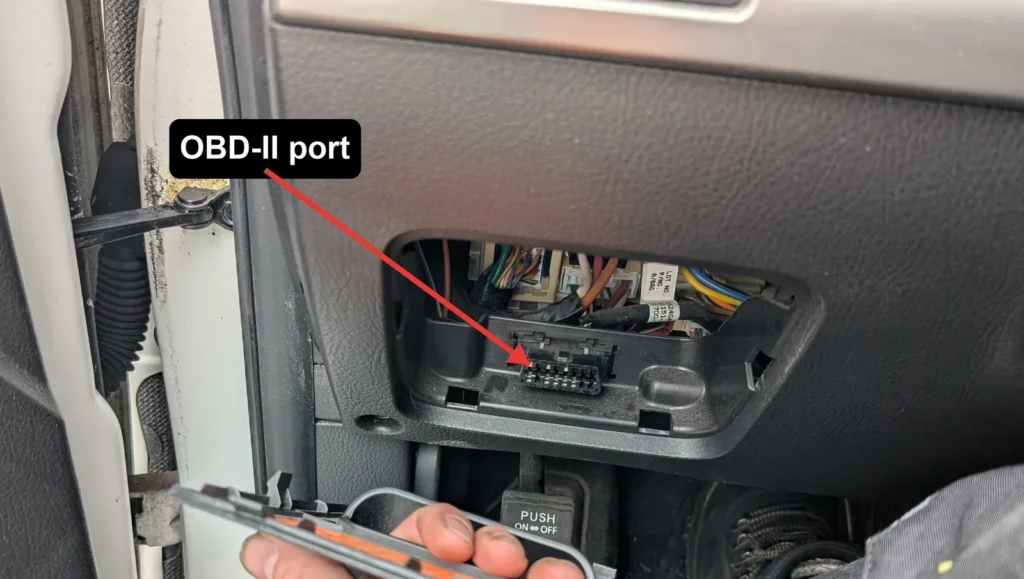
- Sit in the driver’s seat and look under the dashboard, low down and to the left of the steering column.
- Unclip and remove the small cover or trim panel in front of the socket – it pulls off by hand.
- The 16-pin trapezoidal OBD-II connector sits behind it, in a moulded bezel close to the driver’s-side fuse box.
- Plug your code reader or dongle straight in, then turn the ignition on to power it up and read any fault codes.
Good to know
No adaptor is needed: the Sorento uses the universal 16-pin OBD-II connector, so any generic scanner works without extra leads. The port is only live when the ignition is on, so switch it on before expecting your reader to wake up. Once connected, the codes it pulls are standard OBD-II trouble codes – you can look up what each one means in the autodtcs.com fault-code database.
FAQ
Where is the OBD port on a Kia Sorento?
Under the dashboard on the driver’s side, low down below the steering column, tucked behind a small clip-off cover near the fuse box.
Do I need a special adaptor?
No. The XM Sorento uses the standard 16-pin OBD-II connector, so any generic code reader or Bluetooth dongle plugs in directly.
Why can’t I see the port?
It is usually hidden behind a small removable cover or coin-tray trim panel. Unclip that panel by hand and the socket is behind it.
Does the ignition need to be on?
Yes. The port is only powered with the ignition switched on, so turn it on before your scanner will connect.
Independent guide — not affiliated with Kia. Always follow your official service manual and safety precautions. Read our full disclaimer.