These instructions apply to the Mitsubishi L200 Mk3 (K60/K70) 1996-2007.
For other models, please choose your vehicle here.
After the 12-volt battery has been disconnected or gone flat on a Mitsubishi L200, the power windows can behave oddly until they are re-initialised. The procedure re-teaches each window its fully-closed position. It only takes a moment per window.
How to re-initialise the power windows
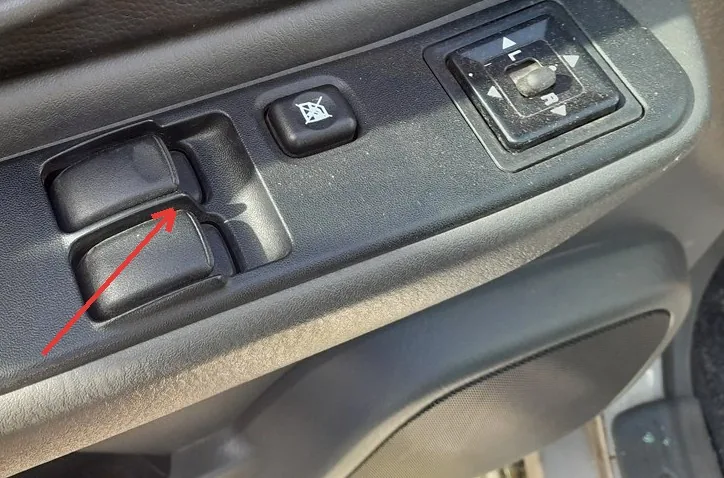
- Turn the ignition on.
- Fully close the driver’s window, then press and hold the close switch for about 2 seconds after the glass has reached the top, and release.
- Repeat the same for the passenger’s window: close it fully, then hold the close switch for about 2 seconds and release.
- Check that both windows raise and lower correctly.
- Turn the ignition off.
Good to know
Holding the switch briefly after the window is already shut is what teaches the control the top limit, so do not skip it. If a window still behaves oddly, repeat the step for that window, making sure you hold the switch for the full couple of seconds at the top.
Frequently asked questions
Why do the windows need re-initialising after a battery change?
Disconnecting the battery clears the stored fully-closed position, so the automatic behaviour is lost until you re-teach the limit by holding the close switch at the top.
Do I need any tools?
No — it is done entirely from the window switches with the ignition on, one window at a time.
If a warning light is showing as well, you can look up what the specific dashboard symbol or fault code means on autodtcs.com.
Independent guide — not affiliated with Mitsubishi. Always follow your official service manual and safety precautions. Read our full disclaimer.