These instructions apply to the Hyundai Nexo Mk1 (FE) 2018-2023.
For other models, please choose your vehicle here.
If your Hyundai Nexo (FE, 2018–2023) will not start and a key symbol is flashing, the smart key battery is probably flat. You can still start the car by holding the key fob against the start button, and the battery itself is an easy do-it-yourself swap. Here is both.
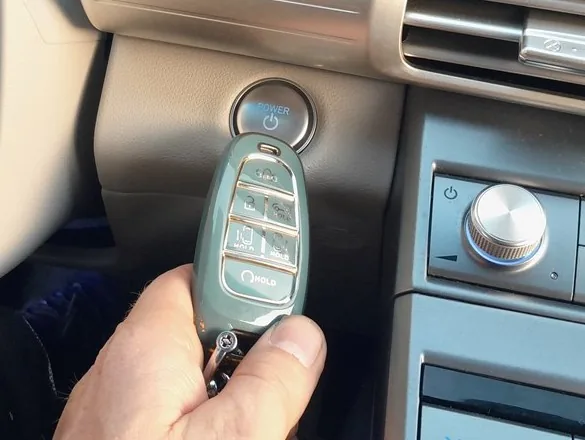
Start the Nexo with a dead key fob
When the smart key battery is nearly empty, a key-shaped warning flashes and the car will not start the usual way. There is a simple workaround:
- Press the brake pedal as you normally would to start.
- Touch the start (POWER) button with the smart key — hold the fob directly against the button and press. The car reads the key through the fob and starts.
This gets you moving; replace the fob battery soon so it works normally again.
Replace the smart key battery
The Nexo smart key uses a CR2032 coin cell. To change it:
- Slide out the mechanical key from the fob.
- Pry off the back cover of the fob with a small, thin tool at the seam.
- Remove the old CR2032 and fit the new one, watching the polarity (the + side should face the same way the old cell did).
- Refit the back cover until it clicks, and slide the mechanical key back in.
Match the removed cell exactly — a CR2032 is a common 3 V lithium coin cell sold everywhere. Dispose of the old battery according to local rules.
If it still won’t work
If a new battery does not fix the fob, or the immobilizer light keeps flashing, keep the fob away from metal objects and other keys and try again. If the problem persists, have the car and key checked by a Hyundai dealer — pairing a new or faulty key needs dealer equipment.
If the fob won’t unlock the car: use the mechanical key
If the buttons will not unlock the doors, there is a hidden mechanical key for exactly this. It helps when the fob battery is flat — and also when the car’s own 12 V battery is dead, which leaves the whole car unresponsive and locked.

- Slide the mechanical key out of the fob.
- Pull the driver’s flush door handle fully out by hand to expose the key slot.
- Insert the mechanical key and turn to unlock the door.
Once inside, try starting the car by holding the fob against the POWER button. But if the whole car was dead — not just the fob — the cause is a flat 12 V battery: you will need to press the 12V BATT RESET switch or jump-start the car before it will start. See our Nexo 12 V battery guide.
Frequently asked questions
What battery does the Hyundai Nexo key fob take?
A CR2032 3 V lithium coin cell — the same common cell used in many car keys and electronics.
How do I start a Nexo with a dead key battery?
Press the brake, then touch the start (POWER) button with the smart key itself and press. The car reads the key at close range and starts.
Why is the key symbol flashing on my Nexo?
Most often the smart key battery is nearly flat. Replace the CR2032. If it keeps flashing with a good battery, the immobilizer may not be reading the key — move it away from metal and other keys, and see a dealer if it continues.
Do I need the dealer to change the key battery?
No. The CR2032 swap is a simple do-it-yourself job. You only need a dealer if the key itself has to be replaced or re-paired.
Independent guide — not affiliated with Hyundai. Always follow your official service manual and safety precautions. Read our full disclaimer.