These instructions apply to the Nissan Leaf Mk2 (ZE1) 2018-2024.
For other models, please choose your vehicle here.
Most lights on the second-generation Nissan Leaf (ZE1, 2018-2024) dashboard mean the same as on any car. The ones that catch Leaf owners out are the EV-specific warnings: the red Service EV System message, the power-limitation (“turtle”) light, the 12-volt battery warning and the parking-sensor fault. Here is what each means and what to do.
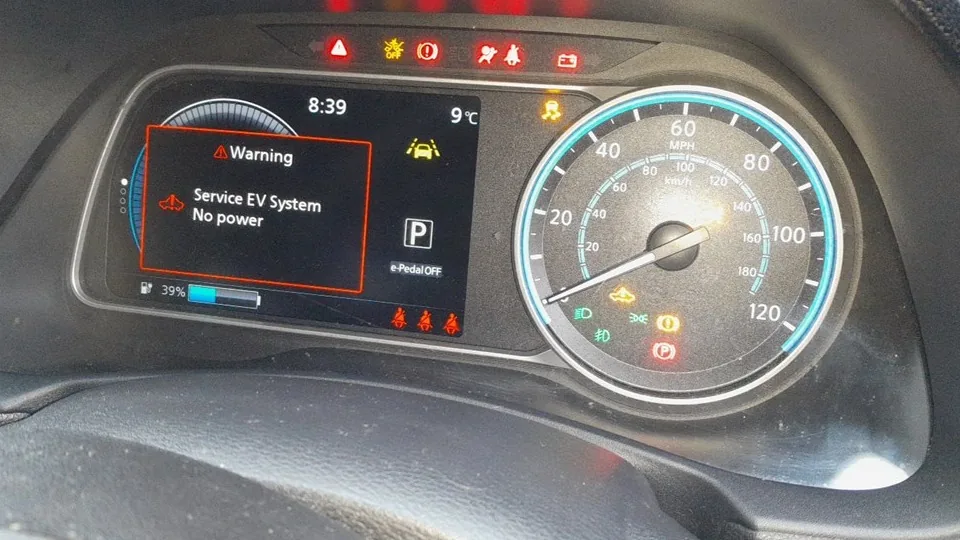
Service EV System / EV system warning light
This is the master warning for the electric drivetrain. It covers a fault anywhere in the traction motor and inverter, the charge port or onboard charger, the high-voltage lithium-ion battery, the cooling system or the shift control — and it also lights if the crash emergency shut-off has triggered.
Treat it as a stop-and-check warning, not a reminder. Do not keep driving a car that holds the red message: have the stored fault codes read by a Nissan EV-qualified workshop. A known case on 2019-2022 62 kWh e+ cars is a no-restart fault covered by Nissan technical bulletin NTB23-024.
Power limitation (“turtle”) light
The power-limitation indicator means the motor’s output has been cut, so the car feels slow and may not reach full speed. There are four usual triggers: the battery charge is very low, the battery is very cold, the EV system is overheating, or there is an EV-system fault.
What to do depends on the cause: charge the car as soon as possible if the battery is low, let it warm up in very cold weather, slow down and allow it to cool if it has been worked hard, and have it checked if the light appears with a normal state of charge and temperature.
12-volt battery warning
The red 12-volt battery symbol monitors the DC/DC converter that charges the small 12-volt battery from the main pack. It normally lights when the car is switched on and goes out in READY mode.
If it stays on in READY the converter may be failing. Stop safely and have it checked — and do not try to charge the 12-volt battery while this light is on. A weak 12-volt battery is also a common root cause of several other Leaf warnings appearing together.

Parking sensor system fault
“Parking sensor system fault — See Owner’s Manual” means the ultrasonic parking sonar has a problem and the system is partly or fully disabled (the sensors only work below about 10 km/h anyway).
Common causes are moisture after wet weather, a dirty or blocked sensor, a single failed sensor or wiring trouble. Clean the sensors and see whether it clears once the car dries out; if the message is permanent, a workshop can read the sensor fault code and replace the faulty unit.
Frequently asked questions
What does Service EV System mean on a Nissan Leaf?
It signals a fault in the electric drivetrain — motor, inverter, charger, high-voltage battery or cooling. It is not a routine service reminder; have the fault codes read before driving further.
Is it safe to drive with the turtle light on?
You can usually drive gently to safety or a charger, but power is deliberately limited. If it is due to a low charge, charge as soon as possible; if it appears with plenty of charge, have the car checked.
How do I clear a parking sensor fault on a Leaf?
Clean the front and rear sensors and let the car dry out — moisture-related faults often clear on their own. A fault that stays needs a workshop to read the sensor code and replace the failed sensor.
Independent guide — not affiliated with Nissan. Always follow your official service manual and safety precautions. Read our full disclaimer.