These instructions apply to the Suzuki Swift Mk3 (AZG/AZH) 2010-2017.
For other models, please choose your vehicle here.
Disconnecting the 12-volt battery on a Suzuki Swift (third generation, FZ/NZ chassis, 2010–2017) is a straightforward job — until you reconnect it and discover that the electric windows lose their auto-up function, the radio asks for a code, the trip meter has reset, and one or two warning lamps refuse to clear. None of this is a fault: the body control module and various sub-ECUs lose volatile state when their backup supply is cut, and each needs a short re-learn before the car behaves normally again. This guide covers how to disconnect the battery safely, what to expect during the dead-battery interval, and exactly which procedures you need to run after reconnection.
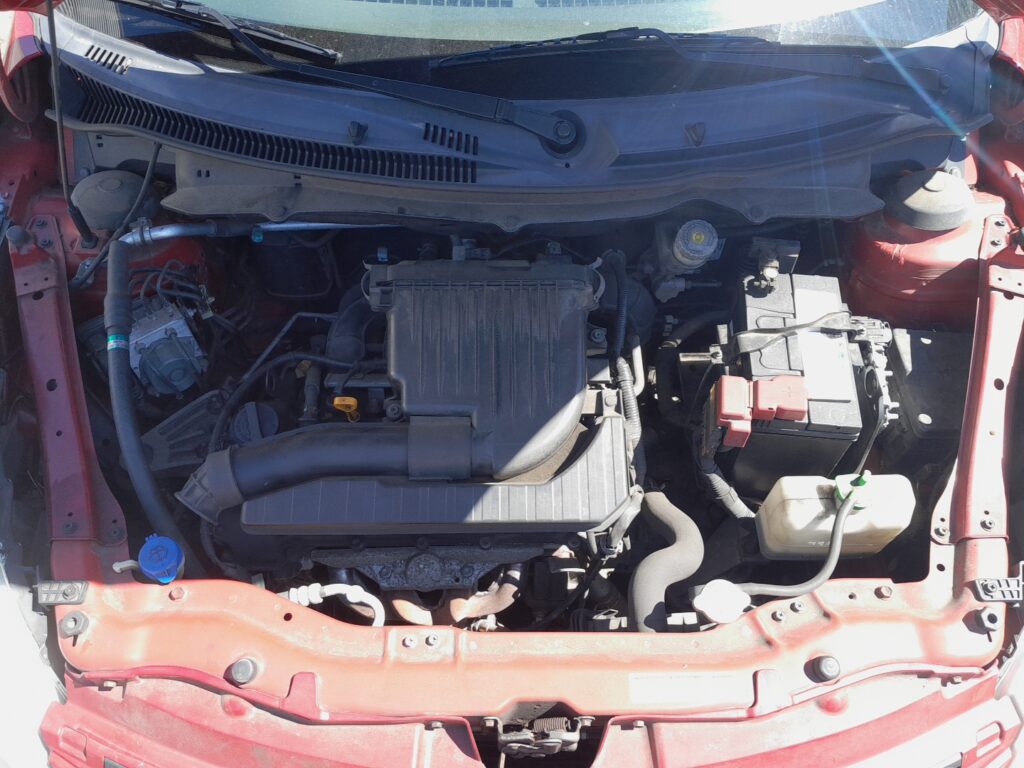

Before you start
The Swift’s 12-volt system on this generation is a conventional flooded lead-acid setup (most trims) or an enhanced flooded EFB on later facelift cars fitted with the Stop & Start system. Battery location is under the bonnet on the passenger side of the engine bay (right-hand-drive cars) or driver side (LHD), held by a single clamp at the base. There is no separate BMS sensor on the negative terminal on most trims, which simplifies the procedure compared to German or Korean cars of the same era — you do not need to register a new battery to the ECU.
- Pyrotechnic safety wait. If you are about to do any work on airbags, seat-belt pretensioners, or the steering column, wait at least 90 seconds after disconnecting the negative terminal before touching those components. This lets the capacitors in the airbag control unit fully discharge.
- Have the radio code to hand if your car has the original Suzuki head unit. Aftermarket head units are usually code-free.
- Park on level ground with the handbrake firmly applied. Some Swifts with automatic transmission can roll slightly when the brake servo loses vacuum after the engine is off — particularly an issue on a slope.
- Don’t work on a hot engine. The battery is close to the exhaust manifold heat shield; let the engine cool for at least 20 minutes before reaching in.
Tools required
- 10 mm spanner or socket (battery clamp bolts and terminal nuts)
- Memory saver lead with a 12 V power source (optional but recommended — preserves radio code, clock, and ECU adaptations)
- Battery terminal brush or fine wire brush (clean before reconnection)
- Petroleum jelly or proprietary terminal grease (corrosion protection)
- Torque wrench capable of 5–8 Nm (terminal nuts) — not strictly required but the correct setting is 5 Nm
Disconnect procedure
- Switch off the ignition and remove the key. Wait one full minute for control modules to enter sleep state.
- Open a window first. If the central locking fails after reconnection, you’ll thank yourself for having a way back into the car.
- Loosen the negative (−, black) terminal nut with the 10 mm spanner. Lift the terminal clamp off the post and tuck it to the side so it cannot spring back onto the post.
- Then loosen the positive (+, red) terminal nut. Lift the clamp off and cover the bare post with insulating tape if you are leaving the bonnet open for any length of time.
- Remove the battery clamp at the base (single 10 mm bolt) if you need to take the battery out for charging or replacement. Lift the battery straight up — it weighs around 12 kg.
Reconnect procedure
- Clean both posts and both terminal clamps with a fine wire brush. Even a thin layer of oxidation will cause a voltage drop that shows up as random electrical glitches.
- Fit the battery and secure the base clamp before reconnecting any cables.
- Connect the positive (+) terminal first. Tighten the nut to 5 Nm — firm finger-tight plus a quarter turn is a reasonable proxy.
- Connect the negative (−) terminal second. Tighten to the same torque.
- Apply a thin film of terminal grease over the connection. Do not smear it onto the post before connecting — grease is an insulator. Grease goes on the outside of the joint to keep moisture out.
- Switch the ignition ON without starting the engine and watch the dashboard. Most warning lights will illuminate briefly and clear; the airbag lamp may stay on for 2–3 seconds before extinguishing.
Post-reconnection tasks
Run these in order — most are quick.
- Set the clock and date via the trip-meter button on the cluster.
- Enter the radio code if prompted (printed on a card in the owner’s manual pouch or available from a Suzuki dealer with the VIN and head-unit serial).
- Re-initialize the electric windows — see our dedicated procedure at Suzuki Swift power windows initialize. Until you do this, auto-up will not work and the pinch protection will be miscalibrated.
- Re-initialize the electric sunroof (if equipped) — see Suzuki Swift electric sunroof initialize.
- For Stop & Start trims: the system will refuse to arm for the first 20–30 minutes of driving while the battery management algorithm re-samples state of charge. See our Suzuki Swift Stop & Start guide if it stays disabled longer than expected.
- Drive the car for 10–15 minutes on a mix of roads. This lets the engine ECU complete its short-term and long-term fuel trim re-learn, which can make the engine feel slightly hesitant for the first few miles.
Common Snags
Warning lights stuck on after reconnection. The most common culprits on this generation are the airbag lamp (loose terminal during work — re-tighten) and the ABS lamp (steering angle sensor needs a re-zero, achieved by driving straight for a few seconds, then a left and right full-lock). The check-engine lamp can stay on for one full drive cycle as the EGR and oxygen-sensor monitors re-run.
Idle is rough or hunts for the first 5 minutes. Normal. The ECU has lost its idle-speed adaptation and is re-learning. Let the car idle for 3 minutes from cold, then drive normally. If it persists past 50 km, the issue is mechanical (throttle body deposits, EGR sticking) rather than the battery work.
Central locking won’t operate from the remote. Press the lock button on the remote twice within range of the car; this resyncs the rolling code. If it still won’t work, manually lock and unlock the driver’s door with the key, then try the remote.
One window only works while you hold the switch (no auto-up/down). This is the expected behaviour until you run the power-windows initialize procedure linked above. It is not a fault.
Frequently asked questions
Do I need to register a new battery on the Suzuki Swift?
No, not on this generation — the Swift does not have a battery-management ECU that tracks battery type or expected charge profile. Fit any battery that meets the original Suzuki specification (typically 50–60 Ah, 480–540 A CCA, conventional flooded or EFB for Stop & Start cars) and it will work.
Why does the airbag lamp flash repeatedly after I reconnected the battery?
A repeating flash code indicates a stored airbag fault, which needs reading with a scan tool that supports SRS — generic OBD-II readers only access engine codes. The most common stored fault after battery work is “loss of communication” caused by a momentarily-shorted terminal during reconnection; clearing the code with a Suzuki-compatible scan tool resolves it.
Can I use a memory saver to avoid all the re-learns?
Yes, partially. A memory saver maintains the volatile RAM in the body control module and head unit, preserving the radio code, clock, and seat memory positions. It does not preserve the window end-stop calibration, because that is stored in the window control module which sees a brief drop when you swap terminals — so you still need to re-initialize the windows.
How long can the battery stay disconnected before I lose all adaptations?
Most ECU adaptations live in flash memory, not RAM, and are preserved indefinitely. What you lose immediately on disconnection: radio code, clock, idle-speed adaptation, and window end-stops. What you lose after 24+ hours: nothing additional — those are the only volatile items on this car.
Should I disconnect the battery before charging it with a smart charger?
Modern smart chargers (CTEK, NOCO, etc.) can charge in situ on this car because the maximum charge voltage is below 14.7 V. If your charger is older or unregulated, disconnect the battery first to protect the electronics.
If a warning lamp won’t clear and you suspect a stored diagnostic trouble code, see autodtcs.com for code-specific guidance.
Independent guide — not affiliated with Suzuki. Always follow your official service manual and safety precautions. Read our full disclaimer.